This thread has been locked.

If you have a related question, please click the "Ask a related question" button in the top right corner. The newly created question will be automatically linked to this question.

LAUNCHXL-F28379D: SYSCONFIG -- Setting Board

Part Number: LAUNCHXL-F28379D
Other Parts Discussed in Thread: SYSCONFIG, C2000WARE,

Hello,

I use SysConfing Tool for my project. Every thing is OK till I do not set the board.

But, if I select the board

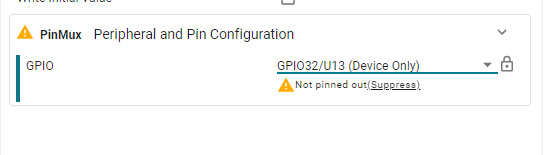
Sometimes SysConfig tells me that the selected pin is not pinned out:

Also, I cannot build the project.

Can somebody explain to me why ?

If my problem is solved, can somebody tell me what is the name of the board I have to put into the options to load sysconfig directly with the rioght confihuration ?


  • Hi Vincent,

    Thanks for reaching out. 

    Sometimes SysConfig tells me that the selected pin is not pinned out:

    This happens whenever you have selected a GPIO pin which is not connected to the LaunchPad header. This means that you will not be able to physically access the pin, so this warning is given for your awareness. You can of course choose to suppress the warning if this does not concern you.

    If my problem is solved, can somebody tell me what is the name of the board I have to put into the options to load sysconfig directly with the rioght confihuration ?

    The reason that you are not able to build is because the CCS compiler is not aware that you are using the board support version of SysConfig. You have two options to resolve this:

    1. You can add the LAUNCHXL_F28379D to the "Name of the board" option in CCS

    2. You can completely remove the device, package, and part information in the CCS. When you do this, then CCS should default to using the headers in the .syscfg file which should be appropriate for your project.

    Regards,

    Peter

  • This happens whenever you have selected a GPIO pin which is not connected to the LaunchPad header. This means that you will not be able to physically access the pin, so this warning is given for your awareness. You can of course choose to suppress the warning if this does not concern you.

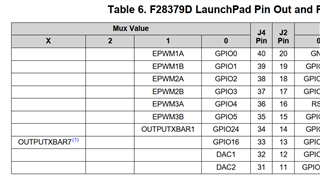
    Actually, yes the pin is physiccaly connected to the board. That's the reason why this warning surprised me.

    If I do not declare any board, this works fine

    You can add the LAUNCHXL_F28379D to the "Name of the board" option in CCS

    Maybe I did not unsderstand wher I have to set the Name of the board, but in the basic options of sysconfig, this does not work (but normally these options simply configure the tool when launching)

    The reason why I wanted to declare the board is to see the pinout inline (instead of lookinf at the manual of the board)

    Today the proprties I chose are:

  • Hi Vincent,

    Apologies for the delay in my relay, I thought my message had sent already. 

    Actually, yes the pin is physiccaly connected to the board. That's the reason why this warning surprised me.

    Okay I understand. Then you can try reselecting the GPIO option in the sysconfig GUI with the same number as you already have, SysConfig should then reassign the pin to the correct functionality and erase the warning.

    An alternative you can try is to use the sysconfig projects specific to the EVM you are using. You can find these in the pinmux folder of the examples within C2000Ware. This should have the support integrated into the project. You can then compare the two projects to see any potential differences

    Regards,

    Peter

  • Hello, I am sorry but I did not undertand "EVM". What do you mean ?

    I found an example provided by TI (pinmuw for 337zwt)

    But I see the same problems:

    1) the name of the board is not written in the sysconfig options

    what is the keyword to load directly the board when launching sysconfig ?

    2) when switching the board it is impoossible to select GPIO32 because this pin appears as device only available

    But this pin is available. I use it on my project. The document sprui77c mentioned it as available on pin 12 / J2 connector

  • Hi Vincent,

    By EVM, I am referring to evaluation module, which is our LaunchPad. I see that there is no device project in the C2000Ware that supports the LaunchPad. You can instead use the empty_lab_launchpad project located in the C2000Ware/training folder. This should automatically support the LaunchPad version of the project.

    Regarding this other issue, I believe this is a bug within the pin mapping of our F2837xD LaunchPad SysConfig file. If you hover over the pin in the SysConfig GUI, it is incorrectly defined as ball U3 instead of U13. I will make this fix in the file and have it corrected in the next quarterly update. Do note that you can still configure the pin and it will work on the hardware. This only affects the visualization within the SysConfig GUI and you will have to press the "suppress" button for now to waive the warning.

    Regards,

    Peter

  • Hello. I am waiting for the next release. But please tell me exactly which string I have ton put in this field to launch sysconfig directly considering the board:

  • Hi Vincent,

    This board name should match the device being used. I believe there is potentially a file location dependency for this, for example below is the board information that gets populated for this --board argument whenever I open the SysConfig GUI and select LAUNCHXL-F28379D

    Regards,

    Peter

  • That works. Thank you