This thread has been locked.

If you have a related question, please click the "Ask a related question" button in the top right corner. The newly created question will be automatically linked to this question.

TMS320F28388D: UART wrong characters echo in uart_ex1_echoback example

Part Number: TMS320F28388D

Hi,

I'm trying to configure CM-UART for my project starting from uart_ex1_echoback example from C2000 Ware 5.00.00.00, but if I run the example I have wrong characters echoback. I'm using a uart_config_c28x to configure overall pin muxing of my TMS320F28388D controlCARD and I followed uart_ex1_echoback initial comment for external connections with a USB-RS232 converter and Putty (or CCS Serial Console) configuration. I also tried to change baudrate with no success.

I think is a baud rate issue, but I don't understand how to fix it: can you confirm the example is ok? If not, can you help me to fix the issue?

Thanks and best regards,

Fabio

  • Hi Fabio, the example works fine. What config are you using in the terminal? Is it matching as per the comments in the example? Also, can you double check the hardware connections that you've made?

  • Hi Aditya,

    I double checked the external connections and I can confirm I have communication, just wrong characters.

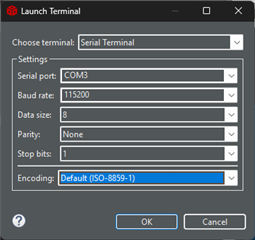
    I'm using this configuration in CCS Serial Terminal (the same is and happens with Putty, COM3 is my USB-RS232 converter):

    This is my present code with a little change to observe received character:

    //#############################################################################
    //
    // FILE:   UART_ex1_echoback.c
    //
    // TITLE:  UART echoback example.
    //
    //! \addtogroup driver_example_cm_list
    //! <h1>UART Echoback</h1>
    //!
    //!  This test receives and echo-backs data through the UART0 port.
    //!
    //!  A terminal such as 'putty' can be used to view the data from
    //!  the CM-UART and to send information to the CM-UART. Characters 
    //!  received by the CM-UART port are sent back to the host.
    //!
    //!  \b Running \b the \b Application
    //!  Open a COM port with the following settings using a terminal:
    //!  -  Find correct COM port
    //!  -  Bits per second = 115200
    //!  -  Data Bits = 8
    //!  -  Parity = None
    //!  -  Stop Bits = 1
    //!  -  Hardware Control = None
    //!
    //!  The program will print out a greeting and then ask you to
    //!  enter a character which it will echo back to the terminal.
    //!
    //!  \b Watch \b Variables \n
    //!  - None
    //!
    //! \b External \b Connections \n
    //!  Connect the UART0 port to a PC via a transceiver and cable.
    //!  - GPIO85 is UART0RX/CMUARTRXA(Connect to Pin3, PC-TX, of serial DB9 cable)
    //!  - GPIO84 is UART0TX/CMUARTTXA(Connect to Pin2, PC-RX, of serial DB9 cable)
    //! 
    //!  \note The pin muxing for the UART0 port needs to be done by the master 
    //!  CPU1. The common configuration example provided in the C28x folder can be 
    //!  used for making GPIO85 as the UART Rx pin and GPIO84 as the UART Tx pin.
    //
    //#############################################################################
    //
    //
    // $Copyright:
    // Copyright (C) 2022 Texas Instruments Incorporated - http://www.ti.com
    //
    // Redistribution and use in source and binary forms, with or without 
    // modification, are permitted provided that the following conditions 
    // are met:
    // 
    //   Redistributions of source code must retain the above copyright 
    //   notice, this list of conditions and the following disclaimer.
    // 
    //   Redistributions in binary form must reproduce the above copyright
    //   notice, this list of conditions and the following disclaimer in the 
    //   documentation and/or other materials provided with the   
    //   distribution.
    // 
    //   Neither the name of Texas Instruments Incorporated nor the names of
    //   its contributors may be used to endorse or promote products derived
    //   from this software without specific prior written permission.
    // 
    // THIS SOFTWARE IS PROVIDED BY THE COPYRIGHT HOLDERS AND CONTRIBUTORS 
    // "AS IS" AND ANY EXPRESS OR IMPLIED WARRANTIES, INCLUDING, BUT NOT 
    // LIMITED TO, THE IMPLIED WARRANTIES OF MERCHANTABILITY AND FITNESS FOR
    // A PARTICULAR PURPOSE ARE DISCLAIMED. IN NO EVENT SHALL THE COPYRIGHT 
    // OWNER OR CONTRIBUTORS BE LIABLE FOR ANY DIRECT, INDIRECT, INCIDENTAL, 
    // SPECIAL, EXEMPLARY, OR CONSEQUENTIAL DAMAGES (INCLUDING, BUT NOT 
    // LIMITED TO, PROCUREMENT OF SUBSTITUTE GOODS OR SERVICES; LOSS OF USE,
    // DATA, OR PROFITS; OR BUSINESS INTERRUPTION) HOWEVER CAUSED AND ON ANY
    // THEORY OF LIABILITY, WHETHER IN CONTRACT, STRICT LIABILITY, OR TORT 
    // (INCLUDING NEGLIGENCE OR OTHERWISE) ARISING IN ANY WAY OUT OF THE USE 
    // OF THIS SOFTWARE, EVEN IF ADVISED OF THE POSSIBILITY OF SUCH DAMAGE.
    // $
    //#############################################################################
    
    //
    // Included Files
    //
    #include <stdint.h>
    #include <stdbool.h>
    
    #include "cm.h"
    
    //
    // Defines
    //
    #define NUM_UART_DATA    4
    
    //
    // Function Prototypes
    //
    __interrupt void UART_RX_IntHandler(void);
    
    //
    // Main
    //
    void main(void)
    {
    
        //
        // disable WD, enable peripheral clocks.
        //
        CM_init();
    
        //
        // Configure UART0 for echoback.Set up to transfer data at 115200 baud.
        //                                                        
        UART_setConfig(UART0_BASE,UART_CLK_FREQ , 115200,(UART_CONFIG_WLEN_8 |
                       UART_CONFIG_STOP_ONE | UART_CONFIG_PAR_NONE));
    
        // 
        // Put a character to show start of example.  This will display on the
        // terminal.
        //
        UART_writeChar(UART0_BASE, '!');
    
        //
        // Enable the UART0 interrupt on the processor (NVIC).
        //
        UART_registerInterrupt(INT_UART0,UART_RX_IntHandler);
    
        //
        // FIFO enable
        //
        UART_enableFIFO(UART0_BASE);
    
        //
        // FIFO interrupt levels are set to generate an interrupt
        // when the TX FIFO is less than or equal to 7/8 empty and the
        // RX FIFO is greater than or equal to 1/8 full.
        //
        UART_setFIFOLevel(UART0_BASE, UART_FIFO_TX1_8, UART_FIFO_RX1_8);
    
        //
        // FIFO receive interrupt configuration
        //
        UART_clearInterruptStatus(UART0_BASE,UART_INT_RX | UART_INT_RT);   
        UART_enableInterrupt(UART0_BASE,UART_INT_RX);
    
        //
        // Loop forever echoing data through the UART.
        //
        while(1)
        {
        }
    }
    
    
    __interrupt void UART_RX_IntHandler(void)
    {
        uint32_t ui32Status;
        char pippo;
    
        //
        // Get the interrupt status.
        //
        ui32Status = UART_getInterruptStatus(UART0_BASE, UART_RAW_INT);
    
        //
        // Clear the asserted interrupts.
        //
        UART_clearInterruptStatus(UART0_BASE, ui32Status);
    
        //
        // Loop while there are characters in the receive FIFO.
        //
        while(UART_isDataAvailable(UART0_BASE))
        {
            pippo = UART_readCharNonBlocking(UART0_BASE);
            //
            // Read the next character from the UART and write it back to the UART.
            //
            UART_writeCharNonBlocking(UART0_BASE,
                                      pippo);
        }
    }
    
    //
    // End of File
    //


    But if I press "m", with a breapoint in the interrupt, I can see in Variables:

    then a null character.

    It turns back "[":

    I saw in TMS320F28388D controlCARD user manual, pin 84 is a boot mode pin (the S2 position 1 switch): can it be the origin of my issue? Unluckly, GPIO42 (other UART TX pin) is not in the docking station pinout to do another test.

    Thanks again,

    Fabio

  • Hi Fabio,

    Here are the steps to be done:

    1. Load uart_config_c28x, run it.
    2. Connect and load CM uart_ex1
    3. Connect to Putty using USB to Serial COM# port, connect TX and RX of the USB to Serial to RX and TX of the Control Card.
    4. The pins are GPIO84 and GPIO85 which are pins 151 and 152 on the docking station.

    On top of this, as you mentioned, what is the configuration of S2 switch on board? 

    Thanks,

    Aditya

  • Hi Aditya,

    thank you for your patience, for sure I was always proceeding as you wrote.

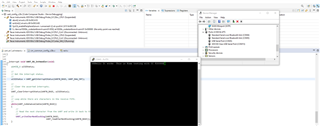
    This is my setup:

    By the way, I checked better that, when I was receiving those weird feedback in my previous posts, or the emulation had to be restarted, but I don't know why, or some happens with other baud rates, it seems that some are worse than others and it is not correlated to speed, e.g.: 9600 or 500000 are worst than 115200.

    When everything starts in the right way, at 115200, my communication works but it is very noisy:


    But I can say it is working in some way, maybe my setup is too bad: I'll try to improve it.

    About S2 switch, I have tried all the combinations with no difference, by th way my last one is: S2.1 at OFF and S2.2 at ON.

    Thanks for your help,

    Fabio

  • Can you try connecting GND pin as well if by chance there is any issue with the grounding by any chance? The configuration seem to be fine. Also, would you have any other cable or USB-UART connector with you to validate the algorithm. Example runs just fine on my end, so the chances of error on the hardware side are high. Even more so because you're able to see some output on your side.

    Aditya

  • Hi Aditya,

    I already tried to connect ground with no difference. Moreover, I also chenged the USB-RS232 converter and the behaviour is perfectly the same. 

    I also think the issue should be hardware at this point, the very strange thing is the repeatibility of the errors, I mean, for example: numbers 1, 3, 5, 7, 9 are prerfectly echo-back, everytime and with any hardware configuration I try, but numbers 2, 4 ,6, 8 and 0 are never, never echo-back correctly. The same with other letters.

    By the way, thanks for your help, I will continue developing, if I will find the issue/solution I will post it.

    Fabio

  • Thanks for the details, Fabio. Waiting for any updates from your side on the debug. I'll check and see on my side if I can think of any potential issue.

    Aditya