This thread has been locked.

If you have a related question, please click the "Ask a related question" button in the top right corner. The newly created question will be automatically linked to this question.

TMS320F28027F: TMS320F28027F - Flashing Bat files Solution

Part Number: TMS320F28027F
Other Parts Discussed in Thread: UNIFLASH

Hii 

I am trying to execute code composer studio from manual to automation process through command line.

I can  able to Build Project through Bat Files in Command Line but for flashing bat files I can see the probe is connected successfully and also flashing done Successfully in command line, but the Backend Process it's Not Working or showing in the command line.so if there is a solution for the flashing bat files command Line please let me know and if possible u can provide the bat files for Flashing it would be much appreciated

1.the below image is the Flashing bat files executed through Command line Point down:

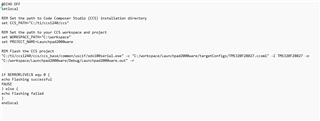
2. flashing bat code script

  • Hi,

    xds100serial is a utility for retrieving the serial number of the XDS100 debug probe in use. It is not used for flashing.

    You can use UniFlash for command line flashing.  You can even try the solution out on the cloud (http://dev.ti.com) without installing anything.

    A simple way to use the command line with UniFlash is to use the "Generate a command line package" feature.  Select your debug probe and target, and then click the "generate package" button.

    Another option would be to write a Debug Server Scripting (DSS) script for CCS.  DSS is the scripting solution used with CCS.