Part Number: LAUNCHXL-F280049C
Other Parts Discussed in Thread: C2000WARE
I'm currently working through the Application Note: Serial Flash Programming of C2000 Microcontrollers and I am trying to use the Flash Kernel located at C2000Ware_x_xx_xx_xx > driverlib > f28004x > examples > flash, select flashapi_ex2_sci_kernel.
I used the .txt file provided by building the flashapi_ex2_sci_kernel with configuration 1: Bank0_NO_LDFU. For the actual application file I am trying to download to CPU1, it is the led_ex1_blinky example located in C2000Ware_5_00_00_00\driverlib\f28004x\examples\led. I took the project, built with configuration 2: CPU1_LAUNCHXL_FLASH and enabled the C200 Hex Utility with the following command:
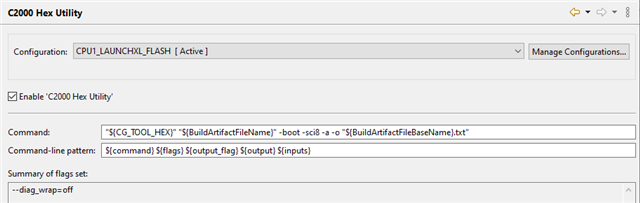
Once I have the two .txt files, I run the following command in the Command Prompt:
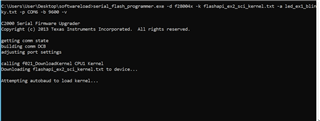
serial_flash_programmer.exe -d f28004x -k flashapi_ex2_sci_kernel.txt -a led_ex1_blinky.txt -p COM6 -b 9600
Then, the Command Prompt stays on "Downloading to device...", even after 15+ minutes.

The boot mode is set to SCI/Wait boot mode, GPIO 24 set to 0 and GPIO 32 set to 1 using the dip switches on the board.
I am connected to the computer via USB-C and my ports are configured as follows:

Additionally, I have gone to the linker command file and aligned all the flash sections to 128-bit boundaries via Find: ALIGN(4) and Replace With: ALIGN(8).
What am I doing wrong? Any help would be much appreciated.
Thanks,
Jakub