This thread has been locked.

If you have a related question, please click the "Ask a related question" button in the top right corner. The newly created question will be automatically linked to this question.

TMS320F28379D: SCI Boot Mode

Part Number: TMS320F28379D
Other Parts Discussed in Thread: C2000WARE

Hey Geeks,

I apologize for the basic question.

I am having a led Blinky code that i'm trying to download it to the F28379D Evaluation board via SCI Boot mode. I have read the ROM code and peripherals chapter in the TRM and understood about the boot dip switches, but i am unable to understand the procedure and steps to do it. I have also gone through the SCI_Boot.c code from the libraries folder in c2000ware.

Could you please give me the exact steps and procedure to do it or guide me to any other forum or documents.

Thanks & Regards,

Denzil Rhodes.

  • Hi Denzil,

    Thanks for the question. To learn the steps and procedure for downloading a firmware update on this device, please consult the Serial Flash Programming Application note (ti.com/lit/sprabv4). If anything is still unclear on the download, please feel free to message me.

    Thanks and regards,

    Charles

  • Hi Charles,

    Thanks for the reply.

    I have read the Serial Flash Programming of C2000Tm Microcontrollers document,I'm trying to build the F2837xD_sci_flash_kernels_cpu01 project from c2000Ware to generate the .txt file. Once that is generated i can add the .txt of F2837xD_sci_flash_kernels_cpu01 , .txt of the Blinky project and serial_flash_programmer_appln into a folder and pass the command "serial_flash_programmer_appln -d f2837xD -k F28377S_GPIOs.txt -a ADC_EPWM_TEST.txt -b 9600 -p COM10" with the respective COM port.(I hope these steps are correct).

    But i am facing an build issue when i try to build the F2837xD_sci_flash_kernels_cpu01 project.

    Could you please let me know if these are the right steps and help me resolve the build issue.

    Thanks & Regards,

    Denzil Rhodes.

  • Hi Denzil,

    The following steps should help with connection:

    1. Open CCS with the project folder
    2. View and launch the target configuration file
    3. In the debug window, right click CPU1 and connect to target
    4. Under the view tab, click the memory browser window and input address 0xD00. At this address, type the hex value 815A (valid keyvalue, SCI boot option 1).

    5. Reset CPU1 and press resume. 

    6. In the command prompt, type serial_flash_programmer.exe -d f2837xD -k F28377S_GPIOs.txt -a ADC_EPWM_TEST.txt -b 9600 -p COM10

    At this point the kernel should begin downloading to the device, following by your application file. 

    A few questions,

    1. Is F28377S_GPIOs.txt the name for your kernel file? Unless you have renamed the .txt file, the kernel name for this project should be the name of the kernel project. The following file after the -a argument should be the application file.

    2. The build error says you cannot open certain file. What version of C2000ware are you using? You may need the latest compiler to be to build the project without error.

    3. Do the build settings for the project include generation of the .txt file for the kernel? These steps are listed in the SPRABV4 document.

    4. When using the project with CCS, you must use the serial_flash_programmer.exe version of the host programmer. The serial_flash_programmer_appln.exe version is used when the flash kernel .out file is loaded to the device through CCS.

    Let me know on these things.

    Thanks and regards,

    Charles

  • Hey Charles,

    Thank you for the steps.

    Answering your questions,

    Yes, F28377S_GPIOs.txt  "WAS" the name of my kernel file, but i was unsure about it. So i have imported the F2837xD_sci_flash_kernels_cpu01 project file from C:\ti\c2000\C2000Ware_4_03_00_00\device_support\f2837xd\examples\dual\F2837xD_sci_flash_kernels\cpu01 path to my CCS IDE and this is where i am facing the build issue.

    To answer the renaming of .txt question, i have attached the a few images.

    I am using CCS ver 11.2.0, with compiler TI v21.6.0 LTS.

    Yes, i have used serial_flash_programmer_appln from the path C:\ti\c2000\C2000Ware_4_03_00_00\utilities\flash_programmers\serial_flash_programmer.

    And the argument next to -a flag is the .txt file of my Blinky program.

    Best Regards,

    Denzil Rhodes.

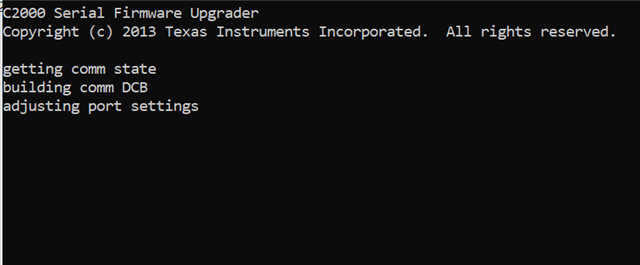
  • Can i use the F2837xD_sci_flash_kernels_cpu01 and blinky_dc_cpu01 .txt files directly from C:\ti\c2000\C2000Ware_4_03_00_00\utilities\flash_programmers\serial_flash_programmer\f2837xD_fw_upgrade_example and pass the above command. Well, i did that and this was the outcome from the terminal:


    And, i have made the boot switches as:

    1=0 , 2=1 and 3=1.(According to the boot table)

    Best Regards,

    Denzil Rhodes.

  • Hi Denzil,

    Yes, you can use those files listed. The boot switch selections are also correct, but the device will need to be connected to in emulation boot mode via CCS before you run the command prompt. Standalone, the device uses GPIO42/GPIO43 for SCI communication mode (https://www.ti.com/lit/ug/sprui77c/sprui77c.pdf). 

    I'll need some time to confirm this but will get back to you tomorrow.

    Thanks and regards,

    Charles

  • I have exactly the same question but i am using external eeprom via SPI boot mode
    i have refer the TRM, but it is not helpful, could you please guide me with the procedure or steps.

  • Hi Charles,

    Can i use USB to TTL converter and directly connect to the GPIO42/43 instead of using the emulation boot mode?

    Could you please confirm if the pre-built .txt file from C:\ti\c2000\C2000Ware_4_03_00_00\utilities\flash_programmers\serial_flash_programmer\f2837xD_fw_upgrade_example is configured to GPIO42/43.

    Best Regards,

    Denzil Rhodes.

  • Hey Charles,

    I fixed the build issue that i was facing. I got the .txt file for the kernel code and the application code.

    I am using the LAUNCHPAD XL board, 

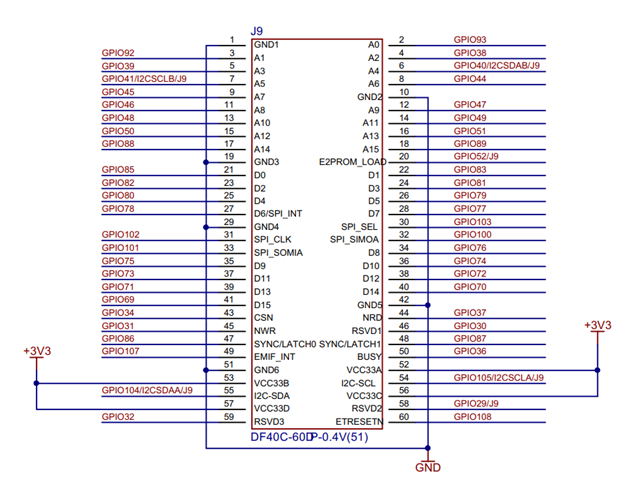
    Does this mean that i can not use the SCI boot mode on LAUNCHPAD XL board?

    I have followed the exact steps that you have mentioned above briefly, but still facing the same above issue in the command prompt.

    I also changed the gpio 84/85 to 43/42 in the SCI_Pinmux_Option1 function from SCI_GetFunction.c file and issue still continues. 

    Best Regards,

    Denzil Rhodes 

  • Hi Denzil,

    Yes, I have confirmed that this is the case with the LAUNCHPAD XL board. 

    The USB to TLL converter would also not be an option due to the other SCI boot mode pin options (GPIO84/85, GPIO28/29) not being available externally on the board.

    As an alternative, there exists the USB bootloader and USB flash programmer which operates with GPIO42/43.

    Regards,

    Charles