This thread has been locked.

If you have a related question, please click the "Ask a related question" button in the top right corner. The newly created question will be automatically linked to this question.

TMS320F28388D: Serial Flash Programming

Part Number: TMS320F28388D
Other Parts Discussed in Thread: C2000WARE

I am attempting to flash f28388d controlCARD via serial. I have set the boot pins on the controlCARD to boot from SCI on reset and I have the controlCARD connected to a COM port.

I am attempting to flash the led_ex1_c28x_dual_blinky_cpu1 example present in C2000 package install, C:\ti\c2000\C2000Ware_4_00_00_00\driverlib\f2838x\examples\c28x_dual\led. 

I have both the flash kernel and the led blinky executables in the SCI boot format and have attempted to use the serial_flash_programmer utility to flash the controlCARD using the following command: 

C:\ti\c2000\C2000Ware_4_00_00_00\utilities\flash_programmers\serial_flash_programmer\serial_flash_programmer -d f2838x -k flash_kernel_c28x_dual_ex1_c28x1\CPU1_RAM\flash_kernel_c28x_dual_ex1_c28x1.txt -a led_ex1_c28x_dual_blinky_cpu1\CPU1_RAM\led_ex1_c28x_dual_blinky_cpu1.txt -p COM8 -b 9600 -v

After running the utility I can see there is a successful autobaud with the controlCARD and the kernel is transferred into the controlCARD's RAM as seen below.
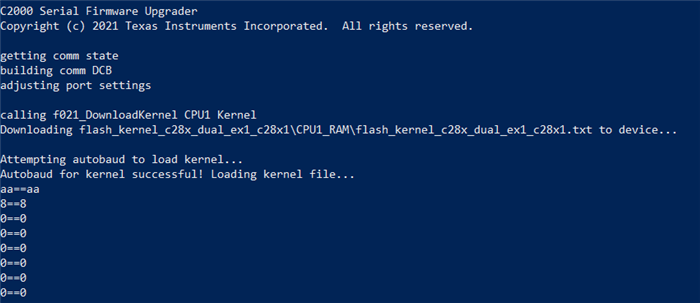
Once the kernel is fully transferred, I see it starts executing. However the controlCARD is unable to autobaud the second time with the host pc. As a result it keeps getting stuck attempting to autobaud.  


I have not been able to figure out or understand what is causing the failure to autobaud after the flash kernel is download to RAM/running. 

  • Hello,

    Expert on this topic is currently out of office and is expected to be back by 2nd Jan. Please expect delay in response.

    Regards,

    Varsha

  • Hi Nam,

    For your kernel project, do you know what the clock frequency is set to in the device.h file? If the kernel is able to load, it may be reconfiguring to a different clock frequency and thus unable to autobaud.

    Thanks and regards,

    Charles

  • Hi Charles, the set clock frequency is 200Mhz, I have not modified the clock frequency for this project.

  • Hi Nam,

    Is the boot mode set to use GPIO 28/29 for your setup within the main flash kernel file? There should be a function called sciGetFunction which takes in a parameter for SCI_BOOT.  

    Physical Device Checks:

    Switch S1:A is set to low and high (0,1), switch S2 is set to low and high (0,1). 

    Are the cables properly connected to device? Can you try inserting the power cable (J1:A) first before the data cable (J3). 

    When attempting this, I am able to connect to the device past autobaud (shown below).

    Thanks,

    Charles

  • Yes sci boot mode is set to use gpio 28/29 in the source code - sciGetFunction takes SCI_BOOT as an argument and SCI_BOOT is defined as 0x01U    //GPIO29, 28.

    For the physical device I have switch S2 set to sci boot (0,1) and I have set gpio28 to be controlled by pin in HSEC connector switch S1:A (0,0). I have a gpio to UART-USB adapter that is hooked up to pins 76&78 on the docking station (corresponding to gpio 28/29). With this I am able to confirm serial communication after running serial flash utility since I see kernel file byte transfer as shown above.

    I have also tested controlling gpio28 via the USB-to-UART adapter on the FTDI chip switch S1:A(0,1) and in both cases serial communication is working as seen by kernel transferred into RAM. 

    It seems that once kernel is transferred and running there is something preventing the controlCard from autobaud locking with the pc. So I don't even see the options of operations to perform like in the screenshot you shared.

    Could you confirm for me the location of the kernel project you are using for your test, also what configurations/settings/changes if any did you make to the kernel project before building it?

  • Location of the kernel project used in testing: C2000Ware_5_01_00_00 > driverlib > f2838x>examples>c28x_dual>flash_kernel (also seen in the Troubleshooting section of ti.com/lit/sprabv4)

    Configurations were left as default when testing. 

    Thanks,

    Charles

  • Okay, I have not made any modifications to the flash kernel either.

    Do you have any other suggestions on why the controlCard consistently fails to echoback the character 'A' only during the second autobaud sequence (initiated from the serial_flash_programmer.exe) before sending the function message?

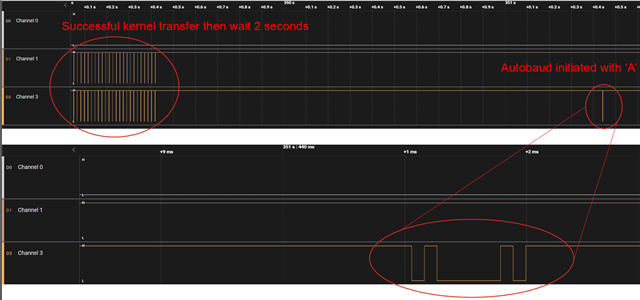
    I hooked up a logic analyzer and verified that after a successful kernel transfer (after first autobaud sequence), the serial_flash_program waits 2 seconds then after "Attempting to autobaud to send function message.." I see the character 'A' on the SCI RX pin as shown below (channel 3) but as you can see there is no response on the SCI TX pin (channel 1) 


  • Hi Nam,

    You said previously this was tested at 200MHz, this was with the 25MHZ XTAL setting for the controlCard?

    Other things to test, you can suspend the program in CCS and load the symbols for the kernel project, setting a breakpoint at the start of 'main' for the kernel program. After the kernel has downloaded through SCI while the device is connected to CCS in emulation mode, it should hit the breakpoint in 'main' and you can step through the initialization operations in CCS to see what values are being set.

    Regards,

    Charles

  • Hi Charles, yes the system clock was generated using the 25Mhz XTAL clock defined by default. I attempted to debug the program in CCS and I noticed it kept getting stuck in device initialization, specifically when attempting to verify the actual crystal frequency matched the defined device oscillator source frequency. By default f2838x rev b (the board version in use) controlCARDs are supposed to be updated to use the 25Mhz oscillator to generate the system clock. Since the check failed, I attempted to use the 20Mhz external oscillator instead and this caused the check to pass. Is seems this board still used the 20Mhz oscillator by default. After defining #USE_20MHZ_XTAL in device header, the verification was successful and autobaud lock was completed.