This thread has been locked.

If you have a related question, please click the "Ask a related question" button in the top right corner. The newly created question will be automatically linked to this question.

TMS320F280037: MCAN will only transmit at 150kbps. cannot change

Part Number: TMS320F280037
Other Parts Discussed in Thread: C2000WARE

Hi, 

Newby here i''m used to PIC's but changed jobs and they are using texas micros.  We have a dev board which i am bringing to life.  I'm running latest CCS and have C2000Ware5.1 installed aswell.

I have got running the PWM , the SPI. but for some reason i cannot get the MCAN to transmit other than 150kbps , which is a weird speed.  We have an external clock for the CAN @ 20Mhz but i've also tried the sysclk divided down.

To check i have a CAN X-analyser and a logic analyser on the CAN-TX coming out the micro 

I've used the CAN bit timing calculator for 500kbps nominal and 1Mbps data and it gives me 

i can confirm that they are being set in the registers .. I've tried a few other calculators and tried some other setting but i only seam to get data at 125kbps NOT 500kbps.  I'm hoping that i've not set something as i'm new to the micro. 

Any guidance I'd be most grateful ...

I'd also like to know if i can turn off the Extended ID as i cannot see the setting 

i did originally start with the normal CAN in syscfg but when i selected my messages it crashed on me ....  

Thanks

  • John,

                My advice would be to start with a Driverlib example and then try your application code. The Driverlib examples are tested examples and should work without any issues. From the C:\ti\c2000\C2000Ware_5_01_00_00\driverlib\f28003x\examples\mcan directory, try mcan_ex7_classic_transmit.c first. This is a simple example that configures the module for classic CAN. Once this works, you know your hardware chain is good. After that, try mcan_ex9_transmit.c. This transmits in the CAN FD mode. 

    Please download my Application report http://www.ti.com/lit/SPRACU9 and look at the Debug tips provided. Most CAN issues can be resolved by going through this checklist. I have also created a video to help with the first communication project using DCAN: https://training.ti.com/getting-started-dcan-module. Understand it is DCAN and not MCAN but you should be able to get some useful info out of it. Please take a look. 

    Consolidated resource list to help you with CAN: https://e2e.ti.com/support/microcontrollers/c2000-microcontrollers-group/c2000/f/c2000-microcontrollers-forum/1033069/faq-what-kind-of-resources-does-ti-provide-to-help-with-can-and-canfd

  • here goes ..  ive taken the FD example and put it in to my test code for a board i'm testing , set it for 8 byes and turned FD off.  I've tried re calculating the can setting and had grief so sat down and did it the hard way with pen and paper.

    // Initialize bit timings.
    //
    bitTimes.nomRatePrescalar = 0x0U; // Nominal Baud Rate Pre-scaler
    bitTimes.nomTimeSeg1 = 0x1EU; // Nominal Time segment before SP . 31 decimal ?
    bitTimes.nomTimeSeg2 = 0x7; // Nominal Time segment after SP
    bitTimes.nomSynchJumpWidth = 0x8U; // Nominal SJW
    bitTimes.dataRatePrescalar = 0x0U; // Data Baud Rate Pre-scaler
    bitTimes.dataTimeSeg1 = 0x1EU; // Data Time segment before SP
    bitTimes.dataTimeSeg2 = 0x7U; // Data Time segment after SP
    bitTimes.dataSynchJumpWidth = 0x8U; // Data SJW

    Tseg1 was 32 and Tseg2 was 8 .. my colleague suggested i took 1 off each as a test

    BUT my main problem was the clock setting. 

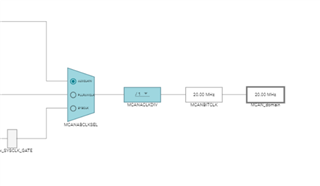
    when checking the register in debug the 2 in registers in blue MCANABCLKSEL + MCANACLDIV were not being set correctly.I was being left with the MUX at sysclk and the divider up at full divide 13h  which is divide by 20 !! 

    I'm aware of the device support setting 

    but when i try to add this my project wont compile ..

    error #10056: symbol "Device_enableAllPeripherals" redefined: first defined in "./syscfg/device.obj"; redefined in "./device/device.obj"
    error #10056: symbol "Device_verifyXTAL" redefined: first defined in "./syscfg/device.obj"; redefined in "./device/device.obj"
    error #10056: symbol "Device_initGPIO" redefined: first defined in "./syscfg/device.obj"; redefined in "./device/device.obj"
    error #10056: symbol "Device_init" redefined: first defined in "./syscfg/device.obj"; redefined in "./device/device.obj"
    error #10056: symbol "__error__" redefined: first defined in "./syscfg/device.obj"; redefined in "./device/device.obj"
    error #10056: symbol "code_start" redefined: first defined in "./f28003x_codestartbranch.obj"; redefined in "./device/f28003x_codestartbranch.obj"
    "../28003x_generic_ram_lnk.cmd", line 93: error #10099-D: program will not fit into available memory, or the section contains a call site that requires a trampoline that can't be generated for this section. placement with alignment/blocking fails for section "codestart" size 0x4 page 0. Available memory ranges:


    As it stands i can transmit at 500000kbps , next is to use the example to attempt to receive 

    Thanks for your reply .. most grateful

    John  

  • Glad you got it to work at 500kbps. Please refer to 4 Bit Timing Configuration in www.ti.com/lit/SPRAD59. I have explained how to compute the timing parameters.