This thread has been locked.

If you have a related question, please click the "Ask a related question" button in the top right corner. The newly created question will be automatically linked to this question.

TMS320F28388D: CCS Theia

Part Number: TMS320F28388D

I have a few questions regarding CCS Theia.

1. Is it possible to debug CPU1 and CM at the same time?

2. If I start a debug session of CM, the CPU1 is not doing anything, which results in CM not doing anything. If I do the same in CCS (eclipse one) it does work. And cpu1 is actually running when I debug CM.

  • Hi Frenk,

    I am contacting the CCS Theia experts on this, but it should be possible to debug CPU1 and CM at same time.

    Are you sure that both CPU1 and CM are being connected to within Theia? Are the target configurations the same?

    Best,

    Ryan Ma

  • Hello,

    The target configs are the same. I use the led blinky example on CPU1 and CM. When I open the example projects and click on debug (CPU1 or CM) I only get a prompt which CPUs I want to debug and can only choose between CPU1, CPU2 or both. No CM is present, and I can not find the debug settings to select the cores (tab does not appear in Theia at the debug settings.

  • Hi Frenk,

    What prompt are you referring to? Are you referring to this one? If so, this is the same that shows up on CCS Eclipse.

    and 

    While debugging in Theia, what view are you trying to see that is similar in eclipse? 

    This thread also may be helpful: e2e.ti.com/.../tms320f28388d-using-debugger-with-2-cores

    Best,

    Ryan Ma

  • After setting up a debug configuration, in eclipse there is a tab (first one) where you can select the cores that you want to debug in the session, in theia this tab is not present.

    Another thing, when I debug in Theia: CPU1 I see the software in CM running, when I debug CM, CPU1 does nothing, thus CM not blinking LEDS as expected, (seems to not have control on gpio pins).

  • Hi Frenk,

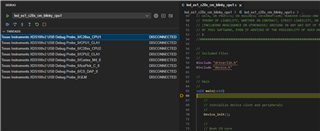
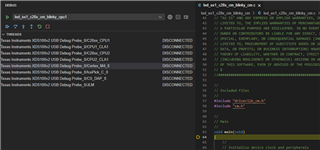
    In CCS Theia, there are a few changes to see CM. 

    1. In the Debug tab on the left of Theia, you might see only CPU1 and CPU2.

    However, if you right click -> show all cores

    You should be able to see now all the other options such as CM (Cortex_M4)

    2. Next make sure to connect target to CPU1 and Cortex M4.

    3. Load the individual programs to CPU1 / CM respectively

    You should now be able to select between C28xx_CPU1 and Cortex_M4_0 to debug.

    Best, 

    Ryan Ma