This thread has been locked.

If you have a related question, please click the "Ask a related question" button in the top right corner. The newly created question will be automatically linked to this question.

TMS320F28379D: Raspberry Pi 5 Communication to Launchpad via Serial Port

Part Number: TMS320F28379D

I'm trying to talk to my F28379D's serial port Launchpad from a Raspberry Pi 5. On the RP5 at a terminal prompt, the command     lsusb    shows the connection as proper. In my RP5 Python code, the correct USB port is recognized by the RP5, but permission is denied. I've tried a myriad of things from my on-line searching to no avail. I know the Launchpad's serial port is working (it's working with another computer). I've tried different USB ports on the RP5 so I don't think that is the issue. It's a software thing. Any suggestions are most welcome!

  • Hi,

    You're using the SCI peripheral of the F2837x device, correct?

    What are the connections your making between the F2837x LaunchPad to the Raspberry Pi 5? It's not clear since you're mentioning USB ports, providing a picture may be helpful.

    Best,

    Kevin

  • I believe I have gotten past the permissioning problem by adding membership to the RP5's group named root. But now the RP5 always reports the Launchpad's USB port as busy. Peeling the onion for sure.

  • I'm using the cable provided by TI to connect the Launchpad to either my PC or to my RP5. I'm running two-way communications between my PC and Launchpad fine (C#-based PC program I wrote, Windows) and this works just fine and as expected. Connecting the same cable to any of my RP5's USB ports just refuses to work though. I can see the full description of the Launchpad's port from the RP5 (using the lsusb command at the terminal prompt), but when I try to configure the USB port from the RP5 side (using pyusb library), it always reports the port as busy. I've been scouring the internet for clues, but nothing has worked thus far. I should add that I tried the same sequence of commands on a RP4 working with a second TI Launchpad and I'm getting the same error.

    I also tried pluging the USB cable from my RP5 into the serial port of a GoPro camera I have, and there was no issue with opening its port. So, I'm inclined to think the issue is with the Launchpad configuration...

  • Hi Jim,

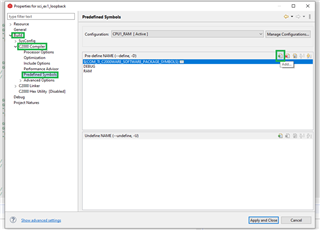
    I see you are using F28379D launchpad. This could be unrelated but one immediate thing to try is adding a pre-define symbol to your CCS project:

    • Some C2000 boards require a predefine symbol to correctly set the clock and other configuration settings on the device. Please view the “device.h” file of the project and see if there are any #ifdef lines that use pre-defined symbols like “_LAUNCHXL_F28XXXX”.
    • If a symbol like “_LAUNCHXL_F28XXXX” exists, AND that is the board you are using for your tests, you will need to add this pre-defined symbol.
    • In CCS, right click the project being used, then choose Properties → Build → C2000 Compiler → Predefined Symbol → then choose the plus button “add” symbol. Add the given pre-define symbol for your particular device that was found in the device.h file (like “_LAUNCHXL_F280025C”).
    • Let me know if this changes anything you see.

    To clarify, you aren't seeing any specific errors, right? You said you have successful connection between launchpad and PC? The only issue is seen as a busy port specifically between the launchpad and RP?

    Best Regards,

    Allison