This thread has been locked.

If you have a related question, please click the "Ask a related question" button in the top right corner. The newly created question will be automatically linked to this question.

TMS320F28379D: Code execution after DCSM implementation

Part Number: TMS320F28379D

I have a project for a 379D chip, utilizing both CPU's. My project without DCSM enabled operates fine in debug mode and in standalone on both CPU's. I started implementing the DCSM module into CPU1 first and could successful debug (can't remember if I tried standalone operation at the time). I eventually went ahead and implemented the DCSM into CPU2. Now the following is happening:

- I can connect and load successfully both CPU's with JTAG but can not run either cpu, however I can see all DCSM settings proper in registers, watch window and On-Chip Flash tab

- I can just load cpu 1 and execute code just fine with jtag connected, but not in standalone.

- I can not get cpu2 run in either configuration, neither jtag or standalone

What is it I am missing here?

Thanks,

Mike

  • Hi Mike,

    What do you see exactly that indicates the CPUs aren't running? In the meantime I'll provide some general information that may help you identify the root cause of this issue.

    A common error with DCSM is code functioning as expected only when the DCSM zones are unsecure. When the zones are secured and you have a function residing in unsecure memory that must read or write data in secure memory, your application will no longer function as expected.

    Also, differences between standalone and JTAG can occur depending on the contents of the .gel file. The .gel file acts as a substitute for the boot-ROM code, which always gets executed in standalone mode. In JTAG mode, you can also put the device into a state that would never be reached in standalone mode, such as unsecuring the zones in the On-Chip flash tool. If you've provided your CSM passwords in the On-Chip flash tool GUI, the .gel file may use these passwords to attempt to unsecure the zones. I'm not sure whether the .gel file for F28379D does this by default but this behavior exists on some C2000 devices.

    Thank you,

    Luke

  • We have a CAN based device to access both CPU’s individually to setup operating parameters and see real time variables. I can see exactly which CPU is operating ‘properly’ and which one not. I partially got it straightened out, I can run both CPU’s with jtag, however when I run them in stand-alone, they are not executing. I disconnect jtag, the cpu’s are still executing (I guess it sort makes sense), I cycle control power, and nothing happens anymore. The security codes are written to the OTP.

    All zones are secure at this point.


    Is there some problem booting the device on its own? Bootcntrl is set to boot from flash (0xB).

  • It appears that CPU1 doesn't get through the IPC CPU boot check, probably because cpu2 never boots? Both bootctrl is 0x0B5A in OTP, might this be a problem?

  • Hi Michael,

    Did you program the Z1_BOOTCTRL and Z2_BOOTCTRL fields with your own values? Can you send a screenshot of what values you programmed? I think what may be happening is you programmed the upper 16 bits of the BOOTCTRL field to all Fs, which would have changed both of your boot mode select pins to be GPIO 255 which is invalid. This would result in the device attempting to run parallel boot upon reset instead of flash boot. This error would not occur when using JTAG since the debugger will relocate the PC to the beginning of your application code.

    Thank you,

    Luke

  • This is what I have programmed into the OTP on both CPU's:

    .sect "dcsm_otp_z1_linkpointer"
    .long 0x1FFFFFFF ;Z1-LINKPOINTER1
    .long 0xFFFFFFFF ;Reserved
    .long 0x1FFFFFFF ;Z1-LINKPOINTER2
    .long 0xFFFFFFFF ;Reserved
    .long 0x1FFFFFFF ;Z1-LINKPOINTER3
    .long 0xFFFFFFFF ;Reserved

    .sect "dcsm_otp_z1_pswdlock"
    .long 0xFFFFFFF0 ;Z1-PSWDLOCK
    .long 0xFFFFFFFF ;Reserved

    .sect "dcsm_otp_z1_crclock"
    .long 0xFFFFFFF0 ;Z1-CRCLOCK
    .long 0xFFFFFFFF ;Reserved

    .sect "dcsm_otp_z1_bootctrl"
    .long 0xFFFFFFFF ;Reserved
    .long 0x49550B5A ;Z1-BOOTCTRL

    .sect "dcsm_zsel_z1"

    .long 0x000000FF ;Z1-EXEONLYRAM
    .long 0x00003FFF ;Z1-EXEONLYSECT
    .long 0x10005555 ;Z1-GRABRAM
    .long 0x05555555 ;Z1-GRABSECT

    This should set up the boot pin properly to GPIO72 and 84.

    Thank you,

    Mike

  • I also forgot to mention that I toggled IO pins and it appears that cpu1 is waiting for the IPC flags from cpu2 and cpu2 never comes out of reset, this was done in standalone mode.

    Any ideas?

    Thank you ,

    Mike

  • Hi Michael,

    Does CPU1 release CPU2 from reset in your application code according to this section in the TRM?

    Thank you,

    Luke

  • I don't think is does, I see the debug pin change state for cpu1 just bevor the IPC flag check but not passing the IPC flag check, I don't see cpu2 ever toggling its debug pin. I assume it is not coming out of reset. Without debugger it is difficult to check the reset register.

  • Hi Michael,

    Would you be able to add some code that checks this register and configures a spare GPIO to be high if CPU2 is held in reset?

    Thank you,

    Luke

  • Sorry for late reply, I was busy the past two weeks with a family emergency. 

    I was thinking about to check registers but haven't done it yet. Any recommendations which registers are most interesting? I try to do it as soon I caught up with my current things.

    Thanks,

    Mike

  • Hi Michael,

    Hope all is well with your family.

    I'd suggest reading the RESET bit in the CPU2RESCTL register:

    This should indicate whether CPU2 is still held in reset.

    Thank you,

    Luke

  • This turns out to be quite difficult. I can run cpu1 with jtag, but not by itself. there is no way I can both cpu's to run. Again, without the DSCM everything runs like a charm. I am utterly frustrated right now.

    Getting any information out of the device is also not possible if none of the devices seem to execute any code or only to a certain point.

    Looking at the examples provided, there is nothing I would see I am missing in my code, however there must be something somewhere missing. 

    I never bothered to load the examples to verify operation, are they laid out to run in standalone mode? if the problem lies on the proper register setup, then I would have the same problem, since none of the register for security are defined in the example applications. 

    Any ideas are welcome!!

    Thank you,

    Mike

  • Hi Michael,

    Can you confirm the following:

    GPIO72 and GPIO84 are being driven high.

    If so, can you try setting a GPIO at different points in the code to see where execution stops? For example, set a GPIO after 5 lines of code, if the GPIO gets set, set the GPIO after 10 lines of code instead and so on until the GPIO does not get set.

    Thank you,

    Luke

  • I can do this, and I will. I am just sidetracked on a different issue I have resolve and be back on it soon. I will need to tackle this security issue soon.

  • Okay, let me know once you have an update on this security issue.

    --Luke

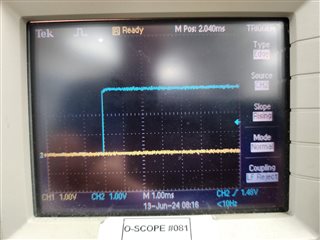
  • I diverted some time to this problem again. Please look at the two code snippets and the scope pictures. The yellow scope line is GPIO82, the blue is GPIO83. First code snippet in in main, relatively at the beginning. the second snippet. 

    Picture 'JTAG' was taken when running with JTAG. Both GPIO's being toggled, code executes in both CPU's. The pic 'Standalone' was taken just cycling control power. CPU 2 seems to start; however, I see that CPU1 does, but eventually gets stuck at line 274 in IPCBootCPU2(). I eventually moved GPIO82 to line 266 in IPCBootCPU2() and found it still toggles when executing in standalone. 

    What could make the condition in line 274 at IPCBootCPU2() true for executing with JTAG but not in standalone mode?

    Thanks,

    Mike

  • Hi Michael,

    Luke is currently OOO until July 1st. He should be able to respond till then. 

    I am looking to see if I can find another expert to assist in the mean time.

    BEst,

    Ryan Ma

  • Great, thanks.

  • Hi Michael,

    Apologize for the delay in response. 

    I am reaching out to an expert on this.

    Best,

    Ryan Ma

  • In this case where is your stack mapped and is that memory secured ?

    Vivek Singh

  • Please see below how the registers are set, I assume it is all recured. See stack location (0x400h) as well.

  • It appears that CPU1 doesn't get through the IPC CPU boot check, probably because cpu2 never boots? Both bootctrl is 0x0B5A in OTP, might this be a problem?

    I think this is the issue. If you have set the BOOT configuration in OTP then there will be no IPC handshake with CPU1 and CPU2 will directly boot to flash. Please refer "Figure 4-7. CPU2 Standalone and Hibernate Boot Flow" in device TRM.

    Vivek Singh

  • Vivek,

    I took out the IPC handshake and have the following scenario:

    on JTAG:

    CPU1 is executing code, CPU2 doesn't seem to come out of reset.

    in standalone:

    It seems CPU2 comes out of reset before CPU1, CPU1 is executing proper code, CPU2 does not, probably because it is missing initialization from CPU1


    Please advise.

    Best regards,

    Mike

  • Mike,

    Yes, that is what I mentioned in my last post. Since you have programmed the flash boot for CPU2, it start running the application after CPU1 BOOTCODE  release to reset to CPU2. Can you try below -

    After connect to CPU1/CPU2 -

    Reset CPU1

    Load (or if already loaded) run CPU1

    Load (or if already loaded) run CPU2

    Also if you have another unit then do not program the BOOT setting on CPU2 and try it.

    Vivek Singh

  • No success, CPU2 hangs, CPU1 is executing.

    Do you mean not program the OTP section Z1-Bootctrl of CPU2? However, burn the other security setting the same way? Burn CPU1 boot ctrl to 0x025A?

    Before I do this, I think I need to understand what is happening exactly. I don't want to burn another chip if possible.

    What I understand is CPU 1 should come out of reset and eventually release CPU2 to come out of reset, how can I control this? Do I have to control this? If flash boot for CPU2 would not work right now, when would I use it? 

    I quite don't understand what I am missing here! 

    Thanks,

    Mike

  • Is there any further feedback on this issue? Is all about not burning the boot control bits on CPU2?

    Thanks,

    Mike

  • Do you mean not program the OTP section Z1-Bootctrl of CPU2? However, burn the other security setting the same way? Burn CPU1 boot ctrl to 0x025A?

    Yes, that is what I meant. Have you tried this ? 

    Vivek Singh