This thread has been locked.

If you have a related question, please click the "Ask a related question" button in the top right corner. The newly created question will be automatically linked to this question.

TMS320F28P550SJ: error when configuring F28P55x DEMO board

Part Number: TMS320F28P550SJ
Other Parts Discussed in Thread: C2000WARE, CCSTUDIO

I used to use CCS12.5 + C2000Ware_5_02_00_00_EA1 on my  F28P55x project, and was able to configure F28P55x DEMO board with .out file.

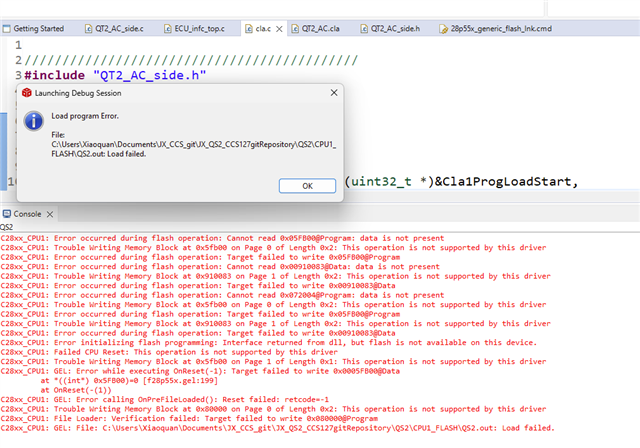
After I upgraded to CCS12.7 + C2000Ware_5_02_00_00 which officially support F28P55x, when configuring F28P55x DEMO board with exactly the same project, it pops up the error message below:

Could you advise how to resolve this issue?

  • Hi,

    Just make sure you have installed all the latest update in CCS. Click on "Check for Update" and if there is any available update, install the same and try. 

    Vivek Singh

  • Thanks, Vivek. I did do the update.

    I am using  CCS12.7 + C2000Ware_5_02_00_00 for my F28P55x project. I was able to configure my F28P55x demo board and ran it yesterday.  

    I did not change anything thereafter, but for some strange reason, when I tried to configure the  board with the same project today, it errors out below:

    I then clicked "yes" , then it pops up the window below:

    Please advise how to resolve this issue so that I can configure the board .

  • The file is actually at:   C:\Users\Xiaoquan\Documents\JX_CCS_git\JX_QS2_CCS127gitRepository\QS2\targetConfigs\TMS320F28P550SJ9.ccxml

    Why does CCS look for it at C:\Users\Xiaoquan\Documents\JX_CCS_git\JX_QS2_CCS127\QS2\targetConfigs?  There  was no such issue and I was able to configure and run on the board yesterday.

  • Hi Vivek,

    Please advise how to resolve this issue so that I can configure the board . I am still stuck here.

    Thanks,

    Quentin

  • Hi Vivek, any update?

  • Hi,

    We have assign it to device expert. Please expect a reply sometime today.

    Vivek Singh

  • Quentin,

    I'm wondering if the existing project is still trying to use resources mapped back to the 12.5 and EA installs from before the device was added to released 12.7 version of CCS. 

    Would it be possible to create a new ccxml file in CCS(View->Target Configurations right click and "New Target Config). in CCS12.7 and use it?  Instead of clicking on the "debug" button in CCS, let's launch the .ccxml manually and connect to the device and see if you can load your project.

    If all this works, let try and replace the .ccxml file in your existing project with this new one and then try the normal debug launch and see if that fixes things.

    Best,

    Matthew

  • Thanks, Matthew. I tried to add a new Target Configuration as shown below, but the new Target Configuration does not show up in "targetConfigs" of "Project Explorer". What should I do? Could you elaborate?

  • Quentin,

    Once you have created the new .ccxml in the target configuration window(and saved it, etc).  Right click on it and go down to "link file to project" and pick the QS2 project from the list.  Now, in the "target configs" folder in the project you should see your "NewTargetConfiguration.ccxml" showing up.  Right click on it and "Set as Active Configuration".  This should make it active, and you can try the debug process to compile/link/connect/load the project.

    Once that works, you can right clock on the .ccxml and set as default as well.

    Best,
    Matthew

  • Thanks, Matthew. I got the following error when configuring the board  -- as I mentioned, I was able to successfully configure the same board with the same project when I also used CCS12.7 + C2000Ware_5_02_00_00  a few days ago:

    C28xx_CPU1: GEL: Error while executing OnTargetConnect(): Cannot read register ST1: data is not present
         at (ST1&~(0x0100)) [f28p55x.gel:515]
         at C28x_Mode() [f28p55x.gel:270]
         at OnTargetConnect()
    C28xx_CPU1: Error occurred during flash operation: Cannot read 0x05FB00@Program: data is not present
    C28xx_CPU1: Trouble Writing Memory Block at 0x5fb00 on Page 0 of Length 0x2: This operation is not supported by this driver
    C28xx_CPU1: Error occurred during flash operation: Target failed to write 0x05FB00@Program
    C28xx_CPU1: Error occurred during flash operation: Cannot read 0x00000000@Data: data is not present
    C28xx_CPU1: Trouble Writing Memory Block at 0x0 on Page 1 of Length 0x2: This operation is not supported by this driver
    C28xx_CPU1: Error occurred during flash operation: Target failed to write 0x00000000@Data
    C28xx_CPU1: Error occurred during flash operation: Cannot read 0x072004@Program: data is not present
    C28xx_CPU1: Trouble Writing Memory Block at 0x5fb00 on Page 0 of Length 0x2: This operation is not supported by this driver
    C28xx_CPU1: Error occurred during flash operation: Target failed to write 0x05FB00@Program
    C28xx_CPU1: Trouble Writing Memory Block at 0x0 on Page 1 of Length 0x2: This operation is not supported by this driver
    C28xx_CPU1: Error occurred during flash operation: Target failed to write 0x00000000@Data
    C28xx_CPU1: Error initializing flash programming: Interface returned from dll, but flash is not available on this device.
    C28xx_CPU1: Failed CPU Reset: This operation is not supported by this driver
    C28xx_CPU1: Trouble Writing Memory Block at 0x5fb00 on Page 1 of Length 0x1: This operation is not supported by this driver
    C28xx_CPU1: GEL: Error while executing OnReset(-1): Target failed to write 0x0005FB00@Data
         at *((int*) 0x5FB00)=0 [f28p55x.gel:199]
         at OnReset(-(1))
    C28xx_CPU1: GEL: Error calling OnPreFileLoaded(): Reset failed: retcode=-1
    C28xx_CPU1: Trouble Writing Memory Block at 0x80000 on Page 0 of Length 0x2: This operation is not supported by this driver
    C28xx_CPU1: File Loader: Verification failed: Target failed to write 0x080000@Program
    C28xx_CPU1: GEL: File: C:\Users\Xiaoquan\Documents\JX_CCS_git\JX_QS2_CCS127gitRepository\QS2\CPU1_FLASH\QS2.out: Load failed.

  • A few things I'd like to try:

    1)Close CCS and open a command prompt to the following directory: C:\ti\ccs1270\ccs\eclipse  once there type ccstudio -clean and press enter.  This will re-launch CCS and clean out the paths.  See if this fixes anything

    2)If #1 doesn't help go back to the new .ccxml you made and open it by double clicking.  On the bottom of the window there is an advanced tab, once you click it and a listing of the target CPUs will appear.  Click on the C28xx_CPU, and then the window to the left will show "CPU properties"

    In the initialization script line you should see the F28P55x GEL file.  Can you confirm this is pulling from your CCS12.7 install path?

    Best,
    Matthew