This thread has been locked.

If you have a related question, please click the "Ask a related question" button in the top right corner. The newly created question will be automatically linked to this question.

TMS320F280049C: Stopping epw in one period

Part Number: TMS320F280049C
Other Parts Discussed in Thread: SYSCONFIG, LAUNCHXL-F280049C, C2000WARE

Hi, 

I am using the SysConfig feature in F28377D to produce my ePWM by modufying cbl-exp8.  

1. Please how can I make all my PWM (4 of them) to run just for one switching period and stop?

2. With reference to the figure below, I want my ePWM (s4) to turn on twice in a switching cycle, please how can I achieve this in SysConfig? 

Thank you Slight smile

  • Part Number: LAUNCHXL-F280049C

    Hi
    I am trying to stop my epwm via one-shot trip. I am using c2000 microcontoller blockset and launchpad-F280049C. I set up the epwm using the F28004x family epwm module. I have set up the one trip-shot as intructed in the TRM. I have routed GPIO 12 through input xbar 1 to do the tripping as shown in the screenshot.
    Can you please advise how to achieve stopping the epw after one period (I use up-down counter for the epwm)? Do I need further sttings for the GPIO12? The purpose of my setup is to do a test within just one period and the epwm must stop.
    Regards,
    Olutayo.


  • Hi Olutayo,

    Just merged your two questions as I believe they are asking the same thing.

    Using the TRIP function on EPWM requires an external signal (a trip source) to signal the PWM to go low. This is an option if you have some GPIO signal that goes low (since trip sources are active low) to signal a trip that shuts of the PWMs. Let me know if there is a specific external signal you are trying to use to shut off the PWMs.

    However, if you are not wanting to implement a hardware trigger, you would have to try implementing this in software. There are several ways to do this, but what I've done is taken our F28004x up-down C2000Ware example and modified it a bit to use interrupts for this (I only made modifications to do this for EPWM1 although EPWM2/3 are present):

    • Action Qualifiers use CMPA and CMPB to produce 2 PWM pulses per PWM period
    • An interrupt is generated at the end of the PWM period (I used CMPAD as the interrupt trigger)
      • In the interrupt, I modified the action qualifiers to set the PWM low 
      • The only caveat is the interrupt is still generated every PWM period, but in terms of output, it accomplished what you are targeting

    The result is that the PWM pulses twice for the first period and then turns off. Below is channel EPWM1A:

    Attached below is the project I used to generate that waveform. Let me know if this is helpful at all!

    epwm_simple_updown.zip

    Best Regards,

    Allison

  • Hi Allison,

    Thank you for your help. I am not using any external trigger and I am not using a coventional code to do this. I am using the c2000 controller blockset in simulink. I believe making an epwm to just run for a cycle should be quite straight forward but unfortunately, I can't figure this out. 

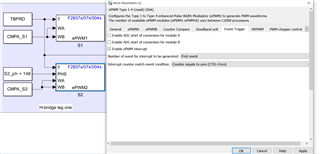
    Can epw event trigger do this like the set up below. I tried it but not working:

    Kindly advise.

    Regards,

    Olutayo

  • Hi Olutayo,

    We generally work directly with the conventional EPWM code and implementations and not experts in the Simulink blockset implementation of EPWM; to get support for specific Simulink capabilities, please try taking a look at the MathWorks FAQ at the links below:

    If you have further questions, the best way to get support on MathWorks products is to contact MathWorks live tech support.

    You can also search for answers or post a question on MATLAB Answers C2000 forum. Additionally, there is info on MathWorks support C2000 in Documentation and Examples.

    Best Regards,

    Allison

  • Hi Allison, 

    I am trying to explore this option. However, it appears that the on-time is interrupted as I can see 1.5 period on your result. I wish to obtain the pwms within the two cursors in the figure below:

    Regards,

    Olutayo

  • Hi Allison,

    I tried opening and running yourattached project but it's giving the following errors despite installing and rinning it with C2000 v5.2.0.00 as recommended. 

    subdir_rules.mk:16: recipe for target 'build-1978635295' failed
    gmake: *** No rule to make target 'C:/ti/c2000/C2000Ware_5_02_00_00_APL_RC3/driverlib/f28004x/driverlib/ccs/Debug/driverlib.lib', needed by 'all'.
    Invalid argument '-s': File "C:\ti\c2000\C2000Ware_5_02_00_00_APL_RC3\.metadata\sdk.json" does not exist
    gmake: *** [build-1978635295] Error 1
    gmake: Target 'all' not remade because of errors.

    **** Build Finished ****

    Kindly help,

    Regards,

    Olutayo

  • Hi Olutayo,

    Ah yes sorry that would be because my C2000Ware is named differently - let me fix the paths and resend today Slight smile

  • Hi Olutayo,

    Please try this - fixed the paths to point to C2000Ware_5_02_00_00!

    7506.epwm_simple_updown.zip

    Best Regards,

    Allison

  • Hi Allison,

    Many thanks. Looks there is a bug in the path as it's not working still. As a work around, I tried to look at the epwm_simple_updown.c  file and replicated you modification in my corresponding file as follows:

    // epwm1ISR - ePWM 1 ISR
    //
    __interrupt void INT_myEPWM1_ISR(void)
    {

    //
    // Set action qualifiers to clear PWM low on zero and then do not change the outputs
    //
    EPWM_setActionQualifierAction(myEPWM1_BASE, EPWM_AQ_OUTPUT_A, EPWM_AQ_OUTPUT_LOW, EPWM_AQ_OUTPUT_ON_TIMEBASE_ZERO);
    EPWM_setActionQualifierAction(myEPWM1_BASE, EPWM_AQ_OUTPUT_A, EPWM_AQ_OUTPUT_NO_CHANGE, EPWM_AQ_OUTPUT_ON_TIMEBASE_PERIOD);
    EPWM_setActionQualifierAction(myEPWM1_BASE, EPWM_AQ_OUTPUT_A, EPWM_AQ_OUTPUT_NO_CHANGE, EPWM_AQ_OUTPUT_ON_TIMEBASE_UP_CMPA);
    EPWM_setActionQualifierAction(myEPWM1_BASE, EPWM_AQ_OUTPUT_A, EPWM_AQ_OUTPUT_NO_CHANGE, EPWM_AQ_OUTPUT_ON_TIMEBASE_DOWN_CMPA);
    EPWM_setActionQualifierAction(myEPWM1_BASE, EPWM_AQ_OUTPUT_A, EPWM_AQ_OUTPUT_NO_CHANGE, EPWM_AQ_OUTPUT_ON_TIMEBASE_UP_CMPB);
    EPWM_setActionQualifierAction(myEPWM1_BASE, EPWM_AQ_OUTPUT_A, EPWM_AQ_OUTPUT_NO_CHANGE, EPWM_AQ_OUTPUT_ON_TIMEBASE_DOWN_CMPB);
    EPWM_setActionQualifierAction(myEPWM1_BASE, EPWM_AQ_OUTPUT_B, EPWM_AQ_OUTPUT_LOW, EPWM_AQ_OUTPUT_ON_TIMEBASE_ZERO);
    EPWM_setActionQualifierAction(myEPWM1_BASE, EPWM_AQ_OUTPUT_B, EPWM_AQ_OUTPUT_NO_CHANGE, EPWM_AQ_OUTPUT_ON_TIMEBASE_PERIOD);
    EPWM_setActionQualifierAction(myEPWM1_BASE, EPWM_AQ_OUTPUT_B, EPWM_AQ_OUTPUT_NO_CHANGE, EPWM_AQ_OUTPUT_ON_TIMEBASE_UP_CMPA);
    EPWM_setActionQualifierAction(myEPWM1_BASE, EPWM_AQ_OUTPUT_B, EPWM_AQ_OUTPUT_NO_CHANGE, EPWM_AQ_OUTPUT_ON_TIMEBASE_DOWN_CMPA);
    EPWM_setActionQualifierAction(myEPWM1_BASE, EPWM_AQ_OUTPUT_B, EPWM_AQ_OUTPUT_NO_CHANGE, EPWM_AQ_OUTPUT_ON_TIMEBASE_UP_CMPB);
    EPWM_setActionQualifierAction(myEPWM1_BASE, EPWM_AQ_OUTPUT_B, EPWM_AQ_OUTPUT_NO_CHANGE, EPWM_AQ_OUTPUT_ON_TIMEBASE_DOWN_CMPB);
    //
    // Clear INT flag for this timer
    //
    EPWM_clearEventTriggerInterruptFlag(myEPWM1_BASE);

    //
    // Acknowledge interrupt group
    //
    Interrupt_clearACKGroup(INTERRUPT_ACK_GROUP3);
    }

    I made the your correcponding adjustments before the lines above but could not produce a period run only but continoud PWM.

    If you or any other forum memebers have further suggestion, that will be appreciated.

    Regards,

    Olutayo

  • Hi Olutayo,

    Hmm strange there's still an error... but yes you can just open another project and replace the main .c and the sysconfig files with what I have in the project and you should get the same behavior. Did you copy the entire files (.c and .syscfg) over and try it? We should be getting the same results if you do this. 

    Best Regards,

    Allison