Part Number: TMS320F28P659DK-Q1
Tool/software:
hello
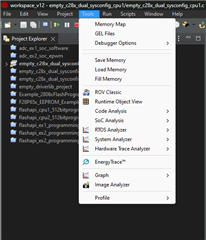
I searched under menu Tools i saw the "Program/Memory Load Options" but no on-chip flash option.
my ccs Version is 12.6.0.00008
where can i find this option?
Mario
This thread has been locked.
If you have a related question, please click the "Ask a related question" button in the top right corner. The newly created question will be automatically linked to this question.
Part Number: TMS320F28P659DK-Q1
Tool/software:
hello
I searched under menu Tools i saw the "Program/Memory Load Options" but no on-chip flash option.
my ccs Version is 12.6.0.00008
where can i find this option?
Mario
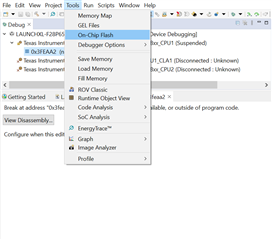
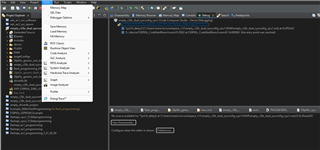
The screenshot I sent previously. As indicated, the connection has already been established—the "Stop" button is red. I can also checked the "Tools" menu.
However, I noticed that the "On-Chip Flash" option is missing. Could you please assist me in resolving this issue?
Hi Mario,
Pls share the ccxml file that you are using .
Best Regards
Siddharth
Hi
Here you are
<?xml version="1.0" encoding="UTF-8" standalone="no"?>
<configurations XML_version="1.2" id="configurations_0">
<configuration XML_version="1.2" id="Texas Instruments XDS110 USB Debug Probe_0">
<instance XML_version="1.2" desc="Texas Instruments XDS110 USB Debug Probe_0" href="connections/TIXDS110_Connection.xml" id="Texas Instruments XDS110 USB Debug Probe_0" xml="TIXDS110_Connection.xml" xmlpath="connections"/>
<connection XML_version="1.2" id="Texas Instruments XDS110 USB Debug Probe_0">
<instance XML_version="1.2" href="drivers/tixds510icepick_c.xml" id="drivers" xml="tixds510icepick_c.xml" xmlpath="drivers"/>
<instance XML_version="1.2" href="drivers/tixds510c28x.xml" id="drivers" xml="tixds510c28x.xml" xmlpath="drivers"/>
<instance XML_version="1.2" href="drivers/tixds510cla2.xml" id="drivers" xml="tixds510cla2.xml" xmlpath="drivers"/>
<instance XML_version="1.2" href="drivers/tixds510cs_child.xml" id="drivers" xml="tixds510cs_child.xml" xmlpath="drivers"/>
<instance XML_version="1.2" href="drivers/tixds510ajsm.xml" id="drivers" xml="tixds510ajsm.xml" xmlpath="drivers"/>
<property Type="choicelist" Value="1" id="The JTAG TCLK Frequency (MHz)">
<choice Name="Fixed with user selected faster value" value="SPECIFIC">
<property Type="choicelist" Value="4" id="Select TCK Setting"/>
</choice>
<choice Name="Fixed with user specified value" value="SPECIFIC">
<property Type="stringfield" Value="1MHz" id="-- Enter a value from 100.0kHz to 2.5MHz"/>
</choice>
</property>
<platform XML_version="1.2" id="platform_0">
<instance XML_version="1.2" desc="TMS320F28P659DK8-Q1_0" href="devices/f28p659dk8-q1.xml" id="TMS320F28P659DK8-Q1_0" xml="f28p659dk8-q1.xml" xmlpath="devices"/>
<device HW_revision="1" XML_version="1.2" description="" id="TMS320F28P659DK8-Q1_0" partnum="TMS320F28P659DK8-Q1" simulation="no">
<router HW_revision="1.0" XML_version="1.2" description="ICEPick_C router" id="IcePick_C_0" isa="ICEPICK_C">
<subpath id="Subpath_1">
<property Type="numericfield" Value="0x11" desc="Port Number_0" id="Port Number"/>
</subpath>
<subpath id="Subpath_0">
<property Type="choicelist" Value="1" id="Custom Configuration"/>
</subpath>
<subpath id="Subpath_2">
<cpu HW_revision="1.0" XML_version="1.2" description="JLM" id="JLM" isa="AJSM">
<property Type="numericfield" Value="0x00000000" id="Unlock Key bits 127:96"/>
</cpu>
</subpath>
</router>
</device>
</platform>
</connection>
</configuration>
</configurations>
Mario
Mario,
Will try using this ccxml and get back to you.
Best Regards
Siddharth
Mario,
It works with CCS version 12.7 , request you to migrate to this IDE version .
Best Regards
Siddharth