This thread has been locked.

If you have a related question, please click the "Ask a related question" button in the top right corner. The newly created question will be automatically linked to this question.

TMS320F28P650DK: what is the name SPI register in CPU2.

Part Number: TMS320F28P650DK

Tool/software:

hi.

I am using TMS320F28P650DK9.

I am using CPU1 and CPU2, and while testing for communication on CPU2.

SPI was set up through 'syscfg' on CPU2.

However, I could not find any SPI-related registers in the 'registers window'.

Is it a different name?

Can someone please help me?
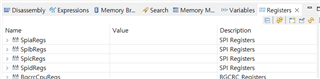
[CPU1 Registers]
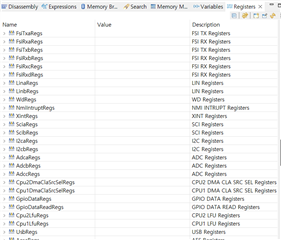
[CPU2 Registers]

  • Hi Jinhee,

    Peripherals, specifically SPI in this scenario, are controlled by individual CPU depending on the application configuration. By default, the CPU1 subsystem owns all the configuration and control. Through software, peripherals can be configured to be accessed by the CPU2 subsystem (refer to System Control TRM section).

    As such, there are only one set of SPI registers per instance associated with the device. If you have already verified that CPU2 is selected by CPUSEL6 fields, then CPU2 has already provided the PERx.LSPCLK for SPI.

    Best Regards,

    Aishwarya

  • HI. 
    I know that SPI is controlled individually, and I am using SPI on CPU2.
    It was confirmed that it operated normally during the test, and that both PICO and POCI signals in CPU2 were normal.
    When checking the registers window on CPU1, all register values ​​are displayed as 0 because there is no control authority.
    The point of my question is that on CPU2 I can't find the SPI registers in the "registers window"

    My CCS is version 12.7.1.00001.

    Can you please check the registers window of CPU2 in CCS version 12?

  • Hi Jinhee,

    Thanks for confirming. I am actually seeing the same issue on my end with the SPIxRegs, so let me reach out to some other experts to determine a resolution. In the meantime, as you might have already tried, you can use memory browser to view register values.

    Aishwarya

  • Hi Jinhee,

    Received confirmation that this is indeed a bug and I've filed a Jira, so this gets fixed in the next release. Thank you for bringing this to our attention.

    This is what you can try in the meantime to see the SPI (and other peripheral) registers:

    1. Exit out of CCS 12.7.
    2. In thefolder, C:\ti\ccs1270\ccs\ccs_base\common\targetdb\devices, select and open the xml file that correlates to the device package you are using in the notepad editor of your choosing.
    3. As you probably will notice, in the Subpath_0 / C28xx_CPU1 section, there are files related to SPI registers. Similarly, you'll have to add these files to the Subpath_1 / C28xx_CPU2 section (see images below). Save the file and try using register view as normal. If you still see no changes, try running fsclean.bat file in the C:\ti\ccs1270\ccs\ccs_base\common\bin to clear cache files.

    Best Regards,

    Aishwarya

  • To follow up, let me get you an updated xml file, so you don't have to make the changes. Can you confirm what package you are using?

  • Thank you very much for your sincere reply.
    The code compiler version is 12.7.1.00001, and TMS320F28P650DK9-PTP is used.
    Do you need any more information?

  • Hi Jinhee,

    I hope the solution works for you as a temporary, immediate workaround. I am working with the team to get you as well as the next release the updated xml file, but please note that it will take some time.

    Best Regards,

    Aishwarya

  • Jinhee,

    Great news, I am attaching the new xml file to be used. These are the updated instructions to follow, similar to the previous ones:

    1. Exit out of CCS IDE.
    2. In the folder, C:\ti\ccs1270\ccs\ccs_base\common\targetdb\devices, remove the f28p650dk9.xml file that correlates to your device package. This can be stored somewhere else or deleted, up to you.
    3. Add this attached device xml in the same path (you can remove the 4403 if you want). 
    4. Run fsclean.bat file in the C:\ti\ccs1270\ccs\ccs_base\common\bin to clear cache files. Restart CCS IDE.

    Best Regards,

    Aishwarya

     4403.f28p650dk9.xml

  • Thank you for the detailed answer.

    Thanks to you, the problem has been resolved. :)

    have a good day.

  • Jinhee,

    Glad to hear the issue is resolved. I will now close this thread. 
    Best Regards,

    Aishwarya