This thread has been locked.

If you have a related question, please click the "Ask a related question" button in the top right corner. The newly created question will be automatically linked to this question.

TMS320F28377D:C2000 SCI generate a single pulse

Part Number: TMS320F28377D
Other Parts Discussed in Thread: C2000WARE, SYSCONFIG

Tool/software:

Trying to generate a single pulse from the input received on SCI RCV. How would I for example give an integer value of 5 and have that translate on a GPIO pin to turn on for 5 clock cycles (of the SCI module or any other arbitrary timer) ? I've been following some of the Matlab examples on SCI

  • Hi Advit,

    I unfortunately cannot speak to the MATLAB examples, but I'd imagine that to do this after receiving the value and reading it from the SCI receive buffer, one simple option is you can store that value (let's call it 'x') and use it in a delay function to add cycles of delay proportional to the value 'x'. You would just write a '1' to the GPIO, delay 'x' cycles then write a '0' to the GPIO to turn it off (or just use the "toggle" function).

    We have a simple GPIO toggle example that does something similar to this in a FOR loop: {C2000Ware}\driverlib\f2837xd\examples\cpu1\gpio

    Best Regards,

    Allison

  • Hi Allison,

    Thanks for your reply. I moved to CCS and I am trying to to use the SCI interrupt as well. Can you share a project for the same?  

  • Hi Advit,

    Our SCI examples for this device can be found at {C2000Ware}\driverlib\f2837xd\examples\cpu1\sci. There is a loopback example using SCI interrupts that you can use as a reference or modify for your application.

    Best Regards,

    Allison

  • I am finally able to to use the SCI to control the GPIO but the output goes 'High' on its own for a brief time even after the following declaration:

    Board_init();
    GPIO_writePin(myBoardLED0_GPIO1,0);  // try resetting asap

    more specficially, observing using breakpoints- in the board_init function in the board.c file, it sets the output 'high' after 

    GPIO_setDirectionMode(myBoardLED0_GPIO1, GPIO_DIR_MODE_OUT);

    I am using the LaunchPad-XL 280025C fyi

  • Hi Advit,

    This Board_init() function is automatically generated from the SysConfig code generation tool. You can see what this function does by looking at the Generated Files in the project, or looking into the .syscfg file. This SysConfig getting started video is a good quick resource if you are new to it to see how this works in the project: https://www.ti.com/video/6304748751001. I believe you can also find the source code for any function call in your program by pressing the CTRL button and clicking on any function call.

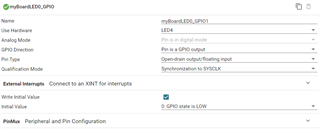
    Are you using the SysConfig GUI? If so, can you please share what settings you have there? In SysConfig, you should be able to set the GPIO as an output and program an initial value (in this case, 0). Are you already doing this?

    Best Regards,

    Allison

  • Yes I am already doing this.  I also tried the push-pull pin type to no luck

  • Hi Advit,

    I believe these should default low, so that's strange. Can you share a screen capture of the board.c file? And also run a debug session where you monitor the GPIO registers (e.g. GPIO DAT regs) in the 'Registers' window of CCS and then step into the board_init() function and step over the code to watch where that GPIO's settings change and where the GPIO becomes high? This can narrow down which function is generating the high state.

    Best Regards,

    Allison

  • Hi Allison,

    I have attached a screenshot of the board.c file. During the debug session, the GPIO becomes HIGH after _setDirectionMode command (highlighted) in the board.c file. I have a separate LED thats doing the same even after giving a inital low value.

    Best,

    AVDIT

  • Hi Advit,

    When you monitor the GPxDAT register of those GPIOs (with continuous refresh on) and step through the code, do you see the reg value become 1 at all? Can you also "step into" the GPIO_setDirectionMode() and step over each line to see precisely where the register value/output change?

    Best Regards,

    Allison

  • I think since the led is inherently pulled up to VCC on the PCB setting the initial value as 0 lights up the LED. Bu now I am confused if my SCI generate pulse is working.

  • Hi Avdit,

    I wanted to clarify: Is your SCI communication working fine? Are you having any difficulty with transmit/receive? 

    Is the only issue generating this GPIO pulse that is dependent on SCI communication? Can I ask why you are generating this pulse?

    Just truing to understand the nature of :

    I am confused if my SCI generate pulse is working.

    Best Regards,

    Allison

  • I was able to generate the pulse using SCI_readCharBlockingFIFO(mySCIA_BASE) and simply writing '1' to the gpio pin until a specific time.

  • Hi Avdit,

    I just checked and specifically the LED's are actually active low on the controlcards and launchpads, so initializing the GPIO to 1 instead of 0 is correct!

    Best Regards,

    Allison