This thread has been locked.

If you have a related question, please click the "Ask a related question" button in the top right corner. The newly created question will be automatically linked to this question.

TMS320F28388D: C2000 microcontrollers forum

Part Number: TMS320F28388D


Tool/software:

I want to connect 28388d and 280036C in daisy chain method and debug two MCUs using one debugger (xds200i).

First, the circuit I connected is as follows.
emu0 and emu1 and TCK_RET are not connected. (If this is a problem, please let me know)
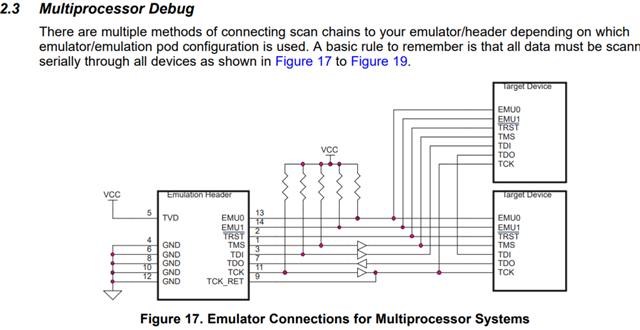

First, when I made a test connection, it said it was successful. This probably means there is no problem with the hardware connection.

the problem is
The .out file of 28388d is loaded properly and appears as shown below. However, 280036c does not seem to be loading.
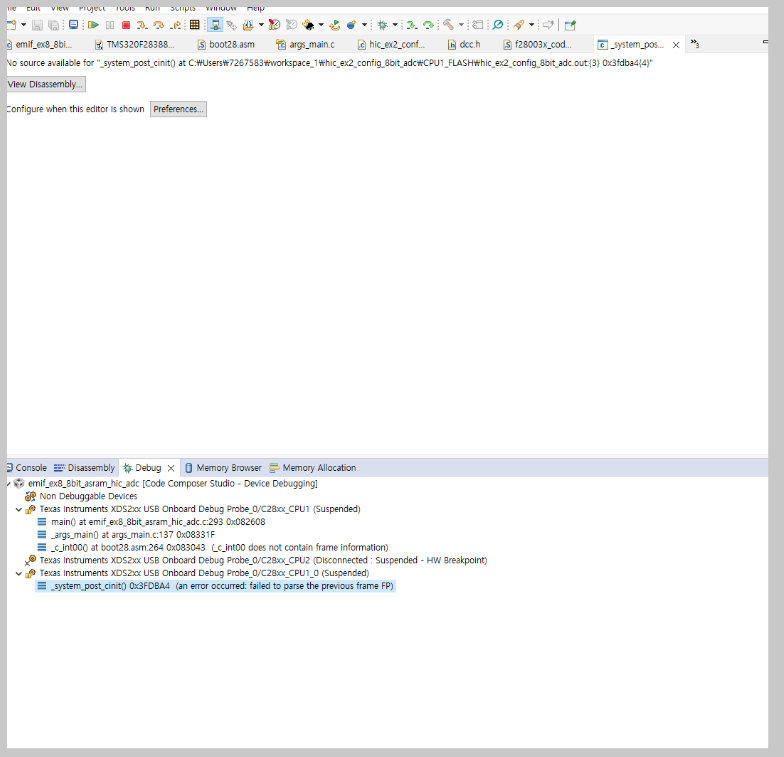
I think there are separate .out files for 28388d and 280036c, but I don't seem to know how to load them.
To summarize, I have set up hardware debugging of two MCUs with one debugger, but I want to debug them by loading each .out file. I would appreciate it if you could tell me the procedure and method.

First of all, below is my debugging settings.

  • Hi,

    First, when I made a test connection, it said it was successful. This probably means there is no problem with the hardware connection.

    This is correct.

    Once you are in the debug menu, you can select your target CPU by clicking on it, then you can click this load button and select your .out file: 

    Best Regards,

    Ben Collier

  • Thank you for your reply. But... I tried that, but the results didn't change. To be precise, in the debug configurations, in the main tab, set the .OUT file to be downloaded to CPU1 and press the Debug button. When the next debugging window appears, select CPU_1 and press the LOAD PROGRAM button as you said. After selecting the .OUT file to be entered into CPU1, I right-clicked CPU1 and clicked Connect target, but the _SYSTEM_POST_Cinit() 0x3FDBA4 error occurred and the program was not debugged.

    Is there something wrong with the order or method?

    For reference, when FLASH writing the emulation pins of 28388D and 280036C respectively without configuring a daisy chain circuit, it works normally and the program runs well.

  • Hi,

    To be precise, in the debug configurations, in the main tab, set the .OUT file to be downloaded to CPU1 and press the Debug button. When the next debugging window appears, select CPU_1 and press the LOAD PROGRAM button as you said. After selecting the .OUT file to be entered into CPU1, I right-clicked CPU1 and clicked Connect target, but the _SYSTEM_POST_Cinit() 0x3FDBA4 error occurred and the program was not debugged.

    I think we should try to debug this without worrying about the debug configuration for now.

    If you right-click on your target configuration, you can select 'Launch Target Configuration'

    Next, could you right click on CPU1 corresponding to the F280036C and 'connect target'? 

    Please make sure that you can read the PARTID, so we know that the connection is good. Then could you try loading the program without connecting to F2838X? 

    Best Regards,

    Ben Collier

  • thx for your reply. i solved this ploblem .I do as you give me