This thread has been locked.

If you have a related question, please click the "Ask a related question" button in the top right corner. The newly created question will be automatically linked to this question.

TMS320F28P550SJ: generate .bin for F28P55x project

Part Number: TMS320F28P550SJ

Tool/software:

I was able to generate .bin with post-build steps below for 280025 and 280049:


"${CCE_INSTALL_ROOT}/utils/tiobj2bin/tiobj2bin" "${BuildArtifactFileName}" "${BuildArtifactFileBaseName}.bin" "${CG_TOOL_ROOT}/bin/ofd2000" "${CG_TOOL_ROOT}/bin/hex2000" "${CCE_INSTALL_ROOT}/utils/tiobj2bin/mkhex4bin"
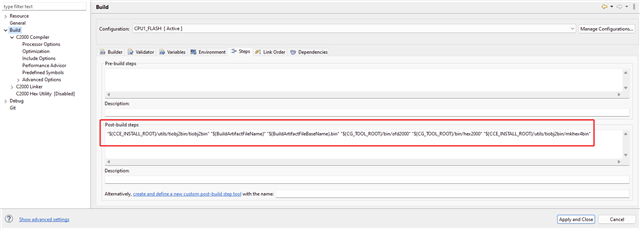
Did the same thing for a F28P55x project, but there is no .bin generated after compiling.

Please advise how to generate .bin for F28P55x project

  • Hi Quentin,

    Are all the paths being resolved correctly? Is there any error message occurring when trying to generate the .bin?

    Best,

    Ryan Ma

  • Hi Ryan,

    All the paths are resolved correctly. There are messages below when compiling:

    ===

    Finished building target: "QS2.out"
     
    "C:/ti/ccs1270/ccs/utils/tiobj2bin/tiobj2bin" "QS2.out" "QS2.bin" "C:/ti/ccs1270/ccs/tools/compiler/ti-cgt-c2000_22.6.1.LTS/bin/ofd2000" "C:/ti/ccs1270/ccs/tools/compiler/ti-cgt-c2000_22.6.1.LTS/bin/hex2000" "C:/ti/ccs1270/ccs/utils/tiobj2bin/mkhex4bin"
    makefile:177: recipe for target 'post-build' failed
    'C:' is not recognized as an internal or external command,
    operable program or batch file.
    gmake[2]: [post-build] Error 255 (ignored)

  • Hi Quentin,

    Please take a look at this thread.

    If you have any further questions please let us know.

    Best,

    Ryan Ma

  • Hi Ryan,

    Thanks for pointing me to the thread. Seems this is a bug found in CCS 12.2.0, and still exists in CCS12.7 which I am using.

    According to the thread, CCS 12.1.0 does not have this bug. Could you send me tiobj2bin.bat file of CCS12.7?

    Thanks,

    Quentin

  • Hi Quentin,

    This should have been fixed in CCS12.7 as well. Let me double check with a colleague and get back to you.

    Best,

    Ryan Ma

  • Thanks, Ryan, but 12.7 does not work for me. So do I need tiobj2bin.bat of  CCS 12.1.0 ?

  • Hi Quentin,

    Can you copy over CCS12.1's version of tiobj2bin.bat to CCS12.7 then run the same command?

    Best,

    Ryan Ma

  • Here is also a fix that was described in the e2e.

    @echo off
    rem ========================================================================== 
    rem tiobj2bin.bat - Converts TI object file from COFF or ELF to binary
    rem     dump format.  Intended for use as a post-build step in CCS.
    rem
    rem This code released under a license detailed at the end of this file.
    rem
    rem Invoke: tiobj2bin file.out file.bin [ofd] [hex] [mkhex]
    rem
    rem file.out - The TI .out file to convert to binary.  Can be COFF or ELF.
    rem file.bin - Name the binary output file
    rem ofd      - The object file display (ofd) utility command to invoke, with
    rem            path info as needed.  If not given, defaults to ofd470.
    rem hex      - The hex utility command to invoke, with path info as needed.
    rem            If not given, defaults to hex470.
    rem mkhex    - A custom utility which takes XML from OFD and outputs the hex
    rem            command file needed for the hex utility.  Path info is given
    rem            as needed.  If not given, defaults to mkhex4bin.  
    rem
    rem You may need to put "quotes" around the parameters.
    rem
    rem Here is an example of how this file is invoked as a post-build step in
    rem CCSv7
    rem
    rem "${CCS_INSTALL_ROOT}/utils/tiobj2bin/tiobj2bin" "${BuildArtifactFileName}" "${BuildArtifactFileBaseName}.bin" "${CG_TOOL_ROOT}/bin/ofd2000" "${CG_TOOL_ROOT}/bin/hex2000" "${CCS_INSTALL_ROOT}/utils/tiobj2bin/mkhex4bin"
    rem
    rem Be sure to replace ofd2000 and hex2000 with the respective binaries for
    rem your device, for example, ofd6x and hex6x(for c6000) or armofd and armhex 
    rem (for ARM).
    rem ========================================================================== 
    
    rem ========================================================================== 
    rem Presumptions: 
    rem - Unless directory path info is provided as part of the parameter name, 
    rem   ofd470 and friends are in the system path
    rem ========================================================================== 
    
    rem ========================================================================== 
    rem Do not remember variables set in this batch file
    rem ========================================================================== 
    setlocal
    
    rem ========================================================================== 
    rem Handle command line args
    rem ========================================================================== 
    if "%~1" == "" (
       echo Usage: %~n0 file.out file.bin [ofd] [hex] [mkhex]
       exit /b
    )
    set outfile=%1
    
    if "%~2" == "" (
       echo Usage: %~n0 file.out file.bin [ofd] [hex] [mkhex]
       exit /b
    )
    set binfile=%2
    
    set ofdcmd=ofd470
    if not "%~3" == "" set ofdcmd=%3
    set hexcmd=hex470
    if not "%~4" == "" set hexcmd=%4
    set mkhexcmd=mkhex4bin
    if not "%~5" == "" set mkhexcmd=%5
    
    rem ========================================================================== 
    rem To make testing easier, an additional 6th parameter for specifying running
    rem Perl is available.  Now an executable version of the script is not
    rem required.  Not documented externally.  Everyone will invoke the full
    rem executable version of mkhex4bin.  Serves 2 purposes: Whether to execute
    rem perl, and how to execute it.
    rem ========================================================================== 
    set perlcmd=none
    if not "%~6" == "" set perlcmd=%6
    
    rem ========================================================================== 
    rem Binary files are impractical for device architectures that do not have
    rem one linear range of memory.  At this time these are: PRU, C5500, C5400.
    rem The for loop is a bit weird.  The DOS operator for stripping off path
    rem name info can only be applied in a few places.  One of them is the 
    rem iterating variable in a for loop.  
    rem ========================================================================== 
    for %%a in (%ofdcmd%) do (
       set base_ofdcmd=%%~na
    )
    
    if %base_ofdcmd% == ofdpru (
       echo Binary files do not work for PRU
       exit /b
    )
    
    if %base_ofdcmd% == ofd55 (
       echo Binary files do not work for C5500
       exit /b
    )
    
    if %base_ofdcmd% == ofd500 (
       echo Binary files do not work for C5400
       exit /b
    )
    
    rem ========================================================================== 
    rem C2000 EABI files are not supported.  This code uses ofd2000 to search the
    rem file header to determine whether it is an ELF file or not.  All the output
    rem of that command, including any error diagnostics, is thrown away.  For the
    rem details of how this works, Internet search the commands used.
    rem ========================================================================== 
    if %base_ofdcmd% == ofd2000 (
       setlocal enabledelayedexpansion
       %ofdcmd% --obj_display=none,header %outfile% > ofdcmdtemp.txt
       findstr/c:" ELF " ofdcmdtemp.txt
       if !errorlevel! equ 0 (
          echo C28x files built with --abi=eabi are not supported
          exit /b
       )
       setlocal disabledelayedexpansion
    )
    
    rem ========================================================================== 
    rem Possibly change the OFD and HEX commands.  See make_exe_work for details.
    rem ========================================================================== 
    call :make_exe_work %ofdcmd% ofd470 armofd
    set ofdcmd=%final_cmd%
    call :make_exe_work %hexcmd% hex470 armhex
    set hexcmd=%final_cmd%
    
    rem ========================================================================== 
    rem Compose temporary file names used for ofd and hex cmds
    rem    Run "set /?" to see documentation of %random%
    rem ========================================================================== 
    set xmltmp=%TMP%\ofd_%random%_%random%_%random%.xml
    set hextmp=%TMP%\hexcmd_%random%_%random%_%random%.tmp
    
    rem ========================================================================== 
    rem Paranoid checks on the temp files
    rem ========================================================================== 
    if exist "%xmltmp%" (
       echo XML temp file exists. Giving up.
       exit /b
    )
    
    if exist "%hextmp%" (
       echo HEX temp file exists. Giving up.
       exit /b
    )
    
    rem ========================================================================== 
    rem 1. Create the XML from the .out file
    rem 2. Create the hex command file from the XML
    rem 3. Create the binary from the .out file and hex file
    rem ========================================================================== 
    %ofdcmd% -x --xml_indent=0 --obj_display=none,sections,header,segments %outfile% > %xmltmp%
    
    if %perlcmd% == none (
       %mkhexcmd% %xmltmp% > %hextmp%
    ) else (
       %perlcmd% %mkhexcmd% %xmltmp% > %hextmp%
    )
    
    if not %errorlevel% equ 0 (
       echo %mkhexcmd% failure occurred.  Giving up.
       exit /b
    )
    
    %hexcmd% -q -b -image -o %binfile% %hextmp% %outfile%
    
    rem ========================================================================== 
    rem Uncomment to debug
    rem ========================================================================== 
    rem type %hextmp%
    
    rem ========================================================================== 
    rem Remove the temp files
    rem ========================================================================== 
    del %xmltmp%
    del %hextmp%
    
    goto :EOF
    
    
    rem ========================================================================== 
    rem ========================================================================== 
    rem FUNCTION: make_exe_work
    rem If ofd470 is requested, but armofd is what is available, then change it.
    rem Also works for hex470/armhex.  Works the other way too, i.e. ofd470
    rem to armofd.
    rem %1 Original command that may be changed
    rem %2 The old command name, i.e. ofd470 or hex470
    rem %3 The new command name, i.e. armofd or armhex
    rem Result is assigned to %final_cmd%
    rem ========================================================================== 
    rem ========================================================================== 
    :make_exe_work
    
    rem ========================================================================== 
    rem The effect of these statements is to parse the orignal command into the
    rem path and file name parts.  Run "call /?" to see what %~dp1 etc means.
    rem Keep path drive letter, and ignore file name extension
    rem ========================================================================== 
    set orig_cmd=%1
    set orig_cmd_path=%~dp1
    set orig_cmd_name=%~n1
    
    set oldname=%2
    set newname=%3
    
    set final_cmd=%orig_cmd%
    
    rem ========================================================================== 
    rem If the command is not ofd470, hex470, armofd, armhex then skip everything
    rem ========================================================================== 
    if %orig_cmd_name%==%oldname% goto NEED_TO_CHECK
    if %orig_cmd_name%==%newname% goto NEED_TO_CHECK
    goto :EOF
    
    :NEED_TO_CHECK
    
    rem ========================================================================== 
    rem If the command works now, we're done.  First, see if the file exists.
    rem Second, see if the command is on the system path.
    rem ========================================================================== 
    if exist %final_cmd% goto :EOF
    if exist %final_cmd%.exe goto :EOF
    where %final_cmd% > NUL 2>&1
    if %errorlevel% equ 0 goto :EOF
    
    rem ========================================================================== 
    rem Change the base cmd name from old to new, or vice versa
    rem ========================================================================== 
    if %orig_cmd_name%==%oldname% (
      set final_cmd_name=%newname%
    ) else  ( 
      set final_cmd_name=%oldname%
    ) 
    
    rem ========================================================================== 
    rem If the cmd path is the same as the current directory, then no path info
    rem was given.  The final cmd is the same as the base cmd.  Otherwise, 
    rem concatenate the original path with the new base cmd name.
    rem ========================================================================== 
    if %orig_cmd_path%==%~dp0 (
      set final_cmd=%final_cmd_name%
    ) else (
      set final_cmd=%orig_cmd_path%%final_cmd_name%
    )
    
    rem ========================================================================== 
    rem Test final_cmd again.  If it doesn't work now, issue an error message.
    rem ========================================================================== 
    if exist %final_cmd% goto :EOF
    if exist %final_cmd%.exe goto :EOF
    where %final_cmd% > NUL 2>&1
    if %errorlevel% equ 0 goto :EOF
    
    echo tiobj2bin.bat failed on %orig_cmd%
    echo Please see http://processors.wiki.ti.com/index.php/Tiobj2bin_Failed
    
    goto :EOF
    
    
    rem /*
    rem *
    rem * Copyright (C) 2011 Texas Instruments Incorporated - http://www.ti.com/ 
    rem * 
    rem * 
    rem *  Redistribution and use in source and binary forms, with or without 
    rem *  modification, are permitted provided that the following conditions 
    rem *  are met:
    rem *
    rem *    Redistributions of source code must retain the above copyright 
    rem *    notice, this list of conditions and the following disclaimer.
    rem *
    rem *    Redistributions in binary form must reproduce the above copyright
    rem *    notice, this list of conditions and the following disclaimer in the 
    rem *    documentation and/or other materials provided with the   
    rem *    distribution.
    rem *
    rem *    Neither the name of Texas Instruments Incorporated nor the names of
    rem *    its contributors may be used to endorse or promote products derived
    rem *    from this software without specific prior written permission.
    rem *
    rem *  THIS SOFTWARE IS PROVIDED BY THE COPYRIGHT HOLDERS AND CONTRIBUTORS 
    rem *  "AS IS" AND ANY EXPRESS OR IMPLIED WARRANTIES, INCLUDING, BUT NOT 
    rem *  LIMITED TO, THE IMPLIED WARRANTIES OF MERCHANTABILITY AND FITNESS FOR
    rem *  A PARTICULAR PURPOSE ARE DISCLAIMED. IN NO EVENT SHALL THE COPYRIGHT 
    rem *  OWNER OR CONTRIBUTORS BE LIABLE FOR ANY DIRECT, INDIRECT, INCIDENTAL, 
    rem *  SPECIAL, EXEMPLARY, OR CONSEQUENTIAL DAMAGES (INCLUDING, BUT NOT 
    rem *  LIMITED TO, PROCUREMENT OF SUBSTITUTE GOODS OR SERVICES; LOSS OF USE,
    rem *  DATA, OR PROFITS; OR BUSINESS INTERRUPTION) HOWEVER CAUSED AND ON ANY
    rem *  THEORY OF LIABILITY, WHETHER IN CONTRACT, STRICT LIABILITY, OR TORT 
    rem *  (INCLUDING NEGLIGENCE OR OTHERWISE) ARISING IN ANY WAY OUT OF THE USE 
    rem *  OF THIS SOFTWARE, EVEN IF ADVISED OF THE POSSIBILITY OF SUCH DAMAGE.
    rem *
    rem */


  • Hi Ryan,

    I copied over CCS12.1's version of tiobj2bin.bat to CCS12.7 then run the same command, and there is still no .bin generated. Console shows the message below:

    =========

    <Linking>
    Finished building target: "QS2.out"
     
    "C:/ti/ccs1270/ccs/utils/tiobj2bin/tiobj2bin" "QS2.out" "QS2.bin" "C:/ti/ccs1270/ccs/tools/compiler/ti-cgt-c2000_22.6.1.LTS/bin/ofd2000" "C:/ti/ccs1270/ccs/tools/compiler/ti-cgt-c2000_22.6.1.LTS/bin/hex2000" "C:/ti/ccs1270/ccs/utils/tiobj2bin/mkhex4bin"
        Format:              ELF Version 1          
        ELF Class:           32-bit objects         
        ELF e_flags:         0                      
    C28x files built with --abi=eabi are not supported
     

    **** Build Finished ****

  • Hi Quentin, 

    Did you try the provided snippet?

    Best,

    Ryan Ma

  • Hi Ryan,

    Yes, when I say "I copied over CCS12.1's version of tiobj2bin.bat to CCS12.7 then run the same command", I actually mean " copied over the provided snippet to CCS12.7"

    Quentin

  • Hi Quentin,

    Understood, could you also try copying over CCS12.1's version to CCS12.7 and see if that works?

    Best,

    Ryan Ma

  • Hi Ryan,

    There seems to be only latest version of CCS from TI's website. Could you send me tiobj2bin.bat file of CCS12.1?

    Thanks,

    Quentin

  • @echo off
    rem ========================================================================== 
    rem tiobj2bin.bat - Converts TI object file from COFF or ELF to binary
    rem     dump format.  Intended for use as a post-build step in CCS.
    rem
    rem This code released under a license detailed at the end of this file.
    rem
    rem Invoke: tiobj2bin file.out file.bin [ofd] [hex] [mkhex]
    rem
    rem file.out - The TI .out file to convert to binary.  Can be COFF or ELF.
    rem file.bin - Name the binary output file
    rem ofd      - The object file display (ofd) utility command to invoke, with
    rem            path info as needed.  If not given, defaults to ofd470.
    rem hex      - The hex utility command to invoke, with path info as needed.
    rem            If not given, defaults to hex470.
    rem mkhex    - A custom utility which takes XML from OFD and outputs the hex
    rem            command file needed for the hex utility.  Path info is given
    rem            as needed.  If not given, defaults to mkhex4bin.  
    rem
    rem You may need to put "quotes" around the parameters.
    rem
    rem Here is an example of how this file is invoked as a post-build step in
    rem CCSv4 (not CCSv3.3):
    rem
    rem "${CCE_INSTALL_ROOT}/utils/tiobj2bin/tiobj2bin.bat" "${BuildArtifactFileName}" "${BuildArtifactFileBaseName}.bin" "${CG_TOOL_ROOT}/bin/ofd470.exe" "${CG_TOOL_ROOT}/bin/hex470.exe" "${CCE_INSTALL_ROOT}/utils/tiobj2bin/mkhex4bin.exe" 
    rem
    rem ========================================================================== 
    
    rem ========================================================================== 
    rem Presumptions: 
    rem - Unless directory path info is provided as part of the parameter name, 
    rem   ofd470 and friends are in the system path
    rem ========================================================================== 
    
    rem ========================================================================== 
    rem Do not remember variables set in this batch file
    rem ========================================================================== 
    setlocal
    
    rem ========================================================================== 
    rem Handle command line args
    rem ========================================================================== 
    if "%~1" == "" (
       echo Usage: %~n0 file.out file.bin [ofd] [hex] [mkhex]
       exit /b
    )
    set outfile=%1
    
    if "%~2" == "" (
       echo Usage: %~n0 file.out file.bin [ofd] [hex] [mkhex]
       exit /b
    )
    set binfile=%2
    
    set ofdcmd=ofd470
    if not "%~3" == "" set ofdcmd=%3
    set hexcmd=hex470
    if not "%~4" == "" set hexcmd=%4
    set mkhexcmd=mkhex4bin
    if not "%~5" == "" set mkhexcmd=%5
    
    rem ========================================================================== 
    rem To make testing easier, an additional 6th parameter for specifying running
    rem Perl is available.  Now an executable version of the script is not
    rem required.  Not documented externally.  Everyone will invoke the full
    rem executable version of mkhex4bin.  Serves 2 purposes: Whether to execute
    rem perl, and how to execute it.
    rem ========================================================================== 
    set perlcmd=none
    if not "%~6" == "" set perlcmd=%6
    
    rem ========================================================================== 
    rem Binary files are impractical for device architectures that do not have
    rem one linear range of memory.  At this time these are: PRU, C5500, C5400.
    rem The for loop is a bit weird.  The DOS operator for stripping off path
    rem name info can only be applied in a few places.  One of them is the 
    rem iterating variable in a for loop.  
    rem ========================================================================== 
    for %%a in (%ofdcmd%) do (
       set base_ofdcmd=%%~na
    )
    
    if %base_ofdcmd% == ofdpru (
       echo Binary files do not work for PRU
       exit /b
    )
    
    if %base_ofdcmd% == ofd55 (
       echo Binary files do not work for C5500
       exit /b
    )
    
    if %base_ofdcmd% == ofd500 (
       echo Binary files do not work for C5400
       exit /b
    )
    
    rem ========================================================================== 
    rem Possibly change the OFD and HEX commands.  See make_exe_work for details.
    rem ========================================================================== 
    call :make_exe_work %ofdcmd% ofd470 armofd
    set ofdcmd=%final_cmd%
    call :make_exe_work %hexcmd% hex470 armhex
    set hexcmd=%final_cmd%
    
    rem ========================================================================== 
    rem Compose temporary file names used for ofd and hex cmds
    rem    Run "set /?" to see documentation of %random%
    rem ========================================================================== 
    set xmltmp=%TMP%\ofd_%random%_%random%_%random%.xml
    set hextmp=%TMP%\hexcmd_%random%_%random%_%random%.tmp
    
    rem ========================================================================== 
    rem Paranoid checks on the temp files
    rem ========================================================================== 
    if exist "%xmltmp%" (
       echo XML temp file exists. Giving up.
       exit /b
    )
    
    if exist "%hextmp%" (
       echo HEX temp file exists. Giving up.
       exit /b
    )
    
    rem ========================================================================== 
    rem 1. Create the XML from the .out file
    rem 2. Create the hex command file from the XML
    rem 3. Create the binary from the .out file and hex file
    rem ========================================================================== 
    %ofdcmd% -x --xml_indent=0 --obj_display=none,sections,header,segments %outfile% > %xmltmp%
    
    if %perlcmd% == none (
       %mkhexcmd% %xmltmp% > %hextmp%
    ) else (
       %perlcmd% %mkhexcmd% %xmltmp% > %hextmp%
    )
    
    if not %errorlevel% equ 0 (
       echo %mkhexcmd% failure occurred.  Giving up.
       exit /b
    )
    
    %hexcmd% -q -b -image -o %binfile% %hextmp% %outfile%
    
    rem ========================================================================== 
    rem Uncomment to debug
    rem ========================================================================== 
    rem type %hextmp%
    
    rem ========================================================================== 
    rem Remove the temp files
    rem ========================================================================== 
    del %xmltmp%
    del %hextmp%
    
    goto :EOF
    
    
    rem ========================================================================== 
    rem ========================================================================== 
    rem FUNCTION: make_exe_work
    rem If ofd470 is requested, but armofd is what is available, then change it.
    rem Also works for hex470/armhex.  Works the other way too, i.e. ofd470
    rem to armofd.
    rem %1 Original command that may be changed
    rem %2 The old command name, i.e. ofd470 or hex470
    rem %3 The new command name, i.e. armofd or armhex
    rem Result is assigned to %final_cmd%
    rem ========================================================================== 
    rem ========================================================================== 
    :make_exe_work
    
    rem ========================================================================== 
    rem The effect of these statements is to parse the orignal command into the
    rem path and file name parts.  Run "call /?" to see what %~dp1 etc means.
    rem Keep path drive letter, and ignore file name extension
    rem ========================================================================== 
    set orig_cmd=%1
    set orig_cmd_path=%~dp1
    set orig_cmd_name=%~n1
    
    set oldname=%2
    set newname=%3
    
    set final_cmd=%orig_cmd%
    
    rem ========================================================================== 
    rem If the command is not ofd470, hex470, armofd, armhex then skip everything
    rem ========================================================================== 
    if %orig_cmd_name%==%oldname% goto NEED_TO_CHECK
    if %orig_cmd_name%==%newname% goto NEED_TO_CHECK
    goto :EOF
    
    :NEED_TO_CHECK
    
    rem ========================================================================== 
    rem If the command works now, we're done.  First, see if the file exists.
    rem Second, see if the command is on the system path.
    rem ========================================================================== 
    if exist %final_cmd% goto :EOF
    if exist %final_cmd%.exe goto :EOF
    where %final_cmd% > NUL 2>&1
    if %errorlevel% equ 0 goto :EOF
    
    rem ========================================================================== 
    rem Change the base cmd name from old to new, or vice versa
    rem ========================================================================== 
    if %orig_cmd_name%==%oldname% (
      set final_cmd_name=%newname%
    ) else  ( 
      set final_cmd_name=%oldname%
    ) 
    
    rem ========================================================================== 
    rem If the cmd path is the same as the current directory, then no path info
    rem was given.  The final cmd is the same as the base cmd.  Otherwise, 
    rem concatenate the original path with the new base cmd name.
    rem ========================================================================== 
    if %orig_cmd_path%==%~dp0 (
      set final_cmd=%final_cmd_name%
    ) else (
      set final_cmd=%orig_cmd_path%%final_cmd_name%
    )
    
    rem ========================================================================== 
    rem Test final_cmd again.  If it doesn't work now, issue an error message.
    rem ========================================================================== 
    if exist %final_cmd% goto :EOF
    if exist %final_cmd%.exe goto :EOF
    where %final_cmd% > NUL 2>&1
    if %errorlevel% equ 0 goto :EOF
    
    echo tiobj2bin.bat failed on %orig_cmd%
    echo Please see http://processors.wiki.ti.com/index.php/Tiobj2bin_Failed
    
    goto :EOF
    
    
    rem /*
    rem *
    rem * Copyright (C) 2011 Texas Instruments Incorporated - http://www.ti.com/ 
    rem * 
    rem * 
    rem *  Redistribution and use in source and binary forms, with or without 
    rem *  modification, are permitted provided that the following conditions 
    rem *  are met:
    rem *
    rem *    Redistributions of source code must retain the above copyright 
    rem *    notice, this list of conditions and the following disclaimer.
    rem *
    rem *    Redistributions in binary form must reproduce the above copyright
    rem *    notice, this list of conditions and the following disclaimer in the 
    rem *    documentation and/or other materials provided with the   
    rem *    distribution.
    rem *
    rem *    Neither the name of Texas Instruments Incorporated nor the names of
    rem *    its contributors may be used to endorse or promote products derived
    rem *    from this software without specific prior written permission.
    rem *
    rem *  THIS SOFTWARE IS PROVIDED BY THE COPYRIGHT HOLDERS AND CONTRIBUTORS 
    rem *  "AS IS" AND ANY EXPRESS OR IMPLIED WARRANTIES, INCLUDING, BUT NOT 
    rem *  LIMITED TO, THE IMPLIED WARRANTIES OF MERCHANTABILITY AND FITNESS FOR
    rem *  A PARTICULAR PURPOSE ARE DISCLAIMED. IN NO EVENT SHALL THE COPYRIGHT 
    rem *  OWNER OR CONTRIBUTORS BE LIABLE FOR ANY DIRECT, INDIRECT, INCIDENTAL, 
    rem *  SPECIAL, EXEMPLARY, OR CONSEQUENTIAL DAMAGES (INCLUDING, BUT NOT 
    rem *  LIMITED TO, PROCUREMENT OF SUBSTITUTE GOODS OR SERVICES; LOSS OF USE,
    rem *  DATA, OR PROFITS; OR BUSINESS INTERRUPTION) HOWEVER CAUSED AND ON ANY
    rem *  THEORY OF LIABILITY, WHETHER IN CONTRACT, STRICT LIABILITY, OR TORT 
    rem *  (INCLUDING NEGLIGENCE OR OTHERWISE) ARISING IN ANY WAY OUT OF THE USE 
    rem *  OF THIS SOFTWARE, EVEN IF ADVISED OF THE POSSIBILITY OF SUCH DAMAGE.
    rem *
    rem */


    Here you go, this is from CCS12.1.

  • Thanks, Ryan, I tried this tiobj2bin.bat file of CCS12.1 but there is still no .bin generated. Console shows the following message:

    =======

    <Linking>
    Finished building target: "QS2.out"
     
    "C:/ti/ccs1270/ccs/utils/tiobj2bin/tiobj2bin" "QS2.out" "QS2.bin" "C:/ti/ccs1270/ccs/tools/compiler/ti-cgt-c2000_22.6.1.LTS/bin/ofd2000" "C:/ti/ccs1270/ccs/tools/compiler/ti-cgt-c2000_22.6.1.LTS/bin/hex2000" "C:/ti/ccs1270/ccs/utils/tiobj2bin/mkhex4bin"
        Format:              ELF Version 1          
        ELF Class:           32-bit objects         
        ELF e_flags:         0                      
    C28x files built with --abi=eabi are not supported
     

    **** Build Finished ****

  • Sorry, I was wrong. Actually .bin is generated with this one. Let me see if .bin is correct.

  • Hi Quentin,

    Please let me know if that helps solve the issue.

    Best

    Ryan Ma

  • Hi Ryan,

    .bin is now generated. Please close this case.

    Thanks,

    Quentin