This thread has been locked.

If you have a related question, please click the "Ask a related question" button in the top right corner. The newly created question will be automatically linked to this question.

TMS320F2800157: fail to debug through CCS

Part Number: TMS320F2800157
Other Parts Discussed in Thread: LAUNCHXL-F2800157

Tool/software:

Hi, experts,

Customer is using F2800157 launchpad, but fails to debug through CCS.

Tow COM ports can be found in customer's PC. "Error -260 @ 0x0" reported while connecting the board in CCS.

Some lauchpad can be connected normally on my PC.

Customer is using station-client system.

Do you have some experience on solving this issue?

Thanks.

  • Hi,

    Could you try changing out the USB cable? Do you see the XDS110 in your PC device manager? 

    Also are you using 4-pin JTAG or 2-pin cJTAG? Could you please also check the settings of S2? Please check the launchpad user's guide to see the functionality of S2.

    Best Regards,

    Ben Collier

  • Hi, Ben,

    We had tried changing USB cables. With every cable, XDS110 can be seen in PC device manager.

    We were using LAUNCHXL-F2800157, the some one worked in my laptop.

  • Could you try following the instructions to update the firmware? 

  • Hi, Ben,

    Would you help to guide the detailed steps to update the firmware?

    Thanks.

  • Hi Ben,

    Background: The current system development environment is VMware VMS.

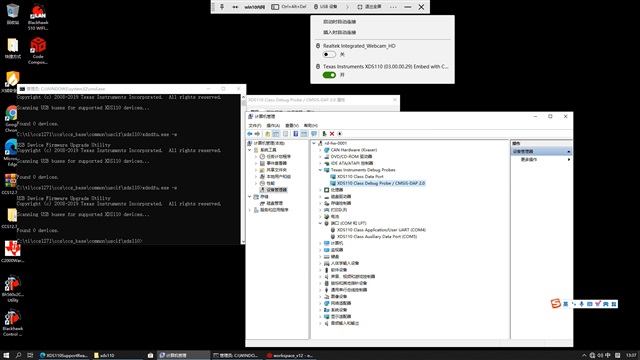
    Problem: The location of the XDS110 driver is not recognized

    Figure 1. Shows that the virtual machine recognizes Texas Instruments XDS110 and that the driver is installed in the device Manager.

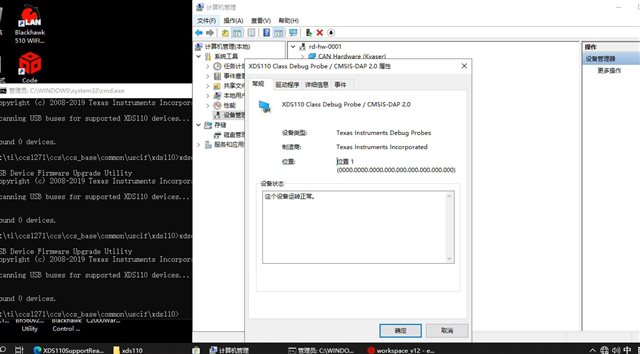
    Figure 2. In the attribute shows the location of the identification information for the whole 000.000.000.000.000.000.000.000.000

    Figure 3 shows the ccxml related configuration, involving parameters related to simulation interface and simulation frequency, etc. After updating parameters, the Test Connection attempt failed, and An error occurred while hard opening the controller was reported.

    Customer requirements: How to identify the XDS110 driver in a virtual machine environment?

  • Background: The current system development environment is VMware VMS.

    Please note that VMs is not an officially supported environment by CCS. 

    However, many people have used VMs with CCS without issue.

    It is odd that Windows Device Manager detects the XDS110 but xdsdfu utility does not. 

    If the customer attaches the launchpad to a native Windows PC (no VM), is it detected correctly?

    Can the VM detect other launchpads?

    Figure 2. In the attribute shows the location of the identification information for the whole 000.000.000.000.000.000.000.000.000

    This is also interesting and looks odd. It like the device is not enumerated properly. What does it look like when the devices are grouped by connection?

  • Hi, Ki,

    If the customer attaches the launchpad to a native Windows PC (no VM), is it detected correctly?

    yes, the launchpad can be detected correctly on native Windows PC.

    Can the VM detect other launchpads?

    We tried 2 launchpads, some issue.

  • Thank you for confirming. I certainly sounds like an issue specific to the VM environment. It seems like the USB XDS110 is not getting properly connected to the VM. 

    The VM looks like Windows 10. What is the host OS?

    And can they provide the screenshot I asked in my previous post where devices are sorted by connection?