This thread has been locked.

If you have a related question, please click the "Ask a related question" button in the top right corner. The newly created question will be automatically linked to this question.

TMS320F28035: TMS320F28035 device not waking up

Part Number: TMS320F28035


Tool/software:

Hello team,

We have sent few ECU's to field and one ECU returned as it is not working. The ECU worked for a month and then stopped working.

It is understood that Microcontroller is not responding.

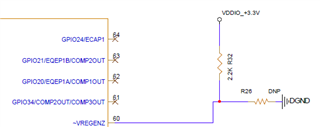
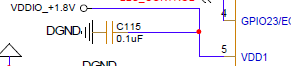
VDDA 3.3V and VDDIO 1.8V are coming properly to microcontroller but XRS pin is low always. Below is the circuit connected to XRS pin

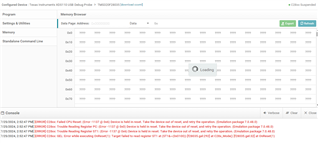
We tried to read the memory and flash from JTAG but it is not happening and giving below errors while trying

We need to understand what causes the XRS pin to go low and support in waking up the device.

Expecting immediate response as it will impact our SOP process.

Thanks & regards,

Madhu P

  • Hi Madhu,

    When the device is powered on, can you see anything happening on XRSN pin? 

    We need to understand what causes the XRS pin to go low and support in waking up the device.

    XRSn pin if pulled up externally by connecting to VDDIO should show up high it is only driven low by device on POR/BOR or by watchdog reset.

    VDDA 3.3V and VDDIO 1.8V are coming properly to microcontroller but XRS pin is low always.

    Did you verify that VDDIO traces on the board look okay and is properly connected ? Also is device operational ?
    Is internal VREG is enabled ?

    Thanks.

  • Hi Prarthan,

    When the device is powered on, can you see anything happening on XRSN pin?

        No. It is latched to 0V always.

    Did you verify that VDDIO traces on the board look okay and is properly connected ? Also is device operational ?
    Is internal VREG is enabled ?

    Yes, 3.3V and 1.8V are coming to controller properly. Checked the voltages near to microcontroller pins. We are using external VREG

    For remaining parts of the ECU, supply going correct but we need the wakeup microcontroller to see their operation

    XRSn pin if pulled up externally by connecting to VDDIO should show up high it is only driven low by device on POR/BOR or by watchdog reset.

    Internal watchdog is disabled. Because of internal watchdog XRS shouldn't be low always right!?. Whenever there is supply reset XRS pin will be high and once it enter the program it will pull down the XRS for few cycles. But, in this case XRS pin is low always.

    Is there any way to bring the XRS pin to high by connecting debugger? not able to erase or flash with debugger (XDS110)

    Regards,

    Madhu P

  • Hi,

    We have replaced the microcontroller, and the ECU is working. And we used the failed microcontroller in other board by replacing the working one and observed similar response on XRS pin which is low always and device not waking up

    Pls let us know what makes this pin to low always as it is not the supply issue.

  • Hi Madhu,


    Please try the following steps : 

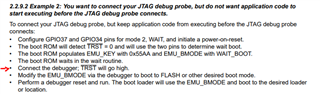
    • Please put the device in 'Wait Boot' mode.
    • Let's double check the target config file, has the correct device(F28035) and emulator XDS110
    • Once this is saved, you should see a button in that same setup window to "Test Connection"  let's run this and see what the results are.
    • Assuming the "Test Connection" successful, as you have the device in Wait Boot mode, if it fails we can debug differently, let me know.
    • At this point we have verified the connection is good.  Let's launch the connection fully by right clicking on the .ccxml and picking "Launch Target Config"
    • This should bring up the target and CPU listing, you'll then want to click on the CPU and pick "connect"
    • Once we are here, we can try to load your project(manually) by going to the Run->Load Program
  • Please put the device in 'Wait Boot' mode.

    To put into boot mode, JTAG connection is enough ? As my GPIO 34 is unconnected and GPIO37 & TRST are connected JTAG interface


    Regards,

    Madhu

  • Madhu,

    Follow steps till the pointer and then you are in wait boot mode.

    Basically set the pins for wait boot mode (mode2) ---> disconnect debugger --> power up the device and bootrom would end up in wait routine.

    Then in wait routine connect debugger and follow from steps below : 

    • Let's double check the target config file, has the correct device(F28035) and emulator XDS110
    • Once this is saved, you should see a button in that same setup window to "Test Connection"  let's run this and see what the results are.
    • Assuming the "Test Connection" successful, as you have the device in Wait Boot mode, if it fails we can debug differently, let me know.
    • At this point we have verified the connection is good.  Let's launch the connection fully by right clicking on the .ccxml and picking "Launch Target Config"
    • This should bring up the target and CPU listing, you'll then want to click on the CPU and pick "connect"
    • Once we are here, we can try to load your project(manually) by going to the Run->Load Program
  • Hi Prarthan,

    Followed the steps. Test Connection is OK but if I'm loading the program, it is giving below error

  • Hi Madhu,

    On XRSn pin check to see if there is a short to ground. We have only seen such issue when its there is a bad component issue, soldering issue or connection issue.

    Do you have a test pin on the board at XRSN pin directly ? Can you remove the device that is not working and check if the test pin on board is pulled up to 3.3 V ?

    And we used the failed microcontroller in other board by replacing the working one and observed similar response on XRS pin which is low always and device not waking up

    It could also be that the device is damaged since its not working on both the boards, can you check if the device is functional ?