This thread has been locked.

If you have a related question, please click the "Ask a related question" button in the top right corner. The newly created question will be automatically linked to this question.

TMS320F28062: How to use flash-api when cpu is secured?

Part Number: TMS320F28062
Other Parts Discussed in Thread: C2000WARE

Tool/software:

Hi,

I am developing a bootloader for f28062 chip.

Unfortunately flash API functions (Erase/Program/Verify) returns code 10 (STATUS_FAIL_CSM_LOCKED) when the cpu is secured.

What I am doing wrong?

Here is my configuration:

  1. "ramfuncs" sector contains ISRs, flash_api_callback
  2.  the functions are copied to RAML0
  3. ".stack" sector is in RAMM0
  4. ".ebss" sector is in RAML1

Regards,
Piotr Romaniuk

  • Hi Piotr,

    Have you secured all of the securable flash and RAM including L0 and L1? Where are you calling the flash API from?

    Thank you,

    Luke

  • Hi Luke,

    I thought that this model of cpu (i.e. f28062) has no security zone configuration.
    Flash and some ram blocks are permanently assigned to the secured zone, aren't they?

    Regards,

    Piotr Romaniuk

  • Hi Piotr,

    F2806 has a Code Security Module (CSM). I am more familiar with DCSM but I can find the answer to any questions you have about CSM.

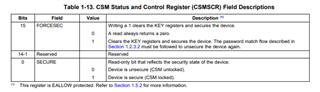
    Are you able to determine if the CSM is locked by reading this register:

    This section describes which memory regions are impacted by CSM when the CSM is locked:

    Is your bootloader running from secure or unsecure memory? If running from unsecure memory, that may prevent the bootloader from modifying secure flash via the flash api.

    Thank you,

    Luke

  • Hi Luke,

    I think my initial post answers your questions:

    Here is my configuration:

    1. "ramfuncs" sector contains ISRs, flash_api_callback
    2.  the functions are copied to RAML0
    3. ".stack" sector is in RAMM0
    4. ".ebss" sector is in RAML1

    (B). I am sure that the cpu is locked, because:

    1. I saw it in CCS debuger: flash memory was reported as zero-filled,
    2. @CCS: when I entered keys and unlocked it I saw true contents of the flash,
    3. Flash API functions reports that it is locked: STATUS_FAIL_CSM_LOCKED,
    4. when I unlock it in my bootloader, by using keys above problem (i.e. B.3) disappears
    Is your bootloader running from secure or unsecure memory?

    The core of bootloader is in FLASHA sector, some functions that cannot be in flash when it is programmed are copied to RAML0 and run from there.

    Regards,

    Piotr Romaniuk

  • Hi Piotr,

    Let me discuss this issue with other DCSM experts on our team and get back to you.

    Thank you,

    Luke

  • Hi Luke,

    8 days passed and there is no solution.

    This is very critical issue for us, production process is blocked, 100 devices cannot be released and sold this week.

    Regards,
    Piotr Romaniuk

  • Hi Piotr,

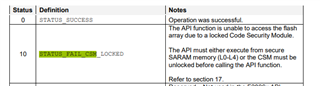
    I was able to obtain the flash api guide for F2806 which included the following description of this error code:

    Can you confirm the flash API has been placed in L0 or L4 RAM? Can you share your linker file?

    I'm assuming you have done this based on your earlier reply:

    1. "ramfuncs" sector contains ISRs, flash_api_callback
    2.  the functions are copied to RAML0

    I can verify your linker file to confirm this. Do you have any other linker files in your project that may be active by mistake?

    I have stressed the importance of this issue to our DCSM experts, I will respond back tomorrow with any other possible root cause for this issue.

    Thank you,

    Luke

  • Hi Luke,

    I have one doubt: should the location where from I call flash API functions be also in SARAM?

    I checked again and I saw that it is not true in my code but was in the TI Flash programming example.

    If there was such a constraint why is it required? What is the rationale?

    Regards,

    Piotr Romaniuk

    PS
    Flash API in this processor is in ROM:

    abs   003ffef3  _Flash2806x_APIVersionHex        
    abs   003ffebd  _Flash2806x_Erase                
    abs   003ffebb  _Flash2806x_Program              
    abs   003ffee7  _Flash2806x_ToggleTest           
    abs   003ffedf  _Flash2806x_Verify

    Linker script (the project folder also contains standard F2806x_Headers_nonBIOS.cmd):

    /*
    // TI File $Revision: /main/3 $
    // Checkin $Date: March 3, 2011   13:45:44 $
    //###########################################################################
    //
    // FILE:    F28062.cmd
    //
    // TITLE:   Linker Command File For F28062 Device
    //
    //###########################################################################
    // $TI Release: $
    // $Release Date: $
    //###########################################################################
    */
    
    /* ======================================================
    // For Code Composer Studio V2.2 and later
    // ---------------------------------------
    // In addition to this memory linker command file,
    // add the header linker command file directly to the project.
    // The header linker command file is required to link the
    // peripheral structures to the proper locations within
    // the memory map.
    //
    // The header linker files are found in <base>\F2806x_headers\cmd
    //
    // For BIOS applications add:      F2806x_Headers_BIOS.cmd
    // For nonBIOS applications add:   F2806x_Headers_nonBIOS.cmd
    ========================================================= */


    /* Define the memory block start/length for the F2806x
       PAGE 0 will be used to organize program sections
       PAGE 1 will be used to organize data sections
    
       Notes:
             Memory blocks on F28062 are uniform (ie same
             physical memory) in both PAGE 0 and PAGE 1.
             That is the same memory region should not be
             defined for both PAGE 0 and PAGE 1.
             Doing so will result in corruption of program
             and/or data.
    
             Contiguous SARAM memory blocks can be combined
             if required to create a larger memory block.
    */
    
    MEMORY
    {
    PAGE 0 :   /* Program Memory */
               /* Memory (RAM/FLASH/OTP) blocks can be moved to PAGE1 for data allocation */
       RAML0       : origin = 0x008000, length = 0x000800     /* on-chip RAM block L0 */   
       OTP         : origin = 0x3D7800, length = 0x000400     /* on-chip OTP */
    
       FLASHB      : origin = 0x3F4000, length = 0x002000     /* on-chip FLASH */
       FLASHA      : origin = 0x3F6000, length = 0x001F80     /* on-chip FLASH */
    
       CSM_RSVD    : origin = 0x3F7F80, length = 0x000076     /* Part of FLASHA.  Program with all 0x0000 when CSM is in use. */
       BEGIN       : origin = 0x3F7FF6, length = 0x000002     /* Part of FLASHA.  Used for "boot to Flash" bootloader mode. */
       CSM_PWL_P0  : origin = 0x3F7FF8, length = 0x000008     /* Part of FLASHA.  CSM password locations in FLASHA */
    
       ROM         : origin = 0x3FF3B0, length = 0x000C10     /* Boot ROM */
       RESET       : origin = 0x3FFFC0, length = 0x000002     /* part of boot ROM  */
       VECTORS     : origin = 0x3FFFC2, length = 0x00003E     /* part of boot ROM  */
    
    PAGE 1 :   /* Data Memory */
               /* Memory (RAM/FLASH/OTP) blocks can be moved to PAGE0 for program allocation */
               /* Registers remain on PAGE1                                                  */
    
       BOOT_RSVD   : origin = 0x000000, length = 0x000050     /* Part of M0, BOOT rom will use this for stack */
       RAMM0       : origin = 0x000050, length = 0x0003B0     /* on-chip RAM block M0 */
    //   RAMM1       : origin = 0x000400, length = 0x000400     /* on-chip RAM block M1 */
       DRAML1      : origin = 0x008800, length = 0x000400     /* on-chip RAM block L1 */
       DRAML2       : origin = 0x008C00, length = 0x005400	/* ram 21k	*/
       //RAML2       : origin = 0x008C00, length = 0x005400	/* ram 21k	*/
       //RAML2       : origin = 0x008C00, length = 0x000400     /* on-chip RAM block L2 */
       //RAML3       : origin = 0x009000, length = 0x001000	  /* on-chip RAM block L3 */
       //RAML4       : origin = 0x00A000, length = 0x002000     /* on-chip RAM block L4 */
       //RAML5       : origin = 0x00C000, length = 0x002000     /* on-chip RAM block L5 */
       USB_RAM     : origin = 0x040000, length = 0x000800     /* USB RAM	- not used	  */
    }
    
    /* Allocate sections to memory blocks.
       Note:
             codestart user defined section in DSP28_CodeStartBranch.asm used to redirect code
                       execution when booting to flash
             ramfuncs  user defined section to store functions that will be copied from Flash into RAM
    */
    
    
    SECTIONS
    {
    
       /* Allocate program areas: */
       .cinit              : > FLASHA,     PAGE = 0
       .pinit              : > FLASHA,     PAGE = 0
       .text               : > FLASHA,     PAGE = 0
       codestart           : > BEGIN,      PAGE = 0
       ramfuncs            : LOAD = FLASHA,
                             RUN = RAML0,
                             LOAD_START(_RamfuncsLoadStart),
                             LOAD_END(_RamfuncsLoadEnd),
                             RUN_START(_RamfuncsRunStart),
                             LOAD_SIZE(_RamfuncsLoadSize),
                             PAGE = 0
    
    /*#ifdef __TI_COMPILER_VERSION - not used 
       #if __TI_COMPILER_VERSION >= 15009000
        //.TI.ramfunc : {} LOAD = FLASHD,
        .TI.ramfunc : {} LOAD = FLASHA,
                             RUN = RAML0,
                             LOAD_START(_RamfuncsLoadStart),
                             LOAD_END(_RamfuncsLoadEnd),
                             RUN_START(_RamfuncsRunStart),
                             PAGE = 0
       #endif
    #endif*/
    
    //keys and reserved area
       csmpasswds          : > CSM_PWL_P0, PAGE = 0
       csm_rsvd            : > CSM_RSVD,   PAGE = 0
    
       /* Allocate uninitalized data sections: */
       .stack              : > RAMM0,      PAGE = 1
       .ebss               : > DRAML1,      PAGE = 1
       .esysmem            : > DRAML1,      PAGE = 1
    
       /* Initalized sections to go in Flash */
       .econst             : > FLASHA,     PAGE = 0
       .switch             : > FLASHA,     PAGE = 0
       
      
       /* .reset is a standard section used by the compiler.  It contains the */
       /* the address of the start of _c_int00 for C Code.   /*
       /* When using the boot ROM this section and the CPU vector */
       /* table is not needed.  Thus the default type is set here to  */
       
       .reset              : > RESET,      PAGE = 0, TYPE = DSECT
       vectors             : > VECTORS,    PAGE = 0, TYPE = DSECT
    
    }
    
    /*
    //===========================================================================
    // End of file.
    //===========================================================================
    */


  • Hi Piotr,

    That may be required since most of the memory is secure anyways. Would you be able to test calling the flash API using code that resides in a secure memory region and see if you get the same issue? I am confirming this with other experts as well.

    Thank you,

    Luke

  • Hi Luke,

    Would you be able to test calling the flash API using code that resides in a secure memory region and see if you get the same issue?

    It is in secure memory now but it is in FLASH not SARAM.

    I will try move it to RAM.

    Regards,

    Piotr Romaniuk

  • Let me know if this resolves the issue.

    Thank you,

    Luke

  • Hi Luke,

    I performed the test.

    I called FlashErase() from RAML0. It failed with return code 10 for secured cpu.

    Regards,

    Piotr Romaniuk

  • Hi Piotr,

    I am attempting to recreate this issue on my side to understand the cause of this issue. Is unlocking the CSM via your bootloader a valid option? Have you always had this issue or did it just start occurring recently?

    Thank you,

    Luke

  • Hi Luke,

    Is unlocking the CSM via your bootloader a valid option?

    No. That's why I am discussing the issue.

    According to Texas Instruments documentation it should work without unlocking.

    Have you always had this issue or did it just start occurring recently?

    I cannot give you any statistics. I just developed the bootloader and noticed that it did not work on locked CPU. 

    I am attempting to recreate this issue on my side to understand the cause of this issue.

    You can start from example in C2000Ware. Be aware that there is a small bug:

    https://e2e.ti.com/support/microcontrollers/c2000-microcontrollers-group/c2000/f/c2000-microcontrollers-forum/1407047/tms320f28062-bug-in-the-flash-programming-example

    If you run it on locked device FlashErase will fail immediatelly.

    Luke, the case is very critical for us, I told you about 100 devices that are postponed because ot the issue, now 500 next is ahead !!!

    Regards,

    Piotr Romaniuk

  • Hi Piotr,

    Apologies for the delayed response, I was out of office on Friday and yesterday for labor day, I understand this is a very critical issue. I've obtained an F2806 launchpad to recreate and understand this issue, working on this now.

    Thank you,

    Luke

  • Hi Piotr,

    Did you perform this test with a debugger connected? When I attempt to single step through the code when the device is secure, I am immediately disconnected from the device. How did you obtain the error code for STATUS_FAIL_CSM_LOCKED?

    Thank you,

    Luke

  • Hi Piotr,

    I've recreated this issue on my side by running in standalone mode and toggling an LED depending on if the flash erase option is successful. I will discuss these results with other DCSM experts to determine the root cause or whether the documentation needs to be updated.

    Thank you,

    Luke

  • Hi Luke,

    You just experienced ECSL protection. You cannot use debugger on secured chip. 

    In my test there was no debugger connected as it was final usecase.

    The initial test was performed on my bootloader - I discovered there the issue. The return code was transmitted over modbus and read on a laptop. Unfortunatelly I cannot share these sources.

    Next, I tried to isolate the problem and provide good point to repeat the issue.

    I checked the flash programming example provided by Texas Instruments but I added LED signaling if FlashErase returned with success or failed.

    I also added infinite loop to be sure that I am only testing Erase function.

    Additional symptom is the time between power on and the return from Erase function, when it erases all sectors it returns after 7-8 seconds. If the error appears the function returns immediatelly.

    I did not sent you none of my modification except obvious bugfix because I wanted that you work on sources that are in c2000Ware and are some reference. At least it should be.

    In my opinion it will be extremely difficult to solve this by testing different options and hypothesis. It must come from CSM architecture inside the chip - basic rules that governs CSM. 

    Regards,

    Piotr Romaniuk

  • Hi Piotr,

    I believe I found the cause of the issue. I noticed you've allocated the Example_CallFlashAPI function to "ramfuncs" but not the Flash_Erase function, which is declared in C2000Ware/libraries/flash_api/f2806x/include/Flash2806x_API_Library.h. You can navigate to this function declaration by hovering over where the function is called in Example_Flash2806x_API.c and doing Ctrl+Click.

    I added the following line to this file which caused my LEDs to indicate the flash erase function was successful:

    #pragma CODE_SECTION(Flash_Erase,"ramfuncs"); //ADDED THIS LINE
    #if FLASH_F2806x
    #define Flash_Erase(a,b)          Flash2806x_Erase(a,b)
    #define Flash_Program(a,b,c,d)    Flash2806x_Program(a,b,c,d)
    #define Flash_Verify(a,b,c,d)     Flash2806x_Verify(a,b,c,d)
    #define Flash_ToggleTest(a,b)     Flash2806x_ToggleTest(a,b)
    #define Flash_DepRecover()        Flash2806x_DepRecover()
    #define Flash_APIVersionHex()     Flash2806x_APIVersionHex()

    Can you try this on your end and let me know if this works for you?

    Thank you,

    Luke

  • Hi Luke,

    The change you describe is not working. Here is why.

    I noticed you've allocated the Example_CallFlashAPI function to "ramfuncs" but not the Flash_Erase

    In this specific cpu the flash API is in the ROM, the library that is attached to project contains only symbols for the linker to properly build the program.
    Flash2806x_Erase is located at 0x3FFEBD that is in ROM.

    the Flash_Erase function, which is declared in C2000Ware/libraries/flash_api/f2806x/include/Flash2806x_API_Library.h.

    #define Flash_Erase(a,b)          Flash2806x_Erase(a,b)

    This is not a declaration, buf macrodefinition for preprocessor. The preprocessor transforms source files as text and knows nothing about C, functions and linking. After the preprocessing source files are compiled, it is possible to see them by adding the option in project settings. You will see no Flash_Erase function in such an intermediate file. This step is not necessery to perform because the compiler confirms that by generating the warning: 

    "[...] Flash2806x_API_Library.h", line 163: warning: specified symbol 'Flash_Erase' undefined
    F

    The final proof is a comparison of .map files for the program with and without your change. They differ only by the build time. 

    Regards,

    Piotr Romaniuk

  • Hi Piotr,

    My mistake, I had accidentally disabled the zone locking when I obtained these test results, when running again with the FORCESEC bit enabled this test fails for me as well.

    I am meeting with other DCSM experts this afternoon to discuss this issue, will provide an update by the end of today.

    Thank you,

    Luke

  • Hi Piotr,

    I believe this is just a matter of copying the flash API from ROM to secure RAM and calling the RAM functions, will try this on my end today.

    Thank you,

    Luke

  • Hi Piotr,

    There is another method that may work which is covered by the example in C:\ti\c2000\C2000Ware_5_03_00_00\libraries\flash_api\f2806x\Example_Flash2806x_API. This loads the flash API into flash and then copies it to RAM. Another customer attempted to copy the API from ROM to RAM but was directed to use this method instead:

    https://e2e.ti.com/support/microcontrollers/c2000-microcontrollers-group/c2000/f/c2000-microcontrollers-forum/170158/how-to-copy-the-f2803x-flash-api-to-ram#pi316717=3&amp;pi316717filter=answers&amp;pi316717scroll=false

    Note you'll have to modify the example to load the flash API to flash instead of using the ROM (uncomment a section in the linker .cmd and change the project properties so that the memcopy from flash to RAM takes place in the main function).

    I'll try to test this on my side before end of today, let me know if this works for you if I'm unable to test.

    Thank you,

    Luke

  • Piotr,

    I tested this on my side and Flash_Erase is working when the CSM is locked. You simply need to change the build configuration of the project to SW_API, no other manual changes needed.

    Here's the main file I used which demonstrates turning an LED on while the flash erase function is operating and setting FORCESEC before the Flash erase operation:

    //###########################################################################
    //
    // FILE:  Example_Flash2806x_API.c	
    //
    // TITLE: F28069 Flash API Example
    //
    // NOTE:  This example runs from Flash.  First program the example
    //        into flash.  The code will then copy the API's to RAM and 
    //        modify the flash. 
    //
    //
    //###########################################################################
    // $TI Release: F2806x Flash API Release V1.00 $
    // $Release Date: MArch 31, 2011 $
    //###########################################################################
    
    
    /*---- Flash API include file -------------------------------------------------*/
    #include "Flash2806x_API_Library.h"
    
    /*---- example include file ---------------------------------------------------*/
    #include "Example_Flash2806x_API.h"
    
    /*---- device support includes ------------------------------------------------*/
    #include "DSP28x_Project.h"
    
    /*---- Standard headers -------------------------------------------------------*/
    #include <stdio.h>                              
    
    /*--- Callback function.  Function specified by defining Flash_CallbackPtr */
    void MyCallbackFunction(void); 
    Uint32 MyCallbackCounter; // Just increment a counter in the callback function
                                  
    /*--- Global variables used to interface to the flash routines */
    FLASH_ST FlashStatus;
    
    /*---------------------------------------------------------------------------
      Data/Program Buffer used for testing the flash API functions
    ---------------------------------------------------------------------------*/
    #define  WORDS_IN_FLASH_BUFFER 0x100               // Programming data buffer, Words
    Uint16  Buffer[WORDS_IN_FLASH_BUFFER];
    
    /*---------------------------------------------------------------------------
      Sector address info
    ---------------------------------------------------------------------------*/
    typedef struct {
         Uint16 *StartAddr;
         Uint16 *EndAddr;
    } SECTOR;
    
    #define OTP_START_ADDR  0x3D7800
    #define OTP_END_ADDR    0x3D7BFF
    
    
    #define FLASH_END_ADDR    0x3F7FFF
    
    
    #define FLASH_F28069   1
    
    #if (FLASH_F28069 || FLASH_F28068 || FLASH_F28067 || FLASH_F28066)
    #define FLASH_START_ADDR  0x3D8000
    SECTOR Sector[8]= {
             (Uint16 *) 0x3D8000,(Uint16 *) 0x3DBFFF,
             (Uint16 *) 0x3DC000,(Uint16 *) 0x3DFFFF,
             (Uint16 *) 0x3E0000,(Uint16 *) 0x3E3FFF,
             (Uint16 *) 0x3E4000,(Uint16 *) 0x3E7FFF,
             (Uint16 *) 0x3E8000,(Uint16 *) 0x3EBFFF,
             (Uint16 *) 0x3EC000,(Uint16 *) 0x3EFFFF,
             (Uint16 *) 0x3F0000,(Uint16 *) 0x3F3FFF,
             (Uint16 *) 0x3F4000,(Uint16 *) 0x3F7FFF,
    };
    
    #elif (FLASH_F28065 || FLASH_F28064 || FLASH_F28063 || FLASH_F28062)
    #define FLASH_START_ADDR  0x3E8000
    SECTOR Sector[8]= {
             (Uint16 *) 0x3E8000,(Uint16 *) 0x3E9FFF,
             (Uint16 *) 0x3EA000,(Uint16 *) 0x3EBFFF,
             (Uint16 *) 0x3EC000,(Uint16 *) 0x3EDFFF,
             (Uint16 *) 0x3EE000,(Uint16 *) 0x3EFFFF,
             (Uint16 *) 0x3F0000,(Uint16 *) 0x3F1FFF,
             (Uint16 *) 0x3F2000,(Uint16 *) 0x3F3FFF,
             (Uint16 *) 0x3F4000,(Uint16 *) 0x3F5FFF,
             (Uint16 *) 0x3F6000,(Uint16 *) 0x3F7FFF,
    };
    #endif
    
    #define Device_cal (void   (*)(void))0x3D7C80
    
    // Dummy variables for header file structure.
    // Without these declarations Flash_CPUScaleFactor and
    // Flash_CallbackPtr will not end up in the correct place.
    //#pragma    DATA_SECTION(EmuKey,"EmuKeyVar");
    //#pragma    DATA_SECTION(EmuBMode,"EmuBModeVar");
    //Uint16     EmuKey;
    //Uint16     EmuBMode;
    
    /* -- Global variable used by the delay function -- */
    //#pragma DATA_SECTION(Flash_CPUScaleFactor, "FlashScalingVar");
    //Uint32 Flash_CPUScaleFactor;
    
    /* -- Callback function pointer -- */
    //#pragma DATA_SECTION(Flash_CallbackPtr, "FlashCallbackVar");
    //void (*Flash_CallbackPtr) (void);
    void
    Gpio_off(void)
    {
        EALLOW;
        GpioCtrlRegs.GPBDIR.bit.GPIO34 = 1;
        GpioDataRegs.GPBSET.bit.GPIO34 = 1;
        EDIS;
    }
    Gpio_on(void)
    {
        EALLOW;
        GpioCtrlRegs.GPBDIR.bit.GPIO34 = 1;
        GpioDataRegs.GPBCLEAR.bit.GPIO34 = 1;
        EDIS;
    }
    void
    delay_loop()
    {
        double i;
        for (i = 0; i < 400000; i++)
        {
    
        }
    }
    
    void main( void )
    {   
    
    
    /*------------------------------------------------------------------
     To use the Flash API, the following steps
     must be followed:
    
          1. Modify Flash2806x_API_Config.h for your targets operating
             conditions.
          2. Include Flash2806x_API_Library.h in the application.
          3. Add the approparite Flash API library to the project.
    
      The user's code is responsible for the following:
    
          4. Initalize the PLL to the proper CPU operating frequency.
          5. If required, copy the flash API functions into on-chip zero waitstate
             RAM.  
          6. Initalize the Flash_CPUScaleFactor variable to SCALE_FACTOR
          7. Initalize the callback function pointer or set it to NULL
          8. Optional: Run the Toggle test to confirm proper frequency configuration
             of the API. 
          9. Optional: Unlock the CSM.
         10. Make sure the PLL is not running in limp mode  
         11. Call the API functions: Flash_Erase(), Flash_Program(), Flash_Verify()
             
      The API functions will:
          
           Disable the watchdog
           Check the device PARTID. 
           Disable interrupts during time critical code.  
           Perform the desired operation and return status
    ------------------------------------------------------------------*/
    
       Uint16 Status;
    /*------------------------------------------------------------------
     Initalize the PLLCR value before calling any of the F2806x Flash API 
     functions.
            
         Check to see if the PLL needs to changed
         PLLCR_VALUE is defined in Example_Flash2806x_API.h
         1) Make sure PLL is not in limp mode
         2) Disable missing clock detect logic
         3) Make the change
         4) Wait for the DSP to switch to the PLL clock
            This wait is performed to ensure that the flash API functions 
            will be executed at the correct frequency.
         5) While waiting, feed the watchdog so it will not reset.
         6) Re-enable the missing clock detect logic 
    ------------------------------------------------------------------*/
       // We must also copy required user interface functions to RAM.
       Example_MemCopy(&RamfuncsLoadStart, &RamfuncsLoadEnd, &RamfuncsRunStart);
    
    // Step 1. Initialize System Control:
    // PLL, WatchDog, enable Peripheral Clocks
    // This example function is found in the DSP2803x_SysCtrl.c file.
       InitSysCtrl();   
    
    /*------------------------------------------------------------------
     Unlock the CSM.
        If the API functions are going to run in unsecured RAM
        then the CSM must be unlocked in order for the flash 
        API functions to access the flash.
       
        If the flash API functions are executed from secure memory 
        (L0-L3) then this step is not required.
    ------------------------------------------------------------------*/
      
       Status = Example_CsmUnlock();
    
       if(Status != STATUS_SUCCESS) 
       {
           Example_Error(Status);
       }
    
    
    /*------------------------------------------------------------------
        Copy API Functions into SARAM
        
        The flash API functions MUST be run out of internal 
        zero-waitstate SARAM memory.  This is required for 
        the algos to execute at the proper CPU frequency.
        If the algos are already in SARAM then this step
        can be skipped.  
        DO NOT run the algos from Flash
        DO NOT run the algos from external memory
    ------------------------------------------------------------------*/
    /******************************************************************/
    // For Piccolo, we dont need to copy the API from Flash as it is 
    // present in BOOT ROM
    /******************************************************************/
    
    
     //   // Copy the Flash API functions to SARAM
    #ifdef SW_API
       Example_MemCopy(&Flash28_API_LoadStart, &Flash28_API_LoadEnd, &Flash28_API_RunStart);
    #endif
    
    
    /*------------------------------------------------------------------
      Initalize Flash_CPUScaleFactor.
    
       Flash_CPUScaleFactor is a 32-bit global variable that the flash
       API functions use to scale software delays. This scale factor 
       must be initalized to SCALE_FACTOR by the user's code prior
       to calling any of the Flash API functions. This initalization
       is VITAL to the proper operation of the flash API functions.  
       
       SCALE_FACTOR is defined in Example_Flash2806x_API.h as   
         #define SCALE_FACTOR  1048576.0L*( (200L/CPU_RATE) )
         
       This value is calculated during the compile based on the CPU 
       rate, in nanoseconds, at which the algorithums will be run.
    ------------------------------------------------------------------*/
       
       EALLOW;
       Flash_CPUScaleFactor = SCALE_FACTOR;
       EDIS;
    
    
    /*------------------------------------------------------------------
      Initalize Flash_CallbackPtr.
    
       Flash_CallbackPtr is a pointer to a function.  The API uses
       this pointer to invoke a callback function during the API operations.
       If this function is not going to be used, set the pointer to NULL
       NULL is defined in <stdio.h>.  
    ------------------------------------------------------------------*/
       
       EALLOW;
       Flash_CallbackPtr = &MyCallbackFunction; 
       EDIS;
       
       MyCallbackCounter = 0; // Increment this counter in the callback function
       
       
       // Jump to SARAM and call the Flash API functions
       Example_CallFlashAPI();
    
    }
    
    /*------------------------------------------------------------------
       Example_CallFlashAPI
    
       This function will interface to the flash API.  
     
       Parameters:  
      
       Return Value:
            
       Notes:  This function will be executed from SARAM
         
    -----------------------------------------------------------------*/
    
    
    #pragma CODE_SECTION(Example_CallFlashAPI,"ramfuncs");
    void Example_CallFlashAPI(void)
    {
       Uint16  i;
       Uint16  Status;
       Uint16  *Flash_ptr;     // Pointer to a location in flash
       Uint32  Length;         // Number of 16-bit values to be programmed
    //   float32 Version;        // Version of the API in floating point
       Uint16  VersionHex;     // Version of the API in decimal encoded hex
    
    /*------------------------------------------------------------------
      Toggle Test
    
      The toggle test is run to verify the frequency configuration of
      the API functions.
      
      The selected pin will toggle at 10kHz (100uS cycle time) if the
      API is configured correctly.
      
      Example_ToggleTest() supports common output pins. Other pins can be used
      by modifying the Example_ToggleTest() function or calling the Flash_ToggleTest()
      function directly.
      
      Select a pin that makes sense for the hardware platform being used.
      
      This test will run forever and not return, thus only run this test
      to confirm frequency configuration and not during normal API use.
    ------------------------------------------------------------------*/
         
       // Example: Toggle GPIO0
       // Example_ToggleTest(0);
       
       // Example: Toggle GPIO10
       // Example_ToggleTest(10);
       
       // Example: Toggle GPIO15
       // Example_ToggleTest(15);   
       
       // Example: Toggle GPIO31
       // Example_ToggleTest(31);   
    
       // Example: Toggle GPIO34
       // Example_ToggleTest(34);   
    
    /*------------------------------------------------------------------
      Check the version of the API
      
      FlashAPIVersionHex() returns the version as a decimal encoded hex.
        
    ------------------------------------------------------------------*/
       VersionHex = Flash_APIVersionHex();
    
       if(VersionHex != 0x0100)
       {
           // Unexpected API version
           // Make a decision based on this info. 
           asm("    ESTOP0");
       }   
    
    /*------------------------------------------------------------------
      Before programming make sure the sectors are Erased. 
    
    ------------------------------------------------------------------*/
    
       // Example: Erase Sector B - Sector C
       // Sectors A has example code so leave them unerased
       
       // SECTORA-SECTORH are defined in Flash2806x_API_Library.h
       EALLOW;
               CsmRegs.CSMSCR.bit.FORCESEC = 1;
               Gpio_on();
           Status = Flash_Erase((SECTORB|SECTORC|SECTORD|SECTORE|SECTORF|SECTORG|
                                 SECTORH),&FlashStatus);
           if(Status != STATUS_SUCCESS)
           {
               Gpio_off();
               delay_loop();
               Gpio_on();
               delay_loop();
               Gpio_off();
               delay_loop();
               Gpio_on();
               delay_loop();
               Example_Error(Status);
           }
           Gpio_off();
       
    
    /*------------------------------------------------------------------
      Program Flash Examples
    
    ------------------------------------------------------------------*/
    
    // A buffer can be supplied to the program function.  Each word is
    // programmed until the whole buffer is programmed or a problem is 
    // found.  If the buffer goes outside of the range of OTP or Flash
    // then nothing is done and an error is returned. 
    
     
        // Example: Program 0x400 values in Flash SectorG
         
        // In this case just fill a buffer with data to program into the flash. 
        for(i=0;i<WORDS_IN_FLASH_BUFFER;i++)
        {
            Buffer[i] = 0x100+i;
        }
        
        Flash_ptr = Sector[1].StartAddr;
        Length = 0x100;
        Status = Flash_Program(Flash_ptr,Buffer,Length,&FlashStatus);
        if(Status != STATUS_SUCCESS) 
        {
            Example_Error(Status);
        }


        // Verify the values programmed.  The Program step itself does a verify
        // as it goes.  This verify is a 2nd verification that can be done.      
        Status = Flash_Verify(Flash_ptr,Buffer,Length,&FlashStatus);
        if(Status != STATUS_SUCCESS) 
        {
            Example_Error(Status);
        }            
    
    // --------------
    
        // Example: Program 0x199 values in Flash SectorG 
    
        for(i=0;i<WORDS_IN_FLASH_BUFFER;i++)
        {
            Buffer[i] = 0x4500+i;
        }
        
        Flash_ptr = (Uint16 *)Sector[1].StartAddr+0x450;
        Length = 0x100;
        Status = Flash_Program(Flash_ptr,Buffer,Length,&FlashStatus);
        if(Status != STATUS_SUCCESS) 
        {
            Example_Error(Status);
        }
        
        // Verify the values programmed.  The Program step itself does a verify
        // as it goes.  This verify is a 2nd verification that can be done.      
        Status = Flash_Verify(Flash_ptr,Buffer,Length,&FlashStatus);
        if(Status != STATUS_SUCCESS) 
        {
            Example_Error(Status);
        } 
    
    
    // --------------
    // You can program a single bit in a memory location and then go back to 
    // program another bit in the same memory location. 
    
       // Example: Program bit 0 in location in Flash SectorF.  
       // That is program the value 0xFFFE
       Flash_ptr = Sector[2].StartAddr;
       i = 0xFFFE;
       Length = 1;
       Status = Flash_Program(Flash_ptr,&i,Length,&FlashStatus);
       if(Status != STATUS_SUCCESS) 
       {
           Example_Error(Status);
       }
    
       // Example: Program bit 1 in the same location. Remember
       // that bit 0 was already programmed so the value will be 0xFFFC
       // (bit 0 and bit 1 will both be 0) 
       
       i = 0xFFFC;
       Length = 1;
       Status = Flash_Program(Flash_ptr,&i,Length,&FlashStatus);
       if(Status != STATUS_SUCCESS) 
       {
           Example_Error(Status);
       }
       
    
        // Verify the value.  This first verify should fail. 
        i = 0xFFFE;    
        Status = Flash_Verify(Flash_ptr,&i,Length,&FlashStatus);
        if(Status != STATUS_FAIL_VERIFY) 
        {
            Example_Error(Status);
        } 
        
        // This is the correct value and will pass.
        i = 0xFFFC;
        Status = Flash_Verify(Flash_ptr,&i,Length,&FlashStatus);
        if(Status != STATUS_SUCCESS) 
        {
            Example_Error(Status);
        } 
    
    // --------------
    // If a bit has already been programmed, it cannot be brought back to a 1 by
    // the program function.  The only way to bring a bit back to a 1 is by erasing
    // the entire sector that the bit belongs to.  This example shows the error
    // that program will return if a bit is specified as a 1 when it has already
    // been programmed to 0.
    
       // Example: Program a single 16-bit value 0x0002, in Flash Sector B
       Flash_ptr = Sector[2].StartAddr+1;
       i = 0x0002;
       Length = 1;
       Status = Flash_Program(Flash_ptr,&i,Length,&FlashStatus);
       if(Status != STATUS_SUCCESS) 
       {
           Example_Error(Status);
       }
    
       // Example: This will return an error!!  Can't program 0x0001
       // because bit 0 in the the location was previously programmed
       // to zero!
       
       i = 0x0001;
       Length = 1;
       Status = Flash_Program(Flash_ptr,&i,Length,&FlashStatus);
       // This should return a STATUS_FAIL_ZERO_BIT_ERROR
       if(Status != STATUS_FAIL_ZERO_BIT_ERROR) 
       {
           Example_Error(Status);
       }
       
    // --------------   
       
       // Example: This will return an error!!  The location specified
       // is outside of the Flash and OTP!
       Flash_ptr = (Uint16 *)0x00340000;
       i = 0x0001;
       Length = 1;
       Status = Flash_Program(Flash_ptr,&i,Length,&FlashStatus);
       // This should return a STATUS_FAIL_ADDR_INVALID error
       if(Status != STATUS_FAIL_ADDR_INVALID) 
       {
           Example_Error(Status);
       }
       
    // --------------   
       
       // Example: This will return an error!!  Can't program 1
       // because bit 0 in the the location was previously programmed
       // to zero!
        for(i=0;i<WORDS_IN_FLASH_BUFFER;i++)
        {
            Buffer[i] = 0xFFFF;
        }
        
        Flash_ptr = Sector[0].EndAddr;
        Length = 13;
        Status = Flash_Program(Flash_ptr,Buffer,Length,&FlashStatus);
        if(Status != STATUS_FAIL_ZERO_BIT_ERROR)//STATUS_FAIL_ADDR_INVALID) 
        {
            Example_Error(Status);
        }   
    
    
    /*------------------------------------------------------------------
      More Erase Sectors Examples - Clean up the sectors we wrote to:
    
    ------------------------------------------------------------------*/
    
       // Example: Erase Sector G
       // SECTORG is defined in Flash2806x_API_Library.h
       Status = Flash_Erase(SECTORG,&FlashStatus);
       if(Status != STATUS_SUCCESS) 
       {
           Example_Error(Status);
       }
       
       // Example: Erase Sector F
       // SECTORF is defined in Flash2806x_API_Library.h
       Status = Flash_Erase((SECTORF),&FlashStatus);
       if(Status != STATUS_SUCCESS) 
       {
           Example_Error(Status);
       }
       
          // Example: Erase Sector D
       // SECTORD is defined in Flash2806x_API_Library.h
       Status = Flash_Erase((SECTORD),&FlashStatus);
       if(Status != STATUS_SUCCESS) 
       {
           Example_Error(Status);
       }
       
          // Example: Erase Sector C
       // SECTORC is defined in Flash2806x_API_Library.h
       Status = Flash_Erase((SECTORC),&FlashStatus);
       if(Status != STATUS_SUCCESS) 
       {
           Example_Error(Status);
       }
       
       
       // Example: This will return an error. No valid sector is specified.
       Status = Flash_Erase(0,&FlashStatus);
       // Should return STATUS_FAIL_NO_SECTOR_SPECIFIED
       if(Status != STATUS_FAIL_NO_SECTOR_SPECIFIED) 
       {
           Example_Error(Status);
       }
    
       Example_Done();
     
    } 
    
    
    /*------------------------------------------------------------------
       Example_CsmUnlock
    
       Unlock the code security module (CSM)
     
       Parameters:
      
       Return Value:
     
                STATUS_SUCCESS         CSM is unlocked
                STATUS_FAIL_UNLOCK     CSM did not unlock
            
       Notes:
         
    -----------------------------------------------------------------*/
    Uint16 Example_CsmUnlock()
    {
        volatile Uint16 temp;
        
        // Load the key registers with the current password
        // These are defined in Example_Flash2806x_CsmKeys.asm
        
        EALLOW;
        CsmRegs.KEY0 = PRG_key0;
        CsmRegs.KEY1 = PRG_key1;
        CsmRegs.KEY2 = PRG_key2;
        CsmRegs.KEY3 = PRG_key3;
        CsmRegs.KEY4 = PRG_key4;
        CsmRegs.KEY5 = PRG_key5;
        CsmRegs.KEY6 = PRG_key6;
        CsmRegs.KEY7 = PRG_key7;   
        EDIS;
    
        // Perform a dummy read of the password locations
        // if they match the key values, the CSM will unlock 
            
        temp = CsmPwl.PSWD0;
        temp = CsmPwl.PSWD1;
        temp = CsmPwl.PSWD2;
        temp = CsmPwl.PSWD3;
        temp = CsmPwl.PSWD4;
        temp = CsmPwl.PSWD5;
        temp = CsmPwl.PSWD6;
        temp = CsmPwl.PSWD7;
    
        // If the CSM unlocked, return succes, otherwise return
        // failure.
        if ( (CsmRegs.CSMSCR.all & 0x0001) == 0) return STATUS_SUCCESS;
        else return STATUS_FAIL_CSM_LOCKED;
        
    }
    
    /*------------------------------------------------------------------
       Example_ToggleTest
      
       This function shows example calls to the ToggleTest.  
    
       This test is used to Toggle a GPIO pin at a known rate and thus 
       confirm the frequency configuration of the API functions.
       
       A pin should be selected based on the hardware being used. 
       
       Return Value: The toggle test does not return.  It will loop 
                     forever and is used only for testing purposes.
            
       Notes:
    ----------------------------------------------------------------*/
    void Example_ToggleTest(Uint16 PinNumber)
    {
           Uint32 mask;
         
           // Before calling the Toggle Test, we must setup
           // the MUX and DIR registers. 
    
           if(PinNumber > (Uint16)47)
           {
               asm("    ESTOP0");  // Stop here. Invalid option.
               for(;;);   
           }
    
           // Pins GPIO32-GPIO47
           else if(PinNumber >= 32) 
           {
               EALLOW;
               mask = ~( ((Uint32)1 << (PinNumber-32)*2) | ((Uint32)1 << (PinNumber-32)*2+1) );
               GpioCtrlRegs.GPBMUX1.all &= mask;
               GpioCtrlRegs.GPBDIR.all = GpioCtrlRegs.GPBDIR.all | ((Uint32)1 << (PinNumber-32) );
               Flash_ToggleTest(&GpioDataRegs.GPBTOGGLE.all, ((Uint32)1 << (PinNumber-32)) );   
               EDIS;
           }
           
           // Pins GPIO16-GPIO31
           else if(PinNumber >= 16)
           {   
               EALLOW;
               mask = ~( ((Uint32)1 << (PinNumber-16)*2) | ((Uint32)1 << (PinNumber-16)*2+1) );
               GpioCtrlRegs.GPAMUX2.all &= mask;
               GpioCtrlRegs.GPADIR.all = GpioCtrlRegs.GPADIR.all | ((Uint32)1 << PinNumber);
               Flash_ToggleTest(&GpioDataRegs.GPATOGGLE.all, ((Uint32)1 << PinNumber) );   
               EDIS;
           }
           
           // Pins GPIO0-GPIO15
           else 
           {
               EALLOW;
               mask = ~( ((Uint32)1 << PinNumber*2) | ((Uint32)1 << PinNumber*2+1 ));
               GpioCtrlRegs.GPAMUX1.all &= mask;
               GpioCtrlRegs.GPADIR.all = GpioCtrlRegs.GPADIR.all | ((Uint32)1 << PinNumber);
               EDIS;
               Flash_ToggleTest(&GpioDataRegs.GPATOGGLE.all, ((Uint32)1 << PinNumber) );   
           }
    
    }
    
    
    /*------------------------------------------------------------------
      Simple memory copy routine to move code out of flash into SARAM
    -----------------------------------------------------------------*/
    
    void Example_MemCopy(Uint16 *SourceAddr, Uint16* SourceEndAddr, Uint16* DestAddr)
    {
        while(SourceAddr < SourceEndAddr)
        { 
           *DestAddr++ = *SourceAddr++;
        }
        return;
    }
    
    
    /*------------------------------------------------------------------
      For this example, if an error is found just stop here
    -----------------------------------------------------------------*/
    #pragma CODE_SECTION(Example_Error,"ramfuncs");
    void Example_Error(Uint16 Status)
    {
    
    //  Error code will be in the AL register. 
        asm("    ESTOP0");
        asm("    SB 0, UNC");
    }
    
    
    /*------------------------------------------------------------------
      For this example, once we are done just stop here
    -----------------------------------------------------------------*/
    #pragma CODE_SECTION(Example_Done,"ramfuncs");
    void Example_Done(void)
    {
    
        asm("    ESTOP0");
        asm("    SB 0, UNC");
    }       
    
    
    /*------------------------------------------------------------------
      Callback function - must be executed from outside flash/OTP
    -----------------------------------------------------------------*/
    #pragma CODE_SECTION(MyCallbackFunction,"ramfuncs");
    void MyCallbackFunction(void)
    {       
        // Toggle pin, service external watchdog etc
        MyCallbackCounter++;
        asm("    NOP");
    }


    Thank you,

    Luke

  • Thank you Luke,

    I used older c2000Ware (i.e. 5-00-00-00) where there is no SW_API build configuration. I just checked in 5-02-00-00 and SW_API is present.

    I will download tomorow the newest one and check it on my site. Looks better.

    Regards,

    Piotr Romaniuk

    PS
    By the way, I also thought about your previous idea, i.e. copying ROM to RAM but it might be not relocable code. That would be non trivial without the sources.

  • Yes it seems we don't have a practical way to copy the flash API from ROM to RAM. Hope the flash to RAM method works for you.