This thread has been locked.

If you have a related question, please click the "Ask a related question" button in the top right corner. The newly created question will be automatically linked to this question.

TMS320F2800156-Q1: Missing project properties.

Part Number: TMS320F2800156-Q1

Tool/software:

Hi,

I am currently working on two projects for F2800156 in Theia 1.5.1.3. 

I have a problem with one of them, I can't see the project's properties. Here you have a snapshot
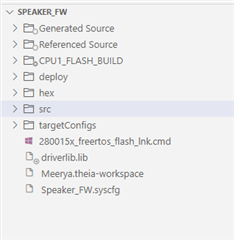
As you can see, the project name with its associated build configuration isn't displayed as in the other project below
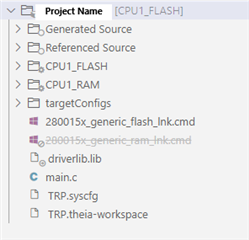
What am I doing wrong? How can I switch to this normal view with the other project?

Regards,

Fernando

  • Hi Fernando,

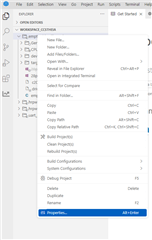
    Can you clarify what you mean by "project properties"? This typically refers to the project properties seen by right-clicking on the project here:

    Do you mean that the project does not show specific output files? Have you already "built" the project to generate that build configuration's files? Or if I am misunderstanding, please correct me. 

    Best Regards,

    Allison

  • Hi Alison,

    In the first project, I couldn't see the Build configuration between brackets, and I wasn’t able to rename it.

    I tried opening the parent folder where the project is located, then reopened the project from that folder, and it worked properly.

    I’m not sure why Theia behaves this way when managing projects—it seems less clear and straightforward compared to how projects were handled in Eclipse.

    Regards,

    Fernando

  • Hi Fernando,

    Are you importing a software example? Or are you creating your own? Can you look at the projectspec file for that CCS project? It should contain the paths to pull in the build configuration files. 

    Best Regards,

    Allison