This thread has been locked.

If you have a related question, please click the "Ask a related question" button in the top right corner. The newly created question will be automatically linked to this question.

TMS320F2800157: CAN FD Boot Mode

Part Number: TMS320F2800157
Other Parts Discussed in Thread: C2000WARE

Tool/software:

I am trying to flash RAM BTLD into my controller using CAN FD Boot Mode.

I configured the boot-mode table and boot-mode pins as shown below and made sure they are written correctly in the OTP as shown

where Z1_GPREG1 shall be as shown in table below
 

Bit Value Comment
31:24 0x5A Key. Indicates vaild register
23:16 0xFF BMSP2 disabled
15:8 0x18 BMSP1 = GPIO24
7:0 0x20 BMSP0 = GPIO32

Z1_GPREG3 shall be as shown in table below

Bit Value Comment
31:24  0x03 Flash Boot Option 0
23:16 0x08 CANFD Boot Option 0
15:8  0x03 Flash Boot Option 0
7:0  0x03 Flash Boot Option 0


 I configured my CANOE setup to communicate with 1MB for Nominal Baudrate and 2MB for Data Baudrate as stated in the reference manual but I get stuff bit error on sending AA 08 to the controller


I also made sure that the pins are set correctly using an oscilloscope.

So my question is:

Is there a specific sampling point for the Baudrates that should be modified as this isn't mentioned in the reference manual?

Please also keep in mind that when booting from flash communication is Ok with my application and everything is working fine in terms of the CAN bus and the connections to my controller.

  • I found that the controller wasn't going to the CAN FD boot mode although the pins are set correctly and I performed a reset also

    GPIO32 is set to 0

    GPIO24 is set to 1

  • Hello Kirollous, 

    I'm going to need a bit more time to look at your question and will provide a response later this afternoon.

    Best,

    Matt 

  • Thank you. I am waiting for your response as this issue is really important to us and blocking the development.

  • Hi Kirollous,

    In the meantime, I can refer you to our CAN flash programming guide, particularly Section 7, if you haven't looked at it already.

    I'll also note that the operational CAN-FD clock range of the PEAK CAN-FD Analyzer is 20MHz to 80MHz. The MCANxBIT clock of the device must match the CAN-FD clock frequency of the PEAK tool in order for frames to transmit. Right now you have it set to 80 MHz. Can you verify this matches the TMS320F2800157? 

    Best,

    Matt

  • Hello Matt,

    As described in the issue description, I am using CANOE setup to send the frames.

    Currently the issue isn't related to the Baud-rate or the clock of the device as I can't even boot in CANFD Mode even though I set the PIN values as expected and configured the OTP.

    I can't verify the clock of the controller as this is in the BootROM provided by TI.

  • In the data sheet the value for BootDef Table for CANFD boot mode for GPIO0 and GPIO1 is 0x28 as follow

    While in the reference manual for TMS320F280015X it's 0x08 so which value is correct

  • Hello,

    Thank you for pointing out that discrepancy, I've made sure this will be updated in the next revision. 

    If it doesn't end up in CAN-FD boot, which boot mode is it going to instead? Please load the symbols in CCS to help debug.

    To load symbols:

    You can step through the device boot ROM by loading the boot ROM symbols (.out file) to the device. This option adds the symbols available in the generated project '.out' file for debugging purposes instead of loading the actual '.out' program onto the core via CCS - this is also why you can use this method with the boot ROM/built in bootloaders to debug and get visibility.

    1. Open CCS to a workspace
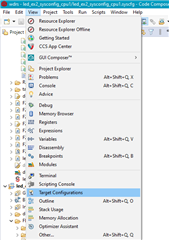
    2. Click 'view' > 'target configurations':
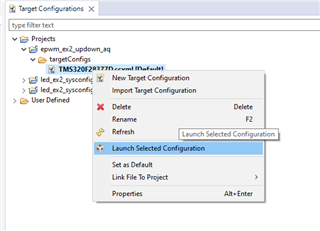
    3. You can import a project for this device to CCS and use that to connect to the device, or copy the raw target config from C2000Ware to the "user defined" target configurations in this window. Either way, find the device target config (example for F28377D below) and launch it:
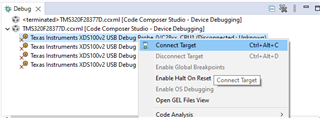
    4. When it brings up the debug window, select the device CPU and connect to the target:
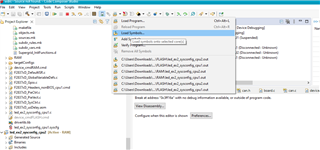
    5. Navigate to the toolbar and click the button to "load symbols"
    6. Load the bootrom .out file. For this device, it should be in 
      1. C:\ti\c2000\C2000Ware_5_02_00_00\libraries\boot_rom\f280013x\revb\rom_sources\ccs_files\cpu\Release
      2. If a window pops up saying it can't find the source file, you can select "Locate File" and find it in C2000Ware
        1. Usually here C:\ti\c2000\C2000Ware_5_02_00_00\libraries\boot_rom\f280013x\revb\rom_sources\F280013x_ROM\bootROM\source
    7. The file should open to show the location of the bootrom you are at, and you can step through/debug

    Best Regards,

    Matt

  • Thanks for your response, I will sebug in the bootrom code and see of this helps.

    But what is the correct value for the CAN FD Bootmode? 

    As the datasheet and the technical reference has conflicting values. 

  • Hello,

    I'm sorry, I should've clarified -- please refer to the technical reference manual's values.

    Best,

    Matt

  • Another question, how would I debug in the bootrom code to find out where it's booting to since this will be considered as an emulation boot mode and I won't be able to boot in CAN FD boot mode then.

  • Hi Kirollous,

    You can configure the emulation boot registers exactly how you programmed the OTP memory for standalone mode (see the technical reference manual's table below). You can find these emulation boot registers in CCS's Memory Browser at address "0xD00". Then, you can debug and step through the Boot ROM code which will show whether you entered the CAN-FD boot functions. 

    Best,
    Matt