This thread has been locked.

If you have a related question, please click the "Ask a related question" button in the top right corner. The newly created question will be automatically linked to this question.

TMDSCNCD28388D: Configuring the CLB Output on an GPIO

Part Number: TMDSCNCD28388D
Other Parts Discussed in Thread: SYSCONFIG

Tool/software:

Hello,

I am new to the Sysconfig tool and have successfully configured my CLB using Sysconfig.

I tested the configuration in the GTK Wave Viewer, and everything worked as expected.

As the next step, I would like to observe the simulated outputs on an oscilloscope through a GPIO pin.

To achieve this, I am using the Sysconfig tool to configure the CLB Output XBar, as shown in the attached screenshot.
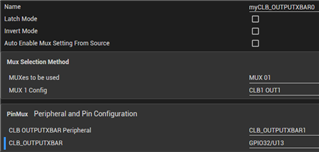
In the CLB, I have set the output of OutLut1 to 1.

Additionally, in the main function, I am calling Board_Init() to initialize the CLB and the CLB_XBAR.

However, when I check pin 85 on the Docking Station, there is no signal.

Is there something else I need to implement manually to get this working?

Any help would be greatly appreciated.

Regards,

Wilko

  • Hi Wilko,

    Did you enable the "Initialize TILE" and "Enable CLB" options in the CLB menu of SysConfig?

    Thank you

    Luke

  • Hi Luke,

    Yes, both options are enabled.

    I discovered that the CLB Output XBars have an invert mode, which I tried, but I'm still not getting any signal on my GPIO.

    I suspect the issue might be in the connection between the CLB Output XBar and the GPIO. Another possible factor could be that I’m working with CPU2—are there any specific considerations I need to keep in mind for that?

    Any insights would be appreciated.

    Regards,

    Wilko

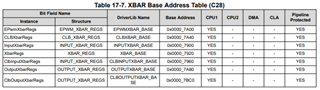
    Found this. Does this mean the CLB-Xbar can only be assigned by CPU1?

  • Hello,

    This expert is currently out of office until 10/21, so please expect a delay in response before then. Thank you for your patience.

    I also wanted to refer you to the CLB Tool User's Guide in the meantime in case it helps: https://www.ti.com/lit/ug/spruir8b/spruir8b.pdf 

    Best Regards,

    Allison

  • Hi,

    I’ve identified the issue: I needed to set the SysConfig context to CPU2.

    Unfortunately, this uncovered a bigger problem—there are no output XBars available in SysConfig when CPU2 is selected.

    Since CPU1 is already handling a heavy workload, I would prefer to use the CLB in conjunction with CPU2.

    Is there any way to route CLB signals to GPIOs from CPU2?

    Edit:

    If possible, we would like to exclude the use of EPWM, as overwritting the EPWM pins causes problems in our pin configuration.

    Regards,

    Wilko

  • Hi Wilko,

    Glad to see the first issue is resolved! I will bring up the second issue for Luke upon his return. Thanks for the continued patience.

    Thanks & Regards,

    Allison

  • Hi Wilko,

    You can configure the Output XBARs using CPU1 and the CLB using CPU2. Is this acceptable?

    Thank you,

    Luke

  • Hi Luke,

    I hope you had a great vacation!

    Just to confirm, if I understand you correctly, I can use two SysConfig files—one for CPU1 and one for CPU2—and then route the CLB output (from CPU2) to a GPIO using the Output XBAR (CPU1)?

    Alternatively, do I need to configure one of the CPUs manually, without SysConfig?

    Additionally, can I use the CLB Output XBAR specifically, or must it be the general Output XBAR?

    If I’m interpreting this correctly, this seems like a solid solution.

    Regards,

    Wilko

  • Hi Wilko,

    Yes you can do all of the XBAR configuration from CPU1 and all of the CLB configuration from CPU2. You should be able to use SysConfig for everything. Bot the Output XBAR and CLB Output XBAR should have access to CLB outputs but CLB output xbar has access to ALL of the CLB outputs which will give you more flexibility.

    Thank you,

    Luke