This thread has been locked.

If you have a related question, please click the "Ask a related question" button in the top right corner. The newly created question will be automatically linked to this question.

TMS320F28388D: Breakpoints jumping different places on the F28388D

Part Number: TMS320F28388D
Other Parts Discussed in Thread: C2000WARE

Tool/software:

Hi , I struggled the debug the program.
I imported the "can_ex3_external_transmit" project from "Resource Explorer".
When i launch the debug (from RAM or FLash) ,sometimes the breakpoint points the different places than i expected.
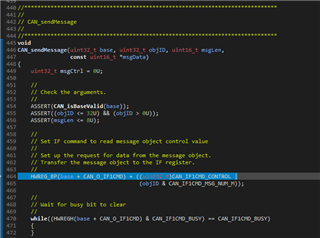
For example when i try to step into the CAN_sendMessage(), it jumps the somewhere in the CAN_setupMessageObject() function.

Board : TMS320F28388D controlCARD
CCS Version : 12.8.1.00005
Compiler Version : TI v22.6.1.LTS
Linker command file : 2838x_RAM_lnk_cpu1.cmd
Debugging Model : Full symbolic debug
Specify DWARF version : 4
Runtime Environment -> Initialization model : Link using autoinitializing model


  • Hi Attila,

    What version of C2000WARE are you using? Do you have any optimizations enabled in the project?

    Best,

    Ryan Ma 

  • Hİ Ryan, 

    I'm using C2000Ware 5.3.0.00, the optimization level is "off" . 

  • Hi Attila,

    Please follow these instructions:

    1. Import the following folder to your CCS workspace. C:\ti\c2000\C2000Ware_5_03_00_00\driverlib\f2838x\driverlib

    and select this folder. Your folder location might be different from mine.

    2. Please Right click on the project, and select "Rebuild Project"

    3. Rebuild your example that you already imported (can_ex3...)

    4. Debug and the breakpoint / code flow should align with what is in the can.c file.

    Hope this helps,

    Ryan Ma

  • Hi Ryan, 

    Your speified file already imported in the project. Clean and Rebuild the project didn't solve my problem. 

    I send you to you my project by DM for further diagnostic the problem.

  • Hi Attila,

    You need to import that project into your CCS workspace and rebuild it. The driverlib.lib needs to be updated.

    Please follow the steps I had outlined in my original response.

    Best,

    Ryan Ma

  • Hi Ryan, 

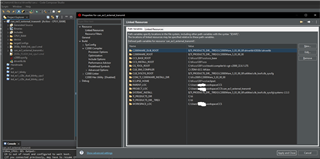
    I put the  C:\ti\c2000\C2000Ware_5_03_00_00\driverlib\f2838x\driverlib path under the Linked Resource and Rebuild it didn't resolve my issue. 

    Can you eleborate some details about importing the related folder? 

  • Hi Attila,

    Please follow these instructions:

    1. Import the following folder to your CCS workspace. C:\ti\c2000\C2000Ware_5_03_00_00\driverlib\f2838x\driverlib

    and select this folder. Your folder location might be different from mine. You need to import the project not through the linked resource but the actual CCS project that holds the driverlib. You can import this project by going to import project and going to the location I specified above. This will add the f2838x_driverlib to your CCS workspace. 

    2. Please Right click on the project, and select "Rebuild Project"

    3. Rebuild your example that you already imported (can_ex3...)

    4. Debug and the breakpoint / code flow should align with what is in the can.c file.

  • Hi Ryan,

    I did everthing what you say,

    also i create empty project and collect everthing manually.

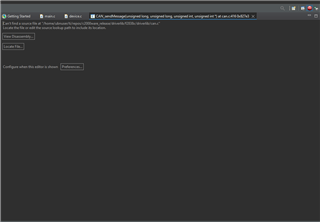
    When i try to debug , it gives this 

    After i point the place "Include Options" with  C:\ti\c2000\C2000Ware_5_03_00_00\driverlib\f2838x\driverlib. 

    And then rebuild the project , Step into the CAN_sendMessage() , the breakpoints jump the within CAN_setupMessageObject() (line 416)

  • Hi Attila,

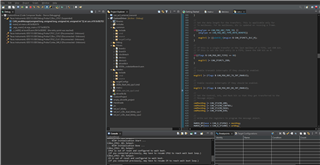
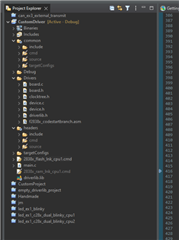
    I can see in your project workspace you have not imported the F2838x driverlib. Please look at my first instructions that I have described.

    You should have this in your project explorer f2838x_driverlib. You can import this folder from the driverlib's source located here for example.

    C:\ti\c2000\C2000Ware_5_03_00_00\driverlib\f2838x\driverlib

    You need to rebuild this project first then you need to rebuild the can_ex3_... project. 

  • Hi Ryan, 

    There is no f2838x_driverlib.lib in my installation. It's name driverlib.lib. 

    I also launch C2000WareUpdater.exe. It says that newest C2000Ware version installed. 

    Can you also share the your f2838x_driverlib.lib to me?  

  • Hi Attila,

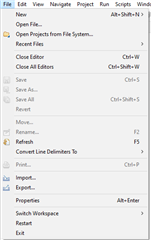
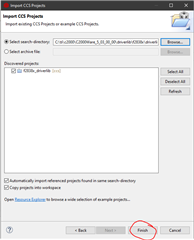
    I have the following screenshots with STEP by STEP procedure on how to update your driverlib.lib.

    1. Go to File -> Import...

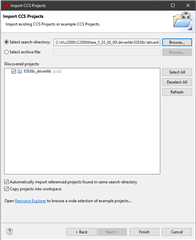
    2. Please Click on CCS Projects

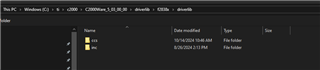
    3. Go to Browse... and go to the path located to your C2000ware's F2838x driverlib source folder.

    C:\ti\c2000\C2000Ware_5_03_00_00\driverlib\f2838x\driverlib

    4. Click on Select Folder

    5. You should see it in here now

    6. Click Finish

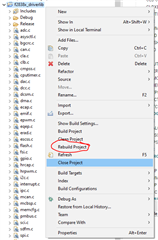
    7. Right click on the project, and rebuild project...

    Best, 

    Ryan Ma