


Other Parts Discussed in Thread: C2000WARE
Tool/software:
Can't flash my LAUNCHXL F28379D on Ubuntu 22.04 LTS. The window saying `GEL Expression: OnReset(0)` hangs forever. It never actually seems to get to the debug session proper (as far as I can tell).
Operating system: Ubuntu 22.04, stock, unmodified fresh install (dedicated virtual machine with 8GB of RAM & 3 CPU cores, running on VirtualBox).
Steps taken:
- Installed full Code Composer Studio 12.8.1.00005 on Ubuntu 22.04
- Installed prerequisite libraries as specified in Linux Host Support page. (software-dl.ti.com/.../ccsv12_linux_host_support.html)
- Manually triggered update via GUI
- Manually called `install_drivers.sh` as specified.
- Reboot.
Create New Project ->
Select a board or device: LAUNCHXL F28379D ->
No RTOS ->
CCS - TI Compiler (MSP, C2000, Arm) ->
C2000Ware
Selected `adc_ex1_soc_software`.
Build process seems to work fine. It's just flashing that fails.
Also went around trying a few others.
- Tests done:
Tried replacing cable. Tried different USB ports, tried flashing from different devices. Tried waiting a long time (in excess of 20 minutes) Confirmed the following:
- Device appears in USB device list (`lsusb`).
- RX light on board flashes when I manually connect with screen to the `/dev/tty` device and type (in VM environment).
- I am able to flash other boards with this setup (e.g., Arduino IDE on various other programmable boards with a USB mini connector)
- There is no option to 'resume' the program.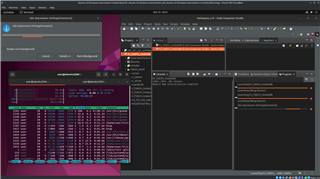
Addendum: I should clarify that I have configured it with a USB 2.0 controller passthrough. I set up a USB device filter so even if the device disappears from the device list, it will automatically re-connect and appear again under the VM.
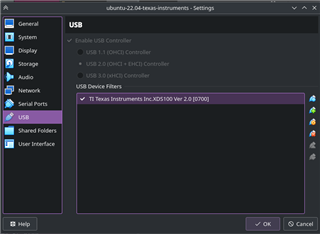
I have tested this setup with other flashing systems (mostly avrdude, probe-rs, etc) and it's been quite reliable, so I doubt that's the problem.
