This thread has been locked.

If you have a related question, please click the "Ask a related question" button in the top right corner. The newly created question will be automatically linked to this question.

TMS320F28335: retrieving the code from the flash

Part Number: TMS320F28335

Tool/software:

Hi experts,

I have a TMS320F28335 card that is already flashed and its up and working. I'd like to retrieve the code from it before I test the card with my custom code so that I can work flash it back with the original binary code. Could you provide any documentation that helps in this regard.

Regards,

Rajesh BN.

  • Rajesh,

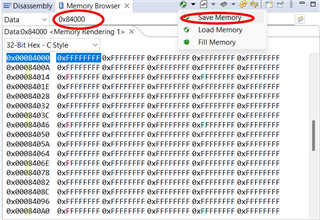
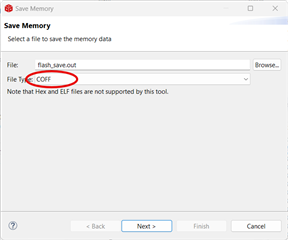
    Inside CCS, if you open a memory browser you can select the start address to display.  There are two icons one does a save the other a load, pick save, use your staring address, then give a length, then it should give you the option to save as .out/coff file.  This can be used to load back later from CCS.

    Best,

    Matthew

  • Mathew,

    you can select the start address to display

    I don't see any option to select the start address after opening the memory browser. Could you please guide me on this.

  • Below screen shots should help you get through the process.  Initial start address in the memory window itself is not as critical as I thought, so that is optional if you just want to see what is there before you go to the next steps.

    1)

    2)

    3)After you add the ranges below, make sure to check the box next to them so they will be saved.  For a flash image I recommends just saving the whole contiguous range as much as possible.

    After all your memory ranges are selected(you can have RAM in here too, but that shouldn't be needed for a flash boot project), the finish button will come active and that should be it.

    Best,
    Matthew

  • Hi Matthew,

    Thanks for the help.

    I have loaded a sample program into the RAM and Yes now I can see the program. I have entered the initial address and the length; and then it flags - failed to write coff

    Regards,

    Rajesh BN.

  • Rajesh,

    Unless the DCSM code security is active, there should not be anything blocking you from the memory save operation.  Have you tried to selectively enable/disable sections of the memory save to see if the issue can be narrowed down to a smaller address range?

    Best,
    Matthew