This thread has been locked.

If you have a related question, please click the "Ask a related question" button in the top right corner. The newly created question will be automatically linked to this question.

LAUNCHXL-F28379D: SCI/UART isn't functioning

Part Number: LAUNCHXL-F28379D

Tool/software:

Hi,

The SCI port refuses to communicate with laptop, using the echoback example in C2000 ware. As shown in the Putty terminal, the PC didn't receive anything.

The serial port on PC is properly configured using FT-Prog.

To debug, I create a new code with Scib and probe the Tx (GPIO 18) with oscilloscope. There's no signal on the oscilloscope.

Thanks,

Xinyu

  • Hi Xinyu,

    Which build configuration are you using in the example? Please be sure you are using the LaunchPad build configuration otherwise the SCI pin configuration may not be correct in the code. 

    Regards,

    Peter

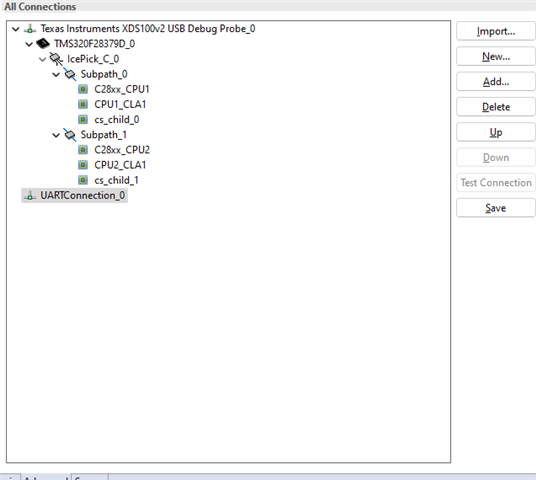
  • Thanks, Peter. In this example, I can only choose the device. I also attached the result of the "Test connection" function, as shown in the second figure. I am also not able to add UART communication in the alternate communication panel. 

    Fig.1 Target Config Panel

    Fig.2 UART connection test result: "Diagnostic command is not defined"

    Fig.3 Current Port Connections

  • Hi Xinyu,

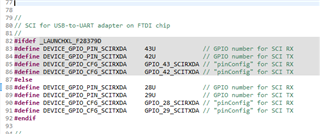
    This connection test is primarily for debugging JTAG connection and as such would not help a lot with the SCI connection debugging. Can you show how the GPIO pins are configured for the SCI example?  If you are using the SCI echoback example without modification, on the LAUNCHXL-F28379D, then you will need to add the variable "_LAUNCHXL_F28379D" to the predefined variables.

    Right-click project > properties > Build > C2000 Compiler > Predefined Symbols

    Then you can add the variable through here.

    Keep in mind that GPIO28 and GPIO29 are the only pins that go through the UART-to-USB bridge on the LaunchPad so those are the pins which must be configured to test SCI communication

    Regards,

    Peter

  • See above for the pins required for the SCI communication. This can be found in the device.h file in the device folder

  • Thanks Peter! Now I get the communication to work for example 3.

    To summarize, the example 3 sets the SCI through GPIO 28 and 29. In the Launch Pad, only GPIO 42 and 43 are configured for SCI communication (also make sure to use the proper header file). To solve the issue, go to: properties > Build > C2000 Compiler > Predefined Symbols and add "_LAUNCHXL_F28379D".