This thread has been locked.

If you have a related question, please click the "Ask a related question" button in the top right corner. The newly created question will be automatically linked to this question.

TMS320F280039C: Bin file creation issue

Part Number: TMS320F280039C

Tool/software:

Dear Team,

I am currently using the microcontroller TMS320F280039C.

We are facing an issue during the generation of bin file. When we load the .out file, the code is successfully flashed into the microcontroller and work as expected. However we are facing an issue during the creation of bin file and we suspect there may be any issue with our bin file generation.

1) Could you please tell us the procedure of bin file creation?
2) How to create .bin file from .out file in CCS through post build steps?

Thanks and Regards,

Manasa P

  • Please see this forum post, and the rest of the associated thread.

    Thanks and regards,

    -George

  • Hi

    The above link page is not responding. We have gone through some pages with similar content and tried but none of them worked for us.
    However we used post-build step as : “${CCS_INSTALL_ROOT}/utils/tiobj2bin/tiobj2bin” “${BuildArtifactFileName}” “${BuildArtifactFileBaseName}.bin” “${CG_TOOL_ROOT}/bin/armofd” “${CG_TOOL_ROOT}/bin/armhex” “${CCS_INSTALL_ROOT}/utils/tiobj2bin/mkhex4bin”

    We are using ccs latest version: 12.8.0
    Could you please help us here.

    Regards,
    Manasa

  • The above link page is not responding.

    The above link is a private one. I have posted below the relevant information:

    The --binary option of the hex utility does not produce the desired binary file.  Because it ignores gaps that naturally occur between sections.  Which raises the question: What should be done instead?  The answer is to use the method described in this forum post.  Ignore the first paragraph, which describes the situation which causes this post to be written.  That situation is different from yours.  But the workaround described in this post also applies to you.  

    Since you build from CCS, also read the article Hex utility in CCS.  Since you need to add a hex utility command file, focus on the part titled Passing a Hex Command File.

  • Hi,

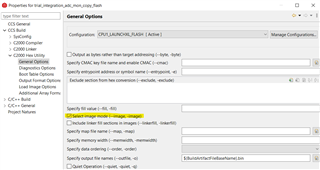
    We went through this forum post as mentioned. Here, the following workaround is given "Use the hex utility hex2000 to create the binary file.  To do that, image mode must be used, which means a ROMS directive must be supplied in a command file.  This ROMS directive tells hex2000 the range of memory from the executable .out file (created by the linker) to convert to binary."


    We referred the document  TMS320C28x Assembly Language Tools v22.6.0.LTS User's Guide (Rev. Z)

    In build settings, under c2000 hex utility, we selected image mode as shown below.


    Then we added the ROMS directive command in linker command file after changing the origin and length as per our requirement.

    ROMS {
                all_mem: o = 0x00100000, l = 0x007fff80
    }

    On building the project, we are getting the following error: 
    "#10008-D cannot find file "ROMS""

    Where should the ROMS directive be added? Are there any other settings to be done?

    Also, is the post-build step “${CCS_INSTALL_ROOT}/utils/tiobj2bin/tiobj2bin” “${BuildArtifactFileName}” “${BuildArtifactFileBaseName}.bin” “${CG_TOOL_ROOT}/bin/armofd” “${CG_TOOL_ROOT}/bin/armhex” “${CCS_INSTALL_ROOT}/utils/tiobj2bin/mkhex4bin” proper?

    Can you please help us out here?

  • Then we added the ROMS directive command in linker command file

    That is not where the ROMS directive should be written.  Write it in a different text file.  This file is supplied as an input to the hex utility hex2000.  To understand how to do this in a CCS project, please see the last part of the article Hex utility in CCS.

    Thanks and regards,

    -George