This thread has been locked.

If you have a related question, please click the "Ask a related question" button in the top right corner. The newly created question will be automatically linked to this question.

TMS320F28379D: How to set SCI-Boot1 as default boot mode

Part Number: TMS320F28379D
Other Parts Discussed in Thread: UNIFLASH

Tool/software:

We have been using below GPIO's for SCI on our board, so want to use these pins as default for flashing the application firmware using bootloader.

SCIRXDA: GPIO28
SCITXDA: GPIO29

Thanks,

Sachin K

  • What I know is that the default boot pins are GPIO72 and GPIO84 to switch from FLASH boot and SCI-A boot.

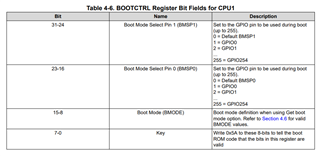
    If you want to use different boot selection pins you have to program the OTP BOOTCTRL located at 0x7801E.

    This program can be dono only once time.

    See figure 4-6 page 614 in the Technical Reference Manual SPRUHM8I

    Regards

  • Hi Sachin,

    The above answer is correct. If you want to use GPIO28/GPIO29 for SCITXDA/SCIRXDA, you want to use BMODE 0x81. 

    You can configure the boot mode select pins (BMSP) and boot mode definition to use SCI-Boot1 with the 'Get' boot mode option. You just have to make sure that both BMSPs you choose to use are both 1 to read the OTP boot mode values. Figure 4-6 outlines the standalone boot flow for this. 

    BOOTCTRL = 0xXXXX815A, where 'XXXX' configures BMSP1 and BMSP0 respectively.

    I highly recommend that you test your configuration using the emulation BOOTCTRL register before attempting to program the DCSM OTP, as it will allow you to debug while the OTP can only be programmed once.

    Please let me know if you have any further questions that I can assist you with.

    Best,

    Matt

  • How to set the  BOOTCTRL registers BMODE bit field values to 0x81 for using  SCIRXDA: GPIO28
    SCITXDA: GPIO29

  • now could set BOOTCTRL register from UNIFLASH and downloaded the application firmware using PC side command line utility. After this for normal application start what should be the BMSPs position.

  • Hi Sachin,

    The expert is out of office until tomorrow, please expect a delay in response.

    Thank you,

    Luke