This thread has been locked.

If you have a related question, please click the "Ask a related question" button in the top right corner. The newly created question will be automatically linked to this question.

LAUNCHXL-F280025C: Adding SysConfig to Examples

Part Number: LAUNCHXL-F280025C
Other Parts Discussed in Thread: SYSCONFIG, C2000WARE, MSPM0L1306

Tool/software:

I created a new sample code.

But I need the function of sysconfig.

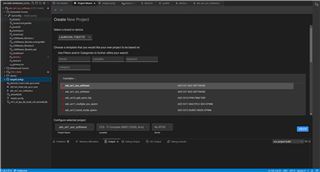
I navigate to project => System Configurations => create New.

Enter the appropriate information.

I get a file named empty.syscfg under the path of adc_ex1_soc_epwm.

Enter the MCU information in Properties => Build => Tools => SysConfig => Basic Options.

I add a new GPIO for testing.

After Build Finished,There are no files in adc_ex1_soc_epwm => Generated Source => SysConfig. EX: board.c

I still can't use the GPIO I just created.

What did I do wrong?


  • Hi Jiang,

    Can you try to open the second example, "adc_ex1_soc_software", which is a syscfg based example.

    Please import this example and try from your side and check if the generated source file is updated.

    Thanks

    Aswin

  • Yes, the generated source file  for this example has been updated.

    But this example is not what I need.

    I think I made a mistake somewhere when adding SysConfig function to the project.

  • HI Jiang,

    Can you also import "adc_ex2_soc_epwm", which should be shown some place below when you scroll and see if this was the example that you were looking?

    Thanks

    Aswin

  • Dear Aswin

    I am an FW engineer with more than ten years of experience.

    But this is my first time using TI IDE and its peripheral functions.

    I want to learn to use TI as proficient as ST or Micrichip.

    I think C2000 SysConfig  is like STM32CubeMX and MPLAB Code Configurator.

    I can use  TI SysConfig funtions to create the basic code I need to save development time.

    For the ultimate goal, I need to use TMS320F28377SPTPS for development LCD.

    Because TMS320F28377SPTPS has almost no examples to refer to, I need to use common development boards to learn the TI system and apply it to TMS320F28377SPTPS .

    It doesn't matter which example I'm looking for.

    How should I use the TI SysConfig is the key point.

    I need to know how to add SysConfig function to my project or how should I create a project with SysConfig function.

    Thanks for your help.

  • Hi Jiang,

    Here are few documents for your easy ramp up on SysConfig - 

    C2000 SysConfig — C2000Tm Software Guide

    C2000 SysConfig

    I was trying out your scenario and came across few issues in the SysConfig tool. I am checking with our tools experts on this.

    I will get back once i have a solution.

    Thanks

    Aswin

  • Hello Jiang, 

    Please see this forum thread with a workaround for this issue: 

    CCSTUDIO: CCS Thiea how to add SysConfig to a project - Processors - INTERNAL forum - Processors - INTERNAL - TI E2E support forums

    Here is the ticket id that was filed for this issue: [EXT_EP-11797] Creating an empty.syscfg file in CCS theia does not preserve settings - Software Issue Report (SIR)

    The bug is targeted to be resolved in CCS 20.1.0, which is scheduled for end of February 2025

    Martin

  • Hi Aswin

    Thanks for your help.

    I will spend some more time reading these documents.

    I have only read the following websites

    software-dl.ti.com/.../ccs_project-management2.html

    and

    https://dev.ti.com/tirex/explore/node?node=A__ATM27HJ4cRGWfNC6yXl.hg__C28X-ACADEMY-CN__hMpsP7d__LATEST

    Because of your previous reply.I started trying to build SysConfig using more different sample projects.

    In this example project, SysConfig can be built successfully without the above problems, but other problems occur at the same time.

    Device.c has a issue : "SYSCTL_EMIF1CLK_DIV_SYSCTL_EMIF1CLK_DIV_1" is undefined.

    I found the correct define name is "SYSCTL_EPWMCLK_DIV_1" in sysctl.h.

    This issue has been discussed on

    https://e2echina.ti.com/support/microcontrollers/c2000/f/c2000-microcontrollers-forum/950160/tms320f28377d-sysconfig-project?tisearch=e2e-sitesearch&keymatch=Sysconfig#

    and

    https://e2e.ti.com/support/microcontrollers/c2000-microcontrollers-group/c2000/f/c2000-microcontrollers-forum/1407444/tms320f28388d-faulty-code-generation-in-device-h/5397411?tisearch=e2e-sitesearch&keymatch=SysCtl_setEMIF1ClockDivider#5397411

    My C2000Ware version is 5.4.0.00.

    Maybe there is no problem using C2000Ware version 5.0.3.00.

  • Hello MartinS

    Link URL display "Page Not Found".

    Are there other ways to add SysConfig function to the project?

  • Hi Aswin

    Sorry,I found that the screenshot location is incorrect.

    That correct.

  • Hi Jiang,

    We have identified this as a bug in F28377 devices, did you face this issue in any other device?

    You need to update the .meta folder with the below change (right side has the correct code). We shall add this fix in the next release.

    Thanks

    Aswin

  • My apologies about bad link, I pasted workaround information below. You would need to adjust projects/device to match your desired device. 

    ----------------------------

    The exact steps that I took : 

    I followed steps to get to empty.syscfg being present in desired project. 

    I then imported a second project that is pre-configured for SysConfig (i used bq769x2_control_i2c_LP_MSPM0L1306_nortos_ticlang for the same device), I right clicked on bq769x2_control_i2c.syscfg file and selected Open with->Code Editor (this opens .syscfg file in a text editor rather than SysConfig editor). 

    I then selected and copied first 6 lines or the file that contain comments and -cliargs. 

    I then opened empty.syscfg in out of box project with code editor as well and pasted the copied text from other file. I saved it. 

    I can now double click empty.syscfg to open sysconfig and add modules which are correctly saved. 

  • I currently only test these two MCUs, F280025C and F28377, because I only have these two models of MCUs.

    F280025C: "adc_ex1_soc_epwm", which is not a syscfg based example.Until now, it has not been solved that the SysConfig function cannot be built.

    F28377:All example project, SysConfig can be built successfully.These projects seem to be a syscfg based example.

    Although Device.c problems may occur in C2000Ware version 5.4.0.0 , version 5.3.0.0 has been tested without any errors.

    Now I switch back to the version 5.4.0.0 to test your answer.But suddenly no error occurred.

    I compared the previous screenshots with the Device.c generated by the new version.The result shows that the contents of the two Device.c are not the same.I don't know what happened.And I can't go back to the screenshot Device.c .Maybe it has something to do with installing C2000Ware 5.3.0.0.

    But I made sure I changed the version settings.

  • After I tested the same method, an error occurred.

    I created the project with "LAUNCHXL F280025C" "adc_ex1_soc_epwm" , which is not a syscfg based example.

    And followed steps to get to empty.syscfg.

    I created another project with "LAUNCHXL F280025C" "adc_ex2_soc_epwm" , which is a syscfg based example.

    According to your method,copy adc_ex2_soc_epwm.syscfg in  text editor.

    And pasted the copied text to empty.syscfg.

  • Hi Jiang, 

    Instructions I provided do not quite work as syscfg file is from an older version of SysConfig. 

    After importing both projects, double click on syscfg file in adc_ex2_soc_epwm project. This should open SysConfig editor, you will be asked to confirm device/package choices. Click Confirm and then save the syscfg file. Then please close the file. 

    Now when you open the syscfg file with a text editor, you should see new comments added to syscfg file on rows 1-7. This the content that we need for ex1 example project. 

    Now we should have a SysConfig file in ex1 project that can be modified and saved. Unfortunately, in order for project to be buildable there are additional changes needed. 

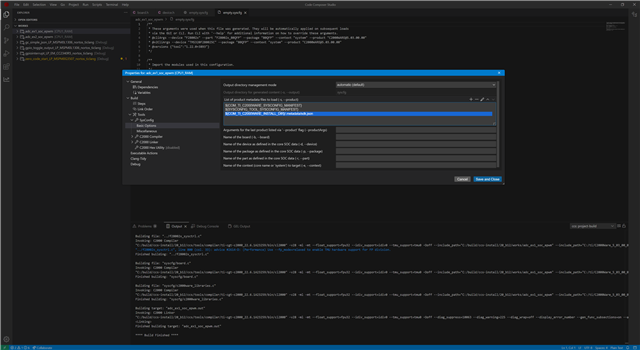
    I have added "${COM_TI_C2000WARE_INSTALL_DIR}/.metadata/sdk.json" to project settings under SysConfig (see first picture). 

    I also needed to add additional include search paths "${COM_TI_C2000WARE_INSTALL_DIR}/driverlib/f28002x/driverlib/" to allow compiler to find some header files. (second picture)

    Both of these exist in ex2 project (path variable names are slightly different, but they resolve to the same thing). 

  • Hi MartinS

    I followed your approach until an exception occurred at the step of adding .json.

    My ex2 project path variable names are different.

    When I copy this path to ex1 using.This error occurs.

    I also didn't find the "driverlib" path in ex2.

    When I copy your path both to ex1.No error occurred.

    But when I try to create new GPIO,board.c did not follow the change.

    empty.syscfg's TEXT files are still only rows 1-7.

  • Hi Jiang, 

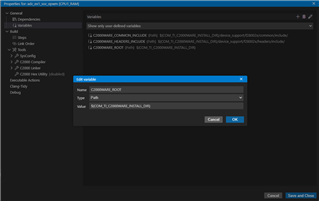
    You are getting an error because you copied .json setting from ex2 project rather than what I mentioned in my previous post. ex2 project creates a few project local variables that are then used in syconfig build tool and compiler/linker settings. These project specific variables do not exist in ex1 project. You can take a look in project properties under "General | Variables" in ex2 project what they are. Most of them use COM_TI_C2000WARE_INSTALL_DIR as the starting portion of the path. 

    driverlib path in ex2 project is defined by ${C2000WARE_DLIB_ROOT}, as above check in same place what it resolves to. 

    I used main SDK variable that is system defined (COM_TI_C2000WARE_INSTALL_DIR) to avoid the need to create these additional project specific variables. 

    Once you adjust these settings (you can use my settings from previous post OR duplicate project local variable definitions to match ex2 variable specification), please let me know if adding configuration to sysconfig does not work. 

    Martin

  • Hi MartinS

    I follow your step and suggestion. 

    I copy all path of ex2 in  "General | Variables" and "Build | Tool | Compiler | Include Options"

    SysConfig does not work.

    I tried to copy all path of ex2 in "Build | Tool | Compiler | Predefined Symbols" and "Build | Tool | Linker | File Search Path"

    SysConfig still not work.(Try to create new GPIO,board.c did not follow the change. empty.syscfg's TEXT files are still only rows 1-7.)

    But,When I rename "empty.syscfg" to "adc_ex2_soc_epwm.syscfg" what like ex2.

    SysConfig is work!!

    Maybe some of the previous steps can be skipped, but the prerequisite is that you must rename first. I have to spend some more time trying it.

  • Thank you for confirming the workaround and providing the additional details.

  • Test results show:

    If you need SysConfig function.

    You can navigate to Project => System Configurations => Create New. To create a new Syscfg file.

    Open Syscfg file by left click. To setting MCU information.

    Navigate to Project => Properties => Build => Tools => SysConfig => Basic Options. 

    Add json file to Project.

    Navigate to Project => Properties => Build => Tools => C2000 Compiler => Include Options.

    Add include file search path with "C2000WARE_DLIB_ROOT".


    Final,Navigate to Project => Properties => General => Variables. 

    Add defined variables path which used in the previous two steps.

    SysConfig is already working.

    But

    When I try to use the subroutine in board.c which generated by SysConfig.

    An error occurred.

    I've been trying to troubleshoot this issue all day.

    I tried adding possible file paths to "General | Variables" , "Tools | C2000 Compiler" and "Tools | C2000 Linker".

    Still can't solve this problem.

  • Hi Jiang, 

    The error seems to indicate that there is some symbol referenced in code that can't be resolved. I am not sure what other changes were made to the project. I have no issues with adding two GPIOs, naming them similarly to what you have and building project. However, I have not done any other changes. I am using CCS 20.0.0 , C2000Ware 5.30 and SysConfig 1.22 (which is bundled with CCS 20). 

    If it helps, below is the project that I have been using.  You only have a single project that is the same name in a workspace folder. Thus I would recommend, that you keep your project as you have it, then choose File->Open Folder and pick a new workspace folder directory, then import attached project and see if you still get a build error. If it works, as it does for me, then you could probably use file comparison tools on directories to figure out what differences might be. 

    Note: I still have empty.syscfg in my project, I did not have to name it the same as the project. 

    0777.adc_ex1_soc_epwm.zip

  • Hi MartinS

    Your attached project has many different with me.

    After reviewing your project content.

    There are no "board.c" or "board.h" in your Generated Source and CPU1_RAM paths.

    So that even "board.h" can't include.

    I tested that your SysConfig can actually change, but it does not produce file which like "board.c" to project directory.

    I don't know what you missed compared to the steps I mentioned above that caused this phenomenon.

    Besides,I follow your instructions to pick a new workspace folder directory and import attached project.

    The interface looks noticeably different.And no project folder was found under the new directory.

    It seems to be an operational error.

    I try to upload my project file to you:

    0247.adc_ex1_soc_epwm.zip


    At present,

    I can successfully create SysConfig and enable.

    But I can't use which SysConfig generated Contents.

  • Is  or  or  still here?

    No one can help me with this problem?

  • Hi Jiang, 

    I took a look at your project and I can't figure out why it is not working. I made a number of adjustments and changes to make it as close to my example that works and it still does not work. The main issue appears to be that driverlib is not getting added during linking build step. 

    THe only suggestion that I have is to try importing fresh project from scratch and perform the same steps that I mentioned above (i.e. do not try to duplicate setup from ex2 project. Once you have basic build with sysconfig working, then start making modifications. 

    Also, I used 5.03 C2000ware as it seems like there is an issue with 5.04 (Mentioned above). 

    martin

  • Hi MartinS

    I tried the way you mentioned once whitch from Jan 8,and used version 5.03.

    Still got the same error with "Build-variable 'C2000WARE_ROOT' cannot be resolved. This project may not build as expected."

    I try to add "C2000WARE_ROOT" path (${COM_TI_C2000WARE_INSTALL_DIR}) at Gemeral>>Variables.

    The error was successfully eliminated.

    but,When I try to add GPIO with SysConfig.

    Still got the another error.

  • Still got the same error with "Build-variable 'C2000WARE_ROOT' cannot be resolved. This project may not build as expected."

    This is a known issue that was fixed in CCS 20.0.2:

    https://sir.ext.ti.com/jira/browse/EXT_EP-12146

  • I update the CCS to 20.0.2.5

    Still got the same error.