This thread has been locked.

If you have a related question, please click the "Ask a related question" button in the top right corner. The newly created question will be automatically linked to this question.

TMS320F28388D: EtherCAT switching between Input (Port 0) and Output (Port 1) and vice versa.

Part Number: TMS320F28388D
Other Parts Discussed in Thread: C2000WARE, DP83822I

Tool/software:

Hi,

  I am experiencing unusual behavior with EtherCAT on our custom hardware with 388D.  

  1. After hardware power-up, EtherCAT is running on CM core.
  2. Let say, RJ45 CAT cable is connected to EtherCAT Port 0 (Input)
  3. Using EEPROM Programmer, when you try to scan for EtherCAT node, slave is not found.  NOTE: Repeating the scan multiple times, result is same “No EtherCAT slave found”
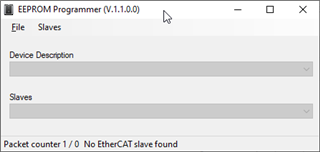
        4.Now I remove RJ45 CAT cable from EtherCAT Port 0 and connect CAT cable to EtherCAT Port 1 (which is Output), and scan for EtherCAT node.

        5. EtherCAT slave found on Port 1 (which is output) 
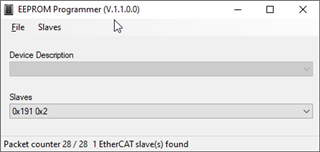
 Visa versa, When I repeat the above steps 2 with CAT cable initially connect to Port 1, then EtherCAT slave will be detected on Port 0.

Same behavior is observed with TwinCAT, when scan for node does not work first time and then when you switch Port, TwinCAT detect the node.

 It looks like very first time, when you scan, 388D EtherCAT switch Input and Output ports.

How can I force EtherCAT to make Port 0 as always Input and EtherCAT Port 1 as output?

 Thanks

  • Hi,

    What C2000WARE example code are you using? Please try the 'f2838x_cpu1_allocate_ecat_to_cm' and 'f2838x_cm_echoback_solution' solutions when trying to program the EEPROM. You can even try 'f2838x_cpu1_echoback_solution' just to program the EEPROM the first time.

    Follow specific instructions in 'EtherCAT_Slave_Controller_User_Guide.pdf'

    C:\ti\c2000\C2000Ware_5_04_00_00\libraries\communications\Ethercat\f2838x\docs

    Best,

    Kevin

  •  

    Hi Kevin,


    Thanks for your help.  Issue has been resolved.  

    Issue: EtherCAT port switch was happening due to Link issue.

    1. Connect RJ45 CAT cable to EtherCAT IN Port 0
    2. Using TwinCAT scan for ECAT Node.
    3. TwinCAT scan reported error “OPLNK:MIS A” which meant link on port A (port 0) is missing.


    Fix:

    On custom HW, Phy DP83822I pin 17 (LED_0) was not connected properly to 388D GPIO pin 148 (for ECAT Port 0) and 149 (ECAT Port 1) ECAT LINKSTATUS. Fixing the LINKSTATUS resolves the issue.


    Thanks

    JP