This thread has been locked.

If you have a related question, please click the "Ask a related question" button in the top right corner. The newly created question will be automatically linked to this question.

TMS320F28388D: Reference CAN based Bootloader for F28388D further query

Part Number: TMS320F28388D
Other Parts Discussed in Thread: C2000WARE, TMDSHSECDOCK

Tool/software:

Hi,

In reference to the above topic,

I referred the CAN flashing Application notes. In that, there is a method to flash the application of CPU2, by clubbing the executables into a single file. 

Will this approach work for F2838x? I ask this because I see that C28P65x and F2838x have different Flash access controls in terms of Hardware. Would it be possible to Flash locations accessible to CPU2, using CPU1 in F2838x?

Thanks,

Regards,

Raghuram

  • Hi Raghuram,

    Unfortunately the IPC mechanism is different on F2838x so that method isn't feasible. I'll also note that there's no CAN flash kernel examples provided in C200Ware for F2838x devices, but there is an CPU1-CPU2 SCI kernel. 

    Best,

    Matt

  • Hi Matt,

    I am using TMDSHSECDOCK and TMDSCNCD28388D. I have modified the SCI kernel to DCAN (only for CPU1 for now). I am using the DCAN flash tool provided in the C2000ware utilities.

    I see that the CAN communication from the tool over CAN Bus, but I dont see the response from F2838x device. It is suppose to send two CAN frames in Message ID 0x02 as per the BootRom code as well as the Flash Kernel code.

    I am using the GPIO37 and GPIO36 for CANATx and CANARx (Default Config)

    The tool, unfortunately seems to be implemented such that it doesnot wait for response message from the device and dumps both the Kernal File and the application file.

    How to know if the device actually jumped to CAN Boot mode and the data is being received properly by the device? Is there a way to debug this? 

    By the Way I have made the Boot pin config as per this table and set it to CAN Boot. Any other things I may have missed, which I need to take care of?

    Thanks,

    Regards,

    Raghuram

  • Hi Raghuram,

    How to know if the device actually jumped to CAN Boot mode and the data is being received properly by the device? Is there a way to debug this? 

    You can try executing CAN boot sequence in emulation boot mode to see if the data is being received properly by the device 

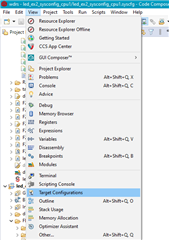
    1. Click 'View' > 'Target Configurations':
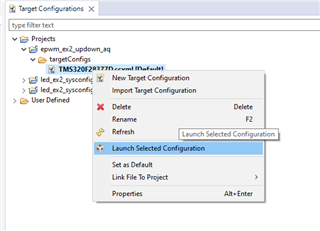
    2. You can import a project for this device to CCS and use that to connect to the device, or copy the raw target config from C2000Ware to the "user defined" target configurations in this window. Either way, find the device target config (example for F28377D below) and launch it:
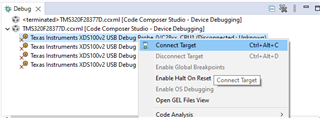
    3. When it brings up the debug window, select the device CPU and connect to the target:
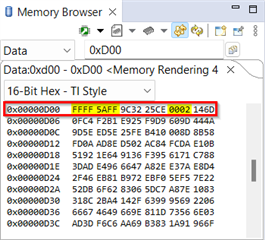
    4. In the memory browser, set addresses 0xD00-0xD01 to 0x5AFF_FFFF and 0xD04 to 0x0002. This will emulate boot option 0x02: CANTX=GPIO37 and CANRX=GPIO36).
    5. Reset the CPU and resume the debug session to enter emulation CAN boot.

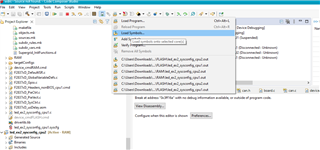
    You can step through the device boot ROM by loading the boot ROM symbols (.out file) to the device.  Loading symbols can be a valuable debug method. This option adds the symbols available in the generated project '.out' file for debugging purposes instead of loading the actual '.out' program onto the core via CCS - this is also why you can use this method with the boot ROM/built in bootloaders to debug and get visibility.

    1. Navigate to the toolbar and click the button to "Load Symbols"
    2. Load the boot ROM .out file. For this device, it should be in 
      1. C2000Ware_X_XX_XX_XX\libraries\boot_rom\f2838x\revA\rom_sources\cpu1\ccs_files\Release
      2. If a window pops up saying it can't find the source file, you can select "Locate File" and find it in C2000Ware
        1. Usually here C2000Ware_X_XX_XX_XX\libraries\boot_rom\f2838x\revA\rom_sources\cpu1\F2838x_ROM\bootROM\source
    3. The file should open to show the location of the boot ROM you are at, and you can step through/debug
    By the Way I have made the Boot pin config as per this table and set it to CAN Boot. Any other things I may have missed, which I need to take care of?

    What is your setup? The hardware components needed to run the DCAN flash programmer are a C2000 device connected to a CAN transceiver and a PEAK PCAN-USB FD Analyzer. For ControlCards, a custom-designed CAN transceiver board needs to be used, as well as the HSEC-180-pin ControlCard Docking Station. The custom-designed transceiver board is connected to the ControlCard using four connections: ground, 3.3V, CANTX and CANRX.

    Best,

    Matt

  • Hi Matt,

    Thanks for the response, I will try the above method. I now, have a question based on the above points explained by you. 

    To jump to CAN Boot mode, do we need to configure the OTP area as well? Is only setting the Boot pins not enough?

    And, if we write the OTP area with the values you mentioned, then will the device always boot in CAN mode?

    Thanks,

    Regards,

    Raghuram

  • Hi Matt,

    About the question:

    What is your setup? The hardware components needed to run the DCAN flash programmer are a C2000 device connected to a CAN transceiver and a PEAK PCAN-USB FD Analyzer. For ControlCards, a custom-designed CAN transceiver board needs to be used, as well as the HSEC-180-pin ControlCard Docking Station. The custom-designed transceiver board is connected to the ControlCard using four connections: ground, 3.3V, CANTX and CANRX.

    I have connected The Control Card to TMDSHSECDOCK. I think it is 180 pins.

    I have connected the GPIO37 and GPIO36 of the docking station to Tx and Rx of the tranceiver pins. I am using PeakUsb for communication.

    Regards,

    Raghuram

  • Hi Raghuram,

    To jump to CAN Boot mode, do we need to configure the OTP area as well? Is only setting the Boot pins not enough?

    That's right, you do not need to program the OTP. You can use the device default boot mode pins to configure CAN boot. 

    And, if we write the OTP area with the values you mentioned, then will the device always boot in CAN mode?

    I'm not advising you to write to the OTP, the emulation boot registers in RAM can be programmed repeatedly while imitating the configuration and usage of the OTP registers. Testing in emulation boot allows you to debug the boot ROM much more easily than standalone boot, as described above. If you write to the OTP, then the device will always boot according to what's defined in the OTP. 

    I have connected the GPIO37 and GPIO36 of the docking station to Tx and Rx of the tranceiver pins. I am using PeakUsb for communication.

    You need to have a CAN transceiver on the ControlCard's side providing CAN_H/CAN_L, instead of connecting the PEAK device directly to the TX/RX pins. LaunchPads have an on-board CAN transceiver offering these signals, but ControlCards do not. 

    Moreover, please confirm that you're using the PCAN-USB FD at least (doesn't need to be the PRO model). The dcan_flash_programmer executable is developed to use the FD devices. 

    Best,

    Matt

  • I will assume that this issue is resolved and close the thread, as its been several weeks without a response. Please open a new thread if that's not the case.