This thread has been locked.

If you have a related question, please click the "Ask a related question" button in the top right corner. The newly created question will be automatically linked to this question.

LAUNCHXL-F280049C: USB connection not working, problem with XDS110 (Version: 3.0.0.33)

Part Number: LAUNCHXL-F280049C
Other Parts Discussed in Thread: AM67A

Tool/software:

When I connect the LAUNCHXL-F280049C board to my computer, it no longer shows up in Windows Device Manager.

When I start Code Composer Studio (Version: 20.0.1.4__1.6.1) up, I get the following error message:

"No compatible board detected - please connect your board"

I have tried to run xdsdfu.exe after resetting the board by connecting pin 97 of TM4C129 to GND under power up and installed XDS110 (Version: 3.0.0.31) with xdsdfu.exe. But when I start up CCS (Version: 20.0.1.4__1.6.1) up, it immediately force an installation of XDS110 (Version: 3.0.0.33). So next time I connect the USB cable to the computer, it is again not visible in Windows Device Manager.

I have discovered that if I press the switch marked "S1 XRsn" on the LAUNCHXL-F280049C board just before I insert the USB cable into the computer and then release switch after I have inserted the USB cable, the board now shows up in Windows Device Manager and I can work with the board. But I have spent an entire day researching the problem before I found this intermediate solution.

Before, the board always showed immediately after being connected with the USB cable without having to do anything special.

Set-up information:

Windows version
===============================================================================
Edition Windows 11 Enterprise
Version 23H2
Installed on ‎2024-‎07-‎03
OS build 22631.4751
Experience Windows Feature Experience Pack 1000.22700.1055.0

Code Composer Studio
===============================================================================

Details
Version: 20.0.1.4__1.6.1

xdsdfu.exe
===============================================================================
PS C:\ti\ccs1271\ccs\ccs_base\common\uscif\xds110> .\xdsdfu.exe -e

USB Device Firmware Upgrade Utility
Copyright (c) 2008-2019 Texas Instruments Incorporated. All rights reserved.

Scanning USB buses for supported XDS110 devices...


<<<< Device 0 >>>>

VID: 0x0451 PID: 0xbef3
Device Name: XDS110 Embed with CMSIS-DAP
Version: 3.0.0.33
Manufacturer: Texas Instruments
Serial Num: CL491035
Mode: Runtime
Configuration: Standard

Found 1 device.

  • Hi,

    Could you try CCS 12.8? I wonder if this is a version issue. 

    Could you also please check out this app note? https://www.ti.com/lit/spracf0

    Thanks,

    Ben Collier

  • Hi

    First I reinstalled the XDS110 by connecting pin 97 of TM4C129 to GND under power up and installed XDS110 (Version: 3.0.0.31)

    (PS C:\ti\ccs1271\ccs\ccs_base\common\uscif\xds110> .\xdsdfu -f firmware_3.0.0.31.bin -r)

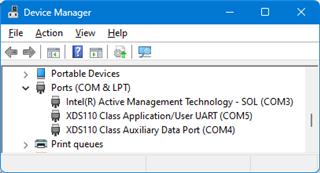
    I then disconnected the LAUNCHXL-F280049C and connected the board again. The board then shows up Windows Device Manager as described in "spracf0c.pdf" page 12 paragraph "5. Present in Device Manger:" (Spelling error?).

    I then started Code Composer Studio Version: 12.8.0.00011. I could compile and run "led_ex1_blinky [Code Composer Studio - Device Debugging]
    Texas Instruments XDS110 USB Debug Probe_0/C28xx_CPU1 (Running)".

    I then started CCS Version: 20.0.1.4__1.6.1. (It tries to update CCS from 20.0.1.4 to 20.0.2.5 from but I cancelled the update because the update hangs. More about that later)

    I then get this massage where I press update:

    IcePick_C_0: Warning: A firmware update is required for the XDS110 probe. The current firmware is version 3.0.0.31. The probe must be upgraded to firmware version 3.0.0.33 to be compatible with this software. Click the "Update" button to update the firmware. DO NOT UNPLUG THE DEBUG PROBE DURING THE UPDATE. (Emulation package 20.0.0.3283)

    And next time I connect the LAUNCHXL-F280049C board to the computer it does not show in the Windows Device Manager unless I press the switch marked "S1 XRsn" on the LAUNCHXL-F280049C board just before I insert the USB cable into the computer and then release switch after I have inserted the USB cable.

    The firmware in the XDS110 is updated to firmware version 3.0.0.33 by CCS 20.0.1.4__1.6.1

    When I start CCS20.0.1.4 I get the message "New updates are available, press OK to continue. Auto check for update can be disabled in the General Settings page.". The CCS20.0.1.4 then tries to install an update from 20.0.1.4 to 20.0.2.5 but fails. The error meassage is:

    A JavaScript error occurred in the main process
    Uncaught Exception:
    Error: spawn Error: ccs_setup_20.0.2.00005.exe EACCES
      at ChildProcess._handle.onexit (node:internal/child_process:286:19)
      at onErrorNT (node:internal/child_process:484:16)
      at process.processT1cksAndRejections (node:internal/process/task_queues:82:21)

    This is probably an additional error that has nothing to do with the other error with XDS110 firmware version 3.0.0.33 not showing up in Windows Device Manager.

    Med venlig hilsen / Best Regards

    Christian Wolf

  • I am running ubuntu 22.04, that was one of the many issues. Despite installing the release from a couple days back it appears to be worse now than with the previous joke.

    Glad I read your post, I no longer feel like a stupid old fool for not getting the entry door open. This is how a huge company introduces potential buyers to their product line.

    If you think this is bad, try using their BSP for the am67a and tda4x, on the surface it looks cool. Wait until you try to use it for any thing meaning full....

  • I have discovered that if I press the switch marked "S1 XRsn" on the LAUNCHXL-F280049C board just before I insert the USB cable into the computer and then release switch after I have inserted the USB cable, the board now shows up in Windows Device Manager and I can work with the board. But I have spent an entire day researching the problem before I found this intermediate solution.

    This is a known issue:

    https://e2e.ti.com/support/microcontrollers/c2000-microcontrollers-group/c2000/f/c2000-microcontrollers-forum/1448708/launchxl-f280039c-launchxl-f280039c/5571762#5571762

    It was supposed to get fixed in CCS 20.0.2 but unfortunately the issue persists. Hence I recommend staying on CCS 20.0.1 and manually flashing firmware 3.0.0.34 that I attached to my last post of the thread.

    It will get properly fixed in CCS 20.1.0

    Sorry for all the pain.

    Ki

  • I have downloaded XDS110 firmware 3.0.0.34 from the link above and installed it with the xdsdfu utility on 3 different LAUNCHXL-F280049C boards with no problems. The boards now show up in Windows Device Manager as they should do and CCS 20.0.1.4 can communicate with the boards.

    As the boards all had the XDS firmware version 3.0.0.33 installed, I had to press the switch marked "S1 XRsn" on the LAUNCHXL-F280049C board just before I insert the USB cable into the computer and then release switch after I have inserted the USB cable in order to be able to connect to the boards.

    I used the following commands to install XDS110 firmware 3.0.0.34:

    .\xdsdfu -m

    .\xdsdfu -f firmware_3.0.0.34.bin -r

    Best Regards

    Christian Wolf

  • Glad to hear version 34 is working. Please stay with CCS 20.0.1 with firmware 34 until CCS 20.1.0 is release. Thank you.