This thread has been locked.

If you have a related question, please click the "Ask a related question" button in the top right corner. The newly created question will be automatically linked to this question.

TMS320F28386D: SCI Error

Part Number: TMS320F28386D
Other Parts Discussed in Thread: C2000WARE

Tool/software:

Dear Experts,

I have a custom board using F28386D as MCU. The SCI GPIO pins are connected to RS-485 transceivers ADM2865EBRNZ. 

I used example "sci_ex3_echoback" to test the SCI function. However, when I debugged the code, the example at rxStatus & SCI_RXSTATUS_ERROR condition. As I checked in Registers, Framing error flag (FE) has value "1". This indicated the reason why the program stop. 

However, I cannot explain the reason this error exists and how to handle this?

Please help. Thank you in advance!

Best Regards,

Hoang.

  • Hi Hoang,

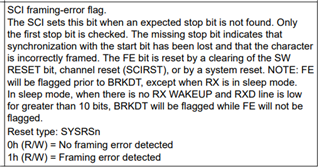
    Below is the description of the FE bit for the SCI module:

    Did you make any modifications to the original sci_ex3_echoback example from C2000ware or were you running it unchanged?

    Best Regards,

    Delaney

  • Hi Delany,
    I only added the define for SCI Pins corresponding to my custom board. 
    I used putty program to display the message.
    When I run the sci_ex3_echoback, the putty program displayed fully message "Hello World", "You will enter a character....". However, it displayed partly message "Enter a character:" like that "Enter" then stop running.
    Additionally, I watched the "receivedChar" variable, it changed its value every time I resuming the running of code. 
    Thanks for your reply.

    Best Regards,
    Hoang.

  • Hi Hoang,

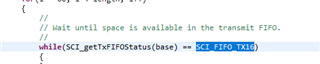
    I suspect I know what is going wrong with the SCI_writeCharArray() function. If you CTRL+click into the SCI_writeCharArray() function definition, is the FIFO status being compared to SCI_FIFO_TX16 or SCI_FIFO_TX15? The one shown below is the corrected version. The SCI_FIFO_TX15 is a bug from some of our older releases of C2000ware.

    Are you inputting one character at a time to the COM port in Putty? If you scope the SCIRX pin does the inputted character look correct?

    Best Regards,

    Delaney

  • Hi Delaney,
    Thanks for your reply.

    I changed SCI_FIFO_TX15 to SCI_FIFO_TX16 but the problem still exists.

    Here is the description of my problem. Sorry for the quality of image but I cannot use screen capture function.

    When I debugged the code at the first time, the Putty displayed as below picture. Then the code stop running.

    After I resumed code, the Putty displayed as below picture. As you can see, the whole message cannot be displayed properly.

    It was so weird that even when I did not connect the COM port to my PC. When I run the code, the variable receivedChar changes its values whenever I resume the code after it stop at "rxStatus & SCI_RXSTATUS_ERROR" condition. The below picture shows the the result when I did not connect the COM port to my PC.

    Because the program stopped running, I cannot input character using Putty.

    Regarding the code, I used it for kit Launch F29379D and it worked correctly. The only difference is SCI Pins configuration.

    Is there any chance my hardware cause this problem?

    Best regards,
    Hoang.

  • Because the program stopped running, I cannot input character using Putty.

    Hi,

    Perhaps try hold ALT key, push Print Screen button to capture the top screen, paste captured screen into the thread. Also comment out ESTOP code so putty will get the last character (debug.c INT)  and (interrupt.c) will pause XDS probe at the error location or just after to view call stack. Could also modify SCI RX code to handle the framing error often due to incorrect parity, data word length etc.. Another tip, flush the RX char buffer on entry and after every 16 words enter the FIFO, do not try highspeed serial data transfers in single char blocking mode that is futile at best. 

    On TX- FIFO data block until the FIFO is ready for new characters. Sending FIFO new char data not the same as blocking each character.

    /* Blocking checks FIFO space filled */
    while(SCI_getTxFIFOStatus(SCIB_BASE) >= SCI_FIFO_TX8)
    {}
    
    
    /* Check cmd string length matches our byte count */
    len = strlen(CmdStrng);
    
    for(c = 0; c <= len; c++) // -1 Null
    {
        //SCIprintf("TxCmd:%x\n", CmdStrng[c]);
        /* Write this character to the transmit FIFO. */
        HWREG(SCIB_BASE + SCI_O_TXBUF) = CmdStrng[c];
        
    }

  • Hi,
    Thanks for your reply.

    I apologize for this convenience but the PC I use to implement the code does not have Internet, and I am not allowed to connect any external devices. Thus, I have to take a pic using my phone.

    When I comment out ESTOP code, the MCU continuously sends colons symbols as below picture.

    I am going to try your suggestion regarding modifying SCI RX code.

    Best Regards,
    Hoang.

  • When I comment out ESTOP code, the MCU continuously sends colons symbols as below picture.

    You can add a single or several break points where you suspect the code is failing, step into code via F5. Hit F6 at the break, single step the code or step over code once into the break/s points. 

  • Hi Hoang,

    I changed SCI_FIFO_TX15 to SCI_FIFO_TX16 but the problem still exists.

    If you just changed the file in the [C2000ware install]/driverlib folder it likely still won't actually fix the issue since these aren't actually what gets used. The driverlib.lib file has the precompiled source that gets used in your project and this would need to be updated. Can you try copying the below file into [C2000ware install]/driverlib/f2838x/driverlib/ccs/Debug/.

     7180.driverlib.lib

    When I run the code, the variable receivedChar changes its values whenever I resume the code after it stop at "rxStatus & SCI_RXSTATUS_ERROR" condition

    This seems like there is some noise on the SCIRX pin causing the device to think it is receiving data when it actually isn't. Especially if you were able to get the example working on a LaunchPAD. This would cause issues with the example code. I would try getting the unmodified example code working on your setup before making modifications. A couple things to try:

    Can you scope the SCIRX pin to see if there is unexpected noise?

    Can you try running the code on the LaunchPAD again without using the GPIOs routed to the UART-to-USB bridge and attach the transceiver? (Basically the same as your current errored setup, but the device surrounding circuitry is the LaunchPAD rather than a custom board.)

    Best Regards,

    Delaney