This thread has been locked.

If you have a related question, please click the "Ask a related question" button in the top right corner. The newly created question will be automatically linked to this question.

XDS110ISO-EVM: XDS110ISO-EVM: Unable to connect to TMS320F28374S

Part Number: XDS110ISO-EVM
Other Parts Discussed in Thread: UNIFLASH, TMS320F28374S

Tool/software:

I cannot connect to TMS320F28374S using XDS110ISO-EVM debug adapter header J3. I have tried connecting with UniFlash 8.7.0.4818 and Code Composer Studio 12.8.1.

TMS320F28374S datasheet has a picture of 14-pin JTAG header where pin 2 (nTRST) is connected to MCU.
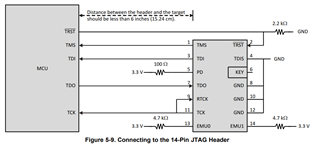
XDS110ISO-EVM schematics shows that debug adapter header J3 does not have nTRST at all. Is it needed? According to JTAG wikipage, it says nTRST is optional.


XDS110ISO-EVM package included adapter from 16-pin to 14-pin JTAG. Adapter schematics shows that nRST pin 2 in 14-pin connector is not connected.
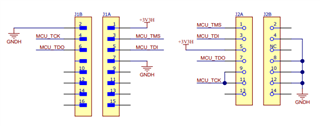

XDS110ISO-EVM Evaluation board | TI.com

  • Hi,

    I will need a couple days to get back to you about this.

    Best Regards,

    Ben Collier

  • Hi,

    XDS110ISO-EVM schematics shows that debug adapter header J3 does not have nTRST at all. Is it needed? According to JTAG wikipage, it says nTRST is optional.

    Not all MCUs have a nTRST pin, but for MCUs that do have a nTRST pin, it must be addressed.

    If nTRST is held low, then the JTAG state machine will always be in the Test-Logic-Reset state, and JTAG communication will not work. 

    If nTRST is held high, then the JTAG programmer is able to change the JTAG states with TCK/TMS and it will be able to communicate properly.

    If you do not have the ability to get nTRST from the debug probe, you should be able to just pull nTRST high while you are programming the device.

    Best Regards,

    Ben Collier

  • Okay. It seems I can connect to target if I pull nTRST high manually.

    Too bad there is no dedicated nTRST pin in the design of XDS110ISO-EVM board. Perhaps Texas Instruments could make firmware that would use one of the pins J3 connector not used for JTAG as nTRST in future :)

    EDIT: XDS110ISO-EVM works if nTRST is connected to any pin in J3 connector that is high, for example, pin 9 (MCU_RXD_ISO_SW).


    C:\ti\ccs1280\ccs\ccs_base\common\uscif>dbgjtag.exe -f testBoard_f28374s.data -rv -o -S integrity
    
    -----[Print the board config pathname(s)]------------------------------------
    
    testBoard_f28374s.data
    
    -----[Print the reset-command software log-file]-----------------------------
    
    This utility has selected a 100/110/510 class product.
    This utility will load the adapter 'jioxds110.dll'.
    The library build date was 'Sep 26 2024'.
    The library build time was '10:09:41'.
    The library package version is '20.0.0.3178'.
    The library component version is '35.35.0.0'.
    The controller does not use a programmable FPGA.
    The controller has a version number of '5' (0x00000005).
    The controller has an insertion length of '0' (0x00000000).
    This utility will attempt to reset the controller.
    This utility has successfully reset the controller.
    
    -----[Print the reset-command hardware log-file]-----------------------------
    
    The scan-path will be reset by toggling the JTAG TRST signal.
    The controller is the XDS110 with USB interface.
    The link from controller to target is direct (without cable).
    The software is configured for XDS110 features.
    The controller cannot monitor the value on the EMU[0] pin.
    The controller cannot monitor the value on the EMU[1] pin.
    The controller cannot control the timing on output pins.
    The controller cannot control the timing on input pins.
    The scan-path link-delay has been set to exactly '0' (0x0000).
    
    -----[Perform the Integrity scan-test on the JTAG IR]------------------------
    
    This test will use blocks of 64 32-bit words.
    This test will be applied just once.
    
    Do a test using 0xFFFFFFFF.
    Scan tests: 1, skipped: 0, failed: 0
    Do a test using 0x00000000.
    Scan tests: 2, skipped: 0, failed: 0
    Do a test using 0xFE03E0E2.
    Scan tests: 3, skipped: 0, failed: 0
    Do a test using 0x01FC1F1D.
    Scan tests: 4, skipped: 0, failed: 0
    Do a test using 0x5533CCAA.
    Scan tests: 5, skipped: 0, failed: 0
    Do a test using 0xAACC3355.
    Scan tests: 6, skipped: 0, failed: 0
    All of the values were scanned correctly.
    
    The JTAG IR Integrity scan-test has succeeded.
    
    -----[Perform the Integrity scan-test on the JTAG DR]------------------------
    
    This test will use blocks of 64 32-bit words.
    This test will be applied just once.
    
    Do a test using 0xFFFFFFFF.
    Scan tests: 1, skipped: 0, failed: 0
    Do a test using 0x00000000.
    Scan tests: 2, skipped: 0, failed: 0
    Do a test using 0xFE03E0E2.
    Scan tests: 3, skipped: 0, failed: 0
    Do a test using 0x01FC1F1D.
    Scan tests: 4, skipped: 0, failed: 0
    Do a test using 0x5533CCAA.
    Scan tests: 5, skipped: 0, failed: 0
    Do a test using 0xAACC3355.
    Scan tests: 6, skipped: 0, failed: 0
    All of the values were scanned correctly.
    
    The JTAG DR Integrity scan-test has succeeded.