


Part Number: TMS320F28035-EP
Other Parts Discussed in Thread: C2000WARE
Tool/software:
Hello,
I’m using CCS 12.8.0 with the TMS320F28035MPNTEP microcontroller and an XDS110 debugger.
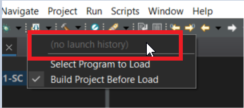
My .out file is located in the debug folder, but I don’t see an option to select it for flashing (see Screenshot 1).
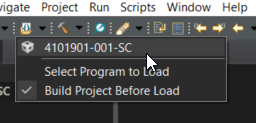
However, if I first debug the program (Run → Debug), then stop debugging and attempt to flash it (Run → Load), the .out file becomes visible. See screenshot 3
This means that in a new workspace, if I haven't debugged the project at least once, I can't directly load the output file. When I try to manually browse and select the .out file via Run → Load → Select Program to Load, I encounter the error: "Load Program Error: Multiple debuggable cores detected."
How can I flash the output file without entering debug mode first.?

After first debug session
Thank You


