This thread has been locked.

If you have a related question, please click the "Ask a related question" button in the top right corner. The newly created question will be automatically linked to this question.

TMS320F28388D: EtherCAT CPU1 Slave Example

Part Number: TMS320F28388D


Tool/software:

Hello,

I was following a resource to test EtherCAT and specifically following the CPU1 Echoback Solution Example. I'm using TwinCAT as the resource suggests. Well I got to a point where I can see process data mapping on TwinCAT but everytime it comes up after a scan it shows an error with the device going from SAFEOP to OP
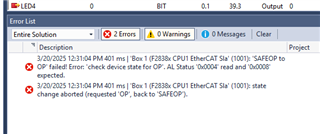
For reference I'm using SSC 5.12 since the document said this is the only version supported. Also I am using a controlCard for the F28388D. 
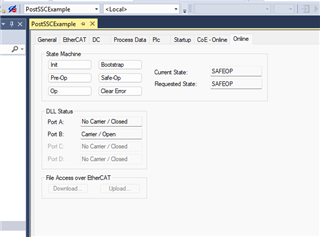
I started debugging to see if I could find out why the device is unable to enter OP mode but I decided to reach out to you before I went in too far

Another issue: During the time I was debugging, I was clicking around TwinCAT in the state machine and I'm not sure if this is what caused my issue but suddenly I could no longer detect an EtherCAT device from either TwinCAT or SOEM. Eventually I just moved my ethernet cable over to the other slot and things appear to be working again, so I suppose it's either some hardware issue or the device is in a weird state that I cannot seem to fix. Wanted to get your thoughts on this to see if people have had this issue before.

Thanks,

Antonio

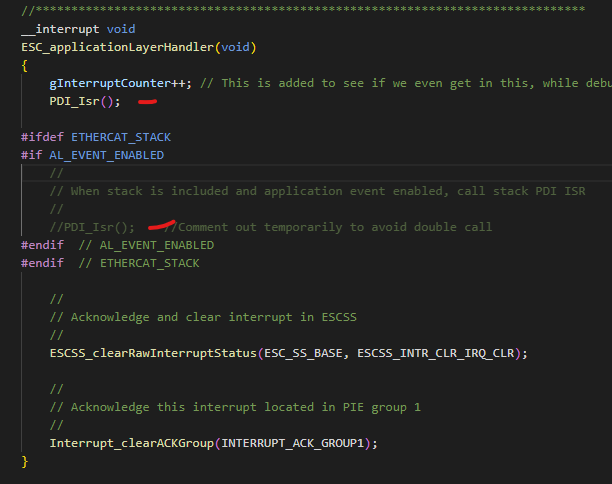
  • I dragged PDI_ISR call out of the compilation check for AL_EVENT_ENABLED and things were working, the master state machine showed in OP mode and I could toggle a switch bank and get the right status back. I am unsure why this happened since AL_EVENT_ENABLED should be 1 but the UI was showing it was compiled out, and I'm worried this could affect other things in my project. Do you have any input on this?

  • Hi Antonio,

    Changes to the SW / stack should not be needed to get to OP and properly run the example.

    I have a few questions for common causes of not reaching OP state:

    1. You have performed process of programming the I2C EEPROM from TwinCAT with echoback ESI file that the SSC tool generates?
    2. Scanning the box looks proper and shows all objects?
    3. Assuming (1) is done and you power cycle your board (and re-program if not running standalone from Flash), try setting Free run mode in twinCAT. Active / real-time mode requires additional config to work
      1. Also use default sync mode (not DC)

    Best,

    Kevin