Other Parts Discussed in Thread: SYSCONFIG, C2000WARE
Tool/software:
I'm looking for data visualization tool for C2000. Similar to NXP FreeMaster Recorder feature (sampled data at very high frequency (maybe above 100kHz))
This thread has been locked.
If you have a related question, please click the "Ask a related question" button in the top right corner. The newly created question will be automatically linked to this question.
Tool/software:
I'm looking for data visualization tool for C2000. Similar to NXP FreeMaster Recorder feature (sampled data at very high frequency (maybe above 100kHz))
Hi Bharath,
Can you share some additional deails about the NXP FreeMaster Recorder Feature? Did you use UART to export the variables out of the device? At what frequency did you export out at? What NXP device were you using?
We have something similar called the MCU Mission Control which is located in our SysConfig Tool.
Best,
Ryan Ma
Data will be sampled at a fixed rate (e.g., 50 kHz) and stored in a static RAM buffer. Sampling can be triggered by either an internal or external event. The data will then be exported via JTAG or UART and visualized using the FreeMaster tool. FreeMaster is capable of processing the received data, as it is aware of both the sampling interval and the data type.
Hi Bharath,
Did NXP FreeMaster export data out of the device? Did you need to add to your application code some way to export the data you wanted to the tool?
Our current tool allows you to export data out of the device in some known format and to be visualized through a GUI within CCS. You can use UART as well.
Best,
Ryan Ma
Hi Bharath,
We are soon to release an app note on these features.
I can walk you through on how to add this though for F2837xD. Are you using a Launchpad or ControlCARD?
1. Create an empty_driverlib_project by importing from "C:\ti\c2000\C2000Ware_5_04_00_00\driverlib\f2837xd\examples\cpu1\empty_projects\"
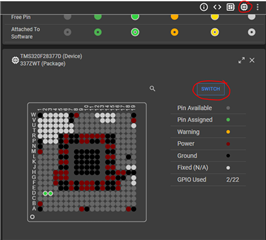
2. Switch to Launchpad F2837xD by going to Devices icon, and switch

3. Add MCU Mission Control

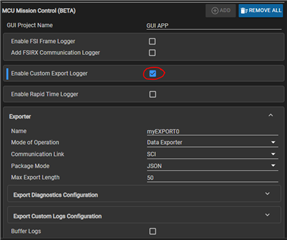
4. Enable the custom export logger feature

5. If you're using the launchpad GPIO43 and GPIO42 should be connected to the XDS110 bridge (UART->USB).

6. Copy and paste the following code
//#############################################################################
//
// FILE: transfer_customlog_export_sci.c
//
// TITLE: Transfer: Custom Logger Solution
//
//! \addtogroup driver_example_list
//! <h1> GUI based solution for data logging (one direction) </h1>
//!
//! This example demonstrates how to use SysConfig to enable datalogging
//! on our C28x devices. To enable this example, make sure to go to
//! Build -> Variables and set GUI_SUPPORT to value of 1.
//! This will create the GUI in CCS which can be opened under
//! View -> GUI Composer -> Applications -> transfer_customlog_export_sci
//!
//! In this example, we are using SCI to export data out of the device.
//! If you're using a launchpad, you can enable board components to select
//! the correct SCI base to visualize the data through the COM port.
//!
//
//#############################################################################
//
// C2000Ware v5.04.00.00
//
// Copyright (C) 2024 Texas Instruments Incorporated - http://www.ti.com
//
// Redistribution and use in source and binary forms, with or without
// modification, are permitted provided that the following conditions
// are met:
//
// Redistributions of source code must retain the above copyright
// notice, this list of conditions and the following disclaimer.
//
// Redistributions in binary form must reproduce the above copyright
// notice, this list of conditions and the following disclaimer in the
// documentation and/or other materials provided with the
// distribution.
//
// Neither the name of Texas Instruments Incorporated nor the names of
// its contributors may be used to endorse or promote products derived
// from this software without specific prior written permission.
//
// THIS SOFTWARE IS PROVIDED BY THE COPYRIGHT HOLDERS AND CONTRIBUTORS
// "AS IS" AND ANY EXPRESS OR IMPLIED WARRANTIES, INCLUDING, BUT NOT
// LIMITED TO, THE IMPLIED WARRANTIES OF MERCHANTABILITY AND FITNESS FOR
// A PARTICULAR PURPOSE ARE DISCLAIMED. IN NO EVENT SHALL THE COPYRIGHT
// OWNER OR CONTRIBUTORS BE LIABLE FOR ANY DIRECT, INDIRECT, INCIDENTAL,
// SPECIAL, EXEMPLARY, OR CONSEQUENTIAL DAMAGES (INCLUDING, BUT NOT
// LIMITED TO, PROCUREMENT OF SUBSTITUTE GOODS OR SERVICES; LOSS OF USE,
// DATA, OR PROFITS; OR BUSINESS INTERRUPTION) HOWEVER CAUSED AND ON ANY
// THEORY OF LIABILITY, WHETHER IN CONTRACT, STRICT LIABILITY, OR TORT
// (INCLUDING NEGLIGENCE OR OTHERWISE) ARISING IN ANY WAY OUT OF THE USE
// OF THIS SOFTWARE, EVEN IF ADVISED OF THE POSSIBILITY OF SUCH DAMAGE.
// $
//#############################################################################
//
// Included Files
//
#include "driverlib.h"
#include "device.h"
#include "board.h"
#include "c2000ware_libraries.h"
#include "export/export_log.h"
//
// Main
//
void main(void)
{
//
// Initialize device clock and peripherals
//
Device_init();
//
// Disable pin locks and enable internal pull-ups.
//
Device_initGPIO();
//
// Initialize PIE and clear PIE registers. Disables CPU interrupts.
//
Interrupt_initModule();
//
// Initialize the PIE vector table with pointers to the shell Interrupt
// Service Routines (ISR).
//
Interrupt_initVectorTable();
//
// PinMux and Peripheral Initialization
//
Board_init();
//
// C2000Ware Library initialization
//
C2000Ware_libraries_init();
//
// Logging Inits
//
EXPORT_init();
EXPORTLOG_init();
//
// Enable Global Interrupt (INTM) and real time interrupt (DBGM)
//
EINT;
ERTM;
while(1)
{
DEVICE_DELAY_US(1000000);
EXPORTLOG_log("Logging entry 1");
EXPORTLOG_log("Next log entry 2");
EXPORTLOG_log("last entry 3");
}
}
//
// End of File
//
7. Copy and paste these post bulid steps:
if not exist "C:\ti\ccs2010\ccs\eclipse\dropins-gc" mkdir "C:\ti\ccs2010\ccs\eclipse\dropins-gc" if not exist "C:\ti\ccs2010\ccs\theia\ccs_plugins" mkdir "C:\ti\ccs2010\ccs\theia\ccs_plugins" xcopy ".\syscfg\gui\" "C:\ti\ccs2010\ccs\eclipse\dropins-gc\transfer_customlog_export_sci\" /E /Y xcopy "C:\ti\c2000\C2000Ware_5_04_00_00\utilities\transfer\.meta\gui\core\" "C:\ti\ccs2010\ccs\eclipse\dropins-gc\transfer_customlog_export_sci\" /E /Y xcopy ".\syscfg\gui\" "C:\ti\ccs2010\ccs\theia\ccs_plugins\transfer_customlog_export_sci\" /E /Y xcopy "C:\ti\c2000\C2000Ware_5_04_00_00\utilities\transfer\.meta\gui\core\" "C:\ti\ccs2010\ccs\theia\ccs_plugins\transfer_customlog_export_sci\" /E /Y
8. Build the project
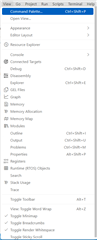
9. Go to View -> Plugins -> transfer_customlog_export_sci

10. Load the .out, and you can view variables being displayed on the table that are being printed out. We also support logging arrays of values and buffering the values before exporting the data. You can refer to this folder path for other examples to port it over to F2837xD.
C:\ti\c2000\C2000Ware_5_04_00_00\driverlib\f2838x\examples\c28x\transfer
Let me know if you're able to see logs in the table.
Best,
Ryan Ma
Hi Bharath,
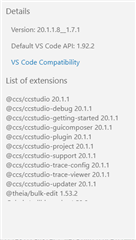
For the following post steps, did you make sure to update to your path? Apologize, I had not mentioned to update these since I am using ccs2010. Seems like you're using ccs2011?
if not exist "C:\ti\ccs2010\ccs\eclipse\dropins-gc" mkdir "C:\ti\ccs2010\ccs\eclipse\dropins-gc"
if not exist "C:\ti\ccs2010\ccs\theia\ccs_plugins" mkdir "C:\ti\ccs2010\ccs\theia\ccs_plugins"
xcopy ".\syscfg\gui\" "C:\ti\ccs2010\ccs\eclipse\dropins-gc\transfer_customlog_export_sci\" /E /Y
xcopy "C:\ti\c2000\C2000Ware_5_04_00_00\utilities\transfer\.meta\gui\core\" "C:\ti\ccs2010\ccs\eclipse\dropins-gc\transfer_customlog_export_sci\" /E /Y
xcopy ".\syscfg\gui\" "C:\ti\ccs2010\ccs\theia\ccs_plugins\transfer_customlog_export_sci\" /E /Y
xcopy "C:\ti\c2000\C2000Ware_5_04_00_00\utilities\transfer\.meta\gui\core\" "C:\ti\ccs2010\ccs\theia\ccs_plugins\transfer_customlog_export_sci\" /E /Y