This thread has been locked.

If you have a related question, please click the "Ask a related question" button in the top right corner. The newly created question will be automatically linked to this question.

F29H85X-SOM-EVM: RTINT on F29H85x

Part Number: F29H85X-SOM-EVM
Other Parts Discussed in Thread: SYSCONFIG

Tool/software:

I'm porting my code, which was developed in bare-metal on a F28374D, to F29H85x using FreeRTOS.

I have 3 tasks:

  • MAIN_TASK called by freertos every 1ms
  • ZCD_Task notified by the MAIN_TASK every 20ms
  • UART_DBG_TASK notified by interrupt-driven notifications from uart rx interrupt.

I also use 3 interrupt:

  • timer1_INT priority 40
  • uart0_INT priority 250
  • EPWM0_ET_INT priority 30

all interrupts were configured as "INT" (they use the software stack and not the hardware stack): everything works!

Then, I tried to change the EPWM0_ET_INT priority from 30 to 10; RTINT threshold was 20

After a few seconds, the code goes into Interrupt_defaultNMIHandler and freezes. Here are the interrupt and task priorities:

    1. timer1_INT priority 40
    2. uart0_INT priority 250
    3. EPWM0_ET_INT priority 10
    4. timer2_INT priority 255 (used by FreeRTOS)
    5. FreeRTOS ZCD_TASK priority 5
    6. FreeRTOS MAIN_TASK priority 5
    7. FreeRTOS UART_DBG_TASK priority 4"

Any idea or suggestion?

thanks

  • Hi Emanuale,

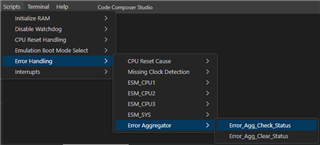
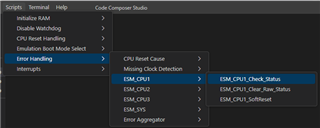
    What do you see in the Gel Output console when you run the following scripts? Once you have the list of errors, you can utilize the Error Aggregator, ESM, and associated peripheral (ex. PIPE) TRM chapters to decode the errors.

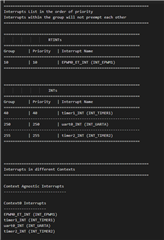
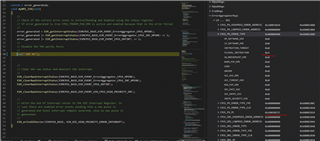
    BTW, you can find the complete list of interrupts and their associated configurations in the interrupts.txt file in SysConfig. I personally use it to visualize all the interrupts I'm working with, especially when I'm modifying their priorities.

    Best Regards,

    Aishwarya

  • Hi

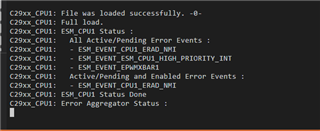
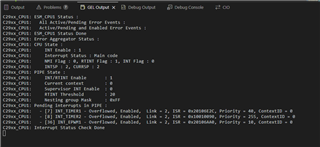
    This is wat I see running the GEL script after activating the ESM when execution is stopped in the

    myNMI_ISR

    :

    This is the interrupt.txt content:

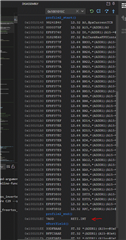
    Removing the breakpoint and going on with the code execution, I see:

    Thanks

    Emanuele

  • Emanuele,

    Since it is stuck in an NMI, in general, make sure to do a CPU restart between running code to take the CPU out of an ISR (uninterruptible) context.

    I would think this is coming from the 'Device_errataWorkaroundNMIVectorFetch()' function in Device_init(). If you are using ERAD / EPWMXBAR, make sure you don't use the same instances as what is in this function. This is possibly because there was some error in and then when code was restarted, the original error and then the errata workaround related errors occurred back-to-back causing an NMI. I would power cycle in between loads to clear the ESM / Error Aggregator or clear the errors using the scripts in between loads / running examples. 

    At this point, try loading the code again and see what errors persist, especially while stepping through with breakpoints in place. In your application code, make sure your timers and EPWM ISR are being timed properly, because that could cause an overflow. 

    Best Regards,

    Aishwarya

  • Hi,

    I have additional info.

    As I reported, the code crashes when I change the interrupt priority of the PWM isr from 30 to 10 (below the RTINT thr that is 20)

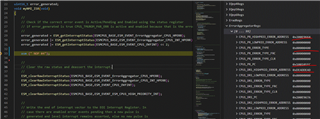
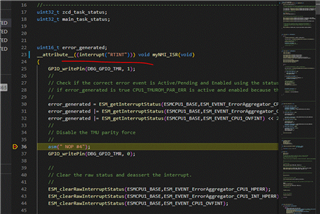
    I added the ESM module to the code and the NMI ISR.

    then I added the code for NMI isr.

    This is what I see when the breakpoint is reached:

    The active event is ESM_EVENT_ErrorAggregator_CPU1_HPERR

    CPU1_PR_ERROR_TYPE says ILLEGAL_INSTRUCTION 

    CPU1_DR1_HIGHPRIO_ERROR_ADDRESS = 0xDEADDEAD I think this means something....

    CPU1_DR1_HIGHPRIO_ERROR_ADDRESS = 0x200E9664 => ILLEGALZERO

    CPU1_PR_PC points to address 0x100101ec

    Do you have any idea?

    Thanks

    Emanuele

  • Hi,

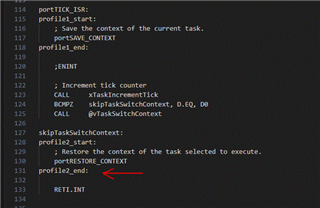
    other info: looking at the map file, the crash happen executing the "profile2_end()" instruction in the portasm.asm file in the SDK

  • Hi

    Other results from experiments ( I don't know if they are usefull):

    if I change the context to the pwm isr (from default context_0 to context_1); code doesn't go in NMI, but the pwm_isr is never serviced and I read

    INT_EPWM1 - Overflowed, Enabled,  Link = 2, ISR = 0x20106AA0, Priority = 20, ContextID = 1

  • Emanuale,

    No need to change the context, that will cause the ISR to not execute (will come back to explain this concept). 

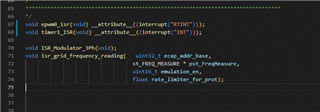
    Can you confirm if all the ISRs are configured through SysConfig and if in board.h, they have the compiler attribute indicating whether it is an INT or RTINT. If the ISRs are not configured through SysConfig, you need to add these to where they are defined in application code. You do not need the attributes in two places, just once is enough (refer here). Something like this...

    __attribute__((interrupt("RTINT"))) - RTINT

    or
    __attribute__((interrupt("INT"))) - INT

    Let me look into this further on my end and try to replicate the issue. 

    Best Regards,

    Aishwarya

  • Hi,

    I can confirm that the code is configured using syscfg.

    I tried also using the "attribute", same result:

    CPU1_PR_PC gives an address that is used in portISR_TICK (freertos)

    Honestly I don't know what to try next.

    Thanks

  • Emanuale,

    Based on the provided information, it looks like the issue could be with the FreeRTOS ISR (potentially all third time). As noted by the Error Aggregator, it's pointing to an illegal instruction in one of the FreeRTOS ISR, specifically the 'RETI.INT', which the exit instruction for an INT ISR. Since this ISR is RTINT, the disassembly code should actually note 'RET.PROT'. Similarly, in the beginning of the RTINT ISR, there should be 'ISR1.PROT || ISR2.PROT'. 

    The reason these necessary instructions are not present in the disassembly is potentially because of what I said in my last answer regarding the attributes. It looks like these FreeRTOS ISR function prototypes were created in a non-SysConfig generated files and need the correct interrupt interrupt attributes.

    This is also applicable for the NMI handler which needs the 'RTINT' compiler attribute which could be causing the PC error you are seeing. The C29x CPU Reference Guide has more details on these assembly instructions and their significance as well. Any SW example using interrupts would showcase how to set them up. Please note, you only need the interrupt attribute once at the first time you declare the ISR function. 

    Here's more information on Context ID: F29H850DM: calification on context

    Best Regards,

    Aishwarya

  • Hi, 

    thanks for you answer:

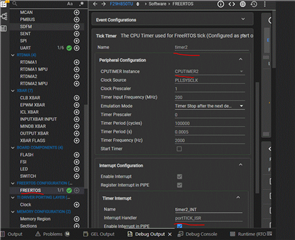
    timer1_ISR IS NOT the isr used for tick in freertos; freertos uses TIMER2.

    For sure init code for TIMER2 (used by freertos) has been generated by syscfg. The code for isr is part of the Kernel source code in the SDK ver 1.0.0.0. provided by TI.

    The priority level for TIMER2 interrupt is 255 so it is an INT not a RTINT.

    The RTINT is the pwm_isr that has prioriy 10.

    All isr now have the __attribute__((interrupt(""))) attribute. 

    I add the interrupt attribute also to NMI, but I have the same result

    Regards

  • Emanuale,

    Would you be able to share your code offline, so I can take a look at this further? Thank you.

    Best Regards,

    Aishwarya

  • I think I could share the firmware, it is a proof of concept and it doesn't reflect the final version used in our product, but I need to verify if we have a valid NDI before.

    Let me check with our TI FAE

  • Emanuale,

    Thank you, I will also look into this further on my end and see if I can replicate the issue.

    Best Regards,

    Aishwarya

  • Emanuale,

    Thank you for sharing your code. Unfortunately, I was unable to build the example due to missing header files and unable to see your ISR implementation, only initial configurations. The interrupt configurations look okay to me, but here are some other ideas to try and settings to look at:

    1. For simplification, I would remove the ESM / NMI configurations in SysConfig and rely on the default NMI handler provided by Driverlib. When the error occurs, just run the error handling scripts in CCS, examine the related registers in registers view, and use the 'NmiStatus' struct in the default NMI handler. Let me know if the values in it look different than before. 
      1. I see that when you have the ESM is added in SysConfig, you are getting the 'ILLEGAL INSTRUCTION' at a RAM address where there should be no valid code, just data. That is why I want to make sure that error is because of these new additions or were always there. 
    2. Verify that the RTINT vector is correctly set up in the vector table (aka PIPE registers) and points to the right handler along with the other configurations.
    3. Examine generated assembly code: Look at the generated assembly code for the EPWM0_ET_INT handler when it's configured as RTINT, focusing on the entry and exit sequences and ensure they include the "ISR1.PROT || ISR2.PROT" and "RETI.RTINT" accordingly. Compare this with the INT version to spot any significant differences.

      1. Verify context save/restore: Ensure that the context save and restore operations are correctly handled for RTINT aka the instructions are there and correct, and I can help review these as well. 
    4. As a test case, if you make the EPWM ISR an INT and one of the other ISRs an RTINT instead does the same issue as you first saw happen?
    5. If you configure all the interrupts as RTINTs, does execution work fine?

    I am asking about these test cases to understand if it is related to the RTINT execution or actually related to how the RTINT interacts with FreeRTOS. Let me try to reproduce the issue on my end with and without FreeRTOS.

    Best Regards,

    Aishwarya

  • Hi

    The firmware compiles. You have to use the FLASH configuration.

    I tried the firmware on 3 different PCs and it compiles on each.

    please try again

  • Hi, I added a new doc on the sharepoint where I answer to your previous questions : F29H85x error analisys.docx

    I answered to all questions except point2: please clarify how to do that.

    We can also use this document to exchange more detailed info.

    In any case, the code in the sharepoint works. As I told you in my previous answer, you have to use the FLASH configuration. RAM configuration is out of date and it has not all the folder paths needed.

    Another thing: I tried also to create a baremetal version of the code (removing freertos); in this way the code works.

  • Emanuale,

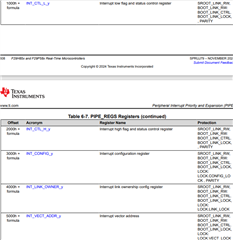
    For number #2, does the PIPE registers indicate the ISR points to the right handler, links, etc. aka the following information below in register view. 

    Also, since we know the code works without FreeRTOS, in the FreeRTOS implementation, can you confirm if there are any float regs in any of the tasks? If yes, that needs to be declared at the top of the task function. This could impact the way the code is compiled.

    Best Regards,

    Aishwarya

  • Hi 

    After updating the SDK with the patch for freertos portTICK_Isr in the port.asm file, the code runs properly!

    The patch solve this issue.

    Thank you for the support