Part Number: TMS320F28379D
Tool/software:
Greetings,
We received a Warning labeled #551-D. Is there a way to tell CCS to treat that as an error instead?
Thank you,
Ed
This thread has been locked.
If you have a related question, please click the "Ask a related question" button in the top right corner. The newly created question will be automatically linked to this question.
Part Number: TMS320F28379D
Tool/software:
Greetings,
We received a Warning labeled #551-D. Is there a way to tell CCS to treat that as an error instead?
Thank you,
Ed
One way is to use the build option --diag_error=551. For the details, and other ways to do it, please search the C28x compiler manual for the sub-chapter titled Understanding Diagnostic Messages and the sub-chapter titled The Diagnostic Message Pragmas.
Thanks and regards,
-George
Good info George. Thank you.
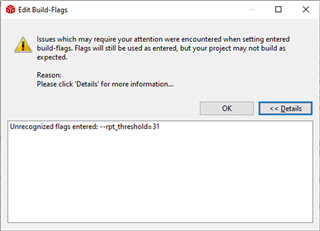
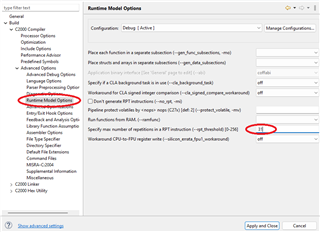
I entered --diag_error=551 from Properties->Build->C2000 Compiler, and then the Edit Flags... button. It was placed at the end of the list of properties. When I clicked OK, I received the following dialog box. I could see that the --diag_error is there. I canceled out of that and looked at the flags before entering the --diag_error, and I can see that the rpt_threshold was already there. We are currently using CCS10.4 and Compiler v20.2.5.LTS. The documentation you cited above doesn't show it as obsolete. Is this something which has become outdated and we carried it forward over time? Should I simply remove it?

Thank you,
Ed
Avoid ...
Properties->Build->C2000 Compiler, and then the Edit Flags... button
That's for compiler options not available elsewhere in the dialog. It is rare to use it.
For --diag_error, try ...

For --rpt_threshold, try ...

To learn how to find other compiler options in the CCS build dialog, please see the article Finding Compiler Options in CCS.
Thanks and regards,
-George