This thread has been locked.

If you have a related question, please click the "Ask a related question" button in the top right corner. The newly created question will be automatically linked to this question.

TMS320F280049C: CCS output format for Uniflash

Part Number: TMS320F280049C
Other Parts Discussed in Thread: UNIFLASH, TMS320F28035

Tool/software:

Hi,

I am using Uniflash to flash my device with success, it can verify the flashed image by debugger and all works fine.

All the above using the default file format ".out". 

I would like to generate an ".hex" file from CCS to be used by Uniflash but after many attempt I am asking help.

I tried all the possible formats from CCS (ihex, m2, m3, tihex, ...) but all failed.

is it simply not possible?

Thanks in advance.

Luca Pizzini

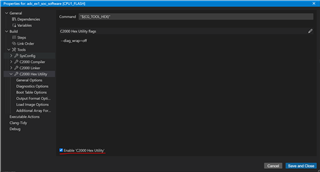
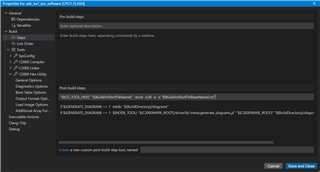
  • Hi Luca, the ".hex" format can be generated in CCS for Uniflash usage by enabling the C2000 Hex Utility and adding the post-build steps in the Build->steps category:

    "${CG_TOOL_HEX}" "${BuildArtifactFileName}" -boot -sci8 -a -o "${BuildArtifactFileBaseName}.txt"

    Also for reference there is a section mentioned in the Serial Flash Programming of C2000 Microcontrollers ROM Bootloader section containing this line.

    With this, you should be able to load the .hex file through UniFlash.

    Thanks and regards,

    Charles

  • Hello Charles,

    I tried your suggestions but failed, sorry. Where am I wrong?

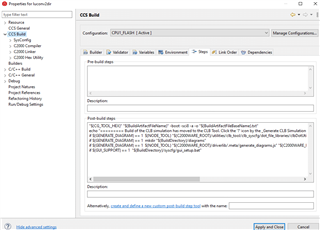
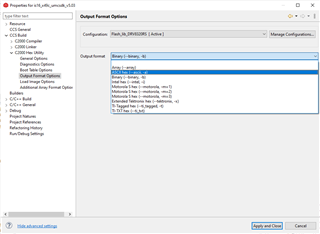
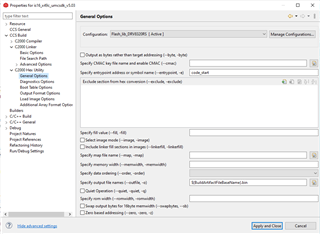
    Here the CCS settings, I added the top line in post-build. Must I remove the rest?

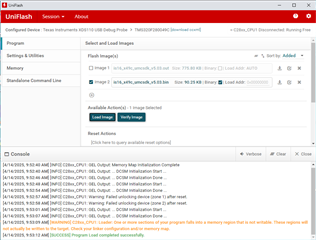
    Here is the error from Uniflash on the first byte/word.

    And here the files I get from CCS.

    Using the .out file all works fine. May be I do not uderstand something.

    Waiting for your guidance,

    Best Regards

    Luca

  • Hi Luca,

    Perhaps UniFlash expects (*.bin) file when bin box is checked. That requires fewer steps to modify project properties, using the hex utility also adding build steps string. Our understanding was the hex utility produces --map output codes and other post build hex output formats. UniFlash go to project properties add to CCS build steps tab, post build steps entry below string. Seem to recall another check box (create bin output) may have to be checked somewhere in project properties. Had tested this string with C2000 MCU several months ago and it seems to work fine.

     "${CCE_INSTALL_ROOT}/utils/tiobj2bin/tiobj2bin" "${BuildArtifactFileName}" "${BuildArtifactFileBaseName}.bin" "${CG_TOOL_ROOT}/bin/armofd" "${CG_TOOL_ROOT}/bin/armhex" "${CCE_INSTALL_ROOT}/utils/tiobj2bin/mkhex4bin"

    Later modified:

    "${CCS_INSTALL_ROOT}/utils/tiobj2bin/mkhex4bin.exe" "${BuildArtifactFileName}" "${BuildArtifactFileBaseName}.bin" "${CCS_TOOL_ROOT}/bin/hex2000.exe" "${CCS_INSTALL_ROOT}/utils/tiobj2bin/mkhex4bin.exe"

  • Hi Gentaco,

    I do not understand what you mean. Now I tried to generate a bin file. I found an output bin format into the hex utility section but failed to verify on flash.

    Is there a problem with hex utility?

    My goal would be (nice to have) to generate a text output file easy to read and store and compare.

    I am thinking for example to intel hex format or motorola srec etc.

    Is there a way (hope simple way) to do this?

    Just to better explain my goal: With older TMS320F28035 we produce a .hex file and program the flash in production line using Elprotronic, a thirdy part programmer. But it does not support F280049. So now I will use olimex (XDS100v3 USB Debug Probe) with Uniflash and it works fine but only with .out file from CCS.

    Thank you

    Luca

  • The build option steps string was for ARM MCU oddly it worked with C2000. Seemingly the string needs to be changed to use hex2000 in the CCS tool root, So ti0bj2bin creates a new batch file for the post build string. Seems the CG_TOOL_ROOT may have an incorrect file name. Check out the new batch file TiHex2Bin created in CCS utils folder. Have to test UniFlash with *.bin file it created. Funny thing is the Armofd format seemed to work with x49c MCU via UniFlash with bin check box selected or maybe it reverted back to *.out without warning message.  Note I changed the post build string to use hex2000.exe. 

    "${CCS_INSTALL_ROOT}/utils/tiobj2bin/mkhex4bin.exe" "${BuildArtifactFileName}" "${BuildArtifactFileBaseName}.bin" "${CCS_TOOL_ROOT}/bin/hex2000.exe" "${CCS_INSTALL_ROOT}/utils/tiobj2bin/mkhex4bin.exe"

    @echo off
    rem ========================================================================== 
    rem tiobj2bin.bat - Converts TI object file from COFF or ELF to binary
    rem     dump format.  Intended for use as a post-build step in CCS.
    rem
    rem This code released under a license detailed at the end of this file.
    rem
    rem Invoke: tiobj2bin file.out file.bin [ofd] [hex] [mkhex]
    rem
    rem file.out - The TI .out file to convert to binary.  Can be COFF or ELF.
    rem file.bin - Name the binary output file
    rem ofd      - The object file display (ofd) utility command to invoke, with
    rem            path info as needed.  If not given, defaults to ofd470.
    rem hex      - The hex utility command to invoke, with path info as needed.
    rem            If not given, defaults to hex470.
    rem mkhex    - A custom utility which takes XML from OFD and outputs the hex
    rem            command file needed for the hex utility.  Path info is given
    rem            as needed.  If not given, defaults to mkhex4bin.  
    rem
    rem You may need to put "quotes" around the parameters.
    rem
    rem Here is an example of how this file is invoked as a post-build step in
    rem CCSv7
    rem
    rem "${CCS_INSTALL_ROOT}/utils/tiobj2bin/tiobj2bin" "${BuildArtifactFileName}" "${BuildArtifactFileBaseName}.bin" "${CG_TOOL_ROOT}/bin/ofd2000" "${CG_TOOL_ROOT}/bin/hex2000" "${CCS_INSTALL_ROOT}/utils/tiobj2bin/mkhex4bin"
    rem
    rem Be sure to replace ofd2000 and hex2000 with the respective binaries for
    rem your device, for example, ofd6x and hex6x(for c6000) or armofd and armhex 
    rem (for ARM).
    rem ========================================================================== 
    
    rem ========================================================================== 
    rem Presumptions: 
    rem - Unless directory path info is provided as part of the parameter name, 
    rem   ofd470 and friends are in the system path
    rem ========================================================================== 
    
    rem ========================================================================== 
    rem Do not remember variables set in this batch file
    rem ========================================================================== 
    setlocal
    
    rem ========================================================================== 
    rem Handle command line args
    rem ========================================================================== 
    if "%~1" == "" (
       echo Usage: %~n0 file.out file.bin [ofd] [hex] [mkhex]
       exit /b
    )
    set outfile=%1
    
    if "%~2" == "" (
       echo Usage: %~n0 file.out file.bin [ofd] [hex] [mkhex]
       exit /b
    )
    set binfile=%2
    
    set ofdcmd=ofd470
    if not "%~3" == "" set ofdcmd=%3
    set hexcmd=hex470
    if not "%~4" == "" set hexcmd=%4
    set mkhexcmd=mkhex4bin
    if not "%~5" == "" set mkhexcmd=%5
    
    rem ========================================================================== 
    rem To make testing easier, an additional 6th parameter for specifying running
    rem Perl is available.  Now an executable version of the script is not
    rem required.  Not documented externally.  Everyone will invoke the full
    rem executable version of mkhex4bin.  Serves 2 purposes: Whether to execute
    rem perl, and how to execute it.
    rem ========================================================================== 
    set perlcmd=none
    if not "%~6" == "" set perlcmd=%6
    
    rem ========================================================================== 
    rem Binary files are impractical for device architectures that do not have
    rem one linear range of memory.  At this time these are: PRU, C5500, C5400.
    rem The for loop is a bit weird.  The DOS operator for stripping off path
    rem name info can only be applied in a few places.  One of them is the 
    rem iterating variable in a for loop.  
    rem ========================================================================== 
    for %%a in (%ofdcmd%) do (
       set base_ofdcmd=%%~na
    )
    
    if %base_ofdcmd% == ofdpru (
       echo Binary files do not work for PRU
       exit /b
    )
    
    if %base_ofdcmd% == ofd55 (
       echo Binary files do not work for C5500
       exit /b
    )
    
    if %base_ofdcmd% == ofd500 (
       echo Binary files do not work for C5400
       exit /b
    )
    
    rem ========================================================================== 
    rem C2000 EABI files are not supported.  This code uses ofd2000 to search the
    rem file header to determine whether it is an ELF file or not.  All the output
    rem of that command, including any error diagnostics, is thrown away.  For the
    rem details of how this works, Internet search the commands used.
    rem ========================================================================== 
    if %base_ofdcmd% == ofd2000 (
       setlocal enabledelayedexpansion
       %ofdcmd% --obj_display=none,header %outfile% | findstr/c:" ELF " > nul 2>&1
       if !errorlevel! equ 0 (
          echo C28x files built with --abi=eabi are not supported
          exit /b
       )
       setlocal disabledelayedexpansion
    )
    
    rem ========================================================================== 
    rem Possibly change the OFD and HEX commands.  See make_exe_work for details.
    rem ========================================================================== 
    call :make_exe_work %ofdcmd% ofd470 armofd
    set ofdcmd=%final_cmd%
    call :make_exe_work %hexcmd% hex470 armhex
    set hexcmd=%final_cmd%
    
    rem ========================================================================== 
    rem Compose temporary file names used for ofd and hex cmds
    rem    Run "set /?" to see documentation of %random%
    rem ========================================================================== 
    set xmltmp=%TMP%\ofd_%random%_%random%_%random%.xml
    set hextmp=%TMP%\hexcmd_%random%_%random%_%random%.tmp
    
    rem ========================================================================== 
    rem Paranoid checks on the temp files
    rem ========================================================================== 
    if exist "%xmltmp%" (
       echo XML temp file exists. Giving up.
       exit /b
    )
    
    if exist "%hextmp%" (
       echo HEX temp file exists. Giving up.
       exit /b
    )
    
    rem ========================================================================== 
    rem 1. Create the XML from the .out file
    rem 2. Create the hex command file from the XML
    rem 3. Create the binary from the .out file and hex file
    rem ========================================================================== 
    %ofdcmd% -x --xml_indent=0 --obj_display=none,sections,header,segments %outfile% > %xmltmp%
    
    if %perlcmd% == none (
       %mkhexcmd% %xmltmp% > %hextmp%
    ) else (
       %perlcmd% %mkhexcmd% %xmltmp% > %hextmp%
    )
    
    if not %errorlevel% equ 0 (
       echo %mkhexcmd% failure occurred.  Giving up.
       exit /b
    )
    
    %hexcmd% -q -b -image -o %binfile% %hextmp% %outfile%
    
    rem ========================================================================== 
    rem Uncomment to debug
    rem ========================================================================== 
    rem type %hextmp%
    
    rem ========================================================================== 
    rem Remove the temp files
    rem ========================================================================== 
    del %xmltmp%
    del %hextmp%
    
    goto :EOF
    
    
    rem ========================================================================== 
    rem ========================================================================== 
    rem FUNCTION: make_exe_work
    rem If ofd470 is requested, but armofd is what is available, then change it.
    rem Also works for hex470/armhex.  Works the other way too, i.e. ofd470
    rem to armofd.
    rem %1 Original command that may be changed
    rem %2 The old command name, i.e. ofd470 or hex470
    rem %3 The new command name, i.e. armofd or armhex
    rem Result is assigned to %final_cmd%
    rem ========================================================================== 
    rem ========================================================================== 
    :make_exe_work
    
    rem ========================================================================== 
    rem The effect of these statements is to parse the orignal command into the
    rem path and file name parts.  Run "call /?" to see what %~dp1 etc means.
    rem Keep path drive letter, and ignore file name extension
    rem ========================================================================== 
    set orig_cmd=%1
    set orig_cmd_path=%~dp1
    set orig_cmd_name=%~n1
    
    set oldname=%2
    set newname=%3
    
    set final_cmd=%orig_cmd%
    
    rem ========================================================================== 
    rem If the command is not ofd470, hex470, armofd, armhex then skip everything
    rem ========================================================================== 
    if %orig_cmd_name%==%oldname% goto NEED_TO_CHECK
    if %orig_cmd_name%==%newname% goto NEED_TO_CHECK
    goto :EOF
    
    :NEED_TO_CHECK
    
    rem ========================================================================== 
    rem If the command works now, we're done.  First, see if the file exists.
    rem Second, see if the command is on the system path.
    rem ========================================================================== 
    if exist %final_cmd% goto :EOF
    if exist %final_cmd%.exe goto :EOF
    where %final_cmd% > NUL 2>&1
    if %errorlevel% equ 0 goto :EOF
    
    rem ========================================================================== 
    rem Change the base cmd name from old to new, or vice versa
    rem ========================================================================== 
    if %orig_cmd_name%==%oldname% (
      set final_cmd_name=%newname%
    ) else  ( 
      set final_cmd_name=%oldname%
    ) 
    
    rem ========================================================================== 
    rem If the cmd path is the same as the current directory, then no path info
    rem was given.  The final cmd is the same as the base cmd.  Otherwise, 
    rem concatenate the original path with the new base cmd name.
    rem ========================================================================== 
    if %orig_cmd_path%==%~dp0 (
      set final_cmd=%final_cmd_name%
    ) else (
      set final_cmd=%orig_cmd_path%%final_cmd_name%
    )
    
    rem ========================================================================== 
    rem Test final_cmd again.  If it doesn't work now, issue an error message.
    rem ========================================================================== 
    if exist %final_cmd% goto :EOF
    if exist %final_cmd%.exe goto :EOF
    where %final_cmd% > NUL 2>&1
    if %errorlevel% equ 0 goto :EOF
    
    echo tiobj2bin.bat failed on %orig_cmd%
    echo Please see http://processors.wiki.ti.com/index.php/Tiobj2bin_Failed
    
    goto :EOF
    
    
    rem /*
    rem *
    rem * Copyright (C) 2011 Texas Instruments Incorporated - http://www.ti.com/ 
    rem * 
    rem * 
    rem *  Redistribution and use in source and binary forms, with or without 
    rem *  modification, are permitted provided that the following conditions 
    rem *  are met:
    rem *
    rem *    Redistributions of source code must retain the above copyright 
    rem *    notice, this list of conditions and the following disclaimer.
    rem *
    rem *    Redistributions in binary form must reproduce the above copyright
    rem *    notice, this list of conditions and the following disclaimer in the 
    rem *    documentation and/or other materials provided with the   
    rem *    distribution.
    rem *
    rem *    Neither the name of Texas Instruments Incorporated nor the names of
    rem *    its contributors may be used to endorse or promote products derived
    rem *    from this software without specific prior written permission.
    rem *
    rem *  THIS SOFTWARE IS PROVIDED BY THE COPYRIGHT HOLDERS AND CONTRIBUTORS 
    rem *  "AS IS" AND ANY EXPRESS OR IMPLIED WARRANTIES, INCLUDING, BUT NOT 
    rem *  LIMITED TO, THE IMPLIED WARRANTIES OF MERCHANTABILITY AND FITNESS FOR
    rem *  A PARTICULAR PURPOSE ARE DISCLAIMED. IN NO EVENT SHALL THE COPYRIGHT 
    rem *  OWNER OR CONTRIBUTORS BE LIABLE FOR ANY DIRECT, INDIRECT, INCIDENTAL, 
    rem *  SPECIAL, EXEMPLARY, OR CONSEQUENTIAL DAMAGES (INCLUDING, BUT NOT 
    rem *  LIMITED TO, PROCUREMENT OF SUBSTITUTE GOODS OR SERVICES; LOSS OF USE,
    rem *  DATA, OR PROFITS; OR BUSINESS INTERRUPTION) HOWEVER CAUSED AND ON ANY
    rem *  THEORY OF LIABILITY, WHETHER IN CONTRACT, STRICT LIABILITY, OR TORT 
    rem *  (INCLUDING NEGLIGENCE OR OTHERWISE) ARISING IN ANY WAY OUT OF THE USE 
    rem *  OF THIS SOFTWARE, EVEN IF ADVISED OF THE POSSIBILITY OF SUCH DAMAGE.
    rem *
    rem */


  • UniFlash loaded the binary file with a memory section warning though the application is running.

  • Thanks Gentaco,

    so I understand that there is no a way to have any text format like: intel hex or srec o ti.txt  etc.

    Am I right?

    Luca

  • Hi Luca try ASCII file format.?

  • Hi Luca,

    As Genatco has stated, were you unable to uncheck the "binary" checkbox once the image has been selected for CPU load? As well as changing the file format to .txt format?

    Thanks and regards,

    Charles

  • The compiler ofd2000.exe and hexC2000.exe seems to only support COF builds according to the tiobj2bin.bat file REM text. Yet the post build option string makes *.bin file for EABI but will not boot from the same code_start address (0x00081000) as *.out file used for UniFlash. The *.bin seems to be missing higher flash address data detailed in x49c_flash_cpu.cmd file. Seems the image symbols are required for the application to work correctly with several #pragma sections EABI builds. This same hex *.bin build method works perfectly for ARM Cortex builds with #pragma data sections. Seemingly mkhex4bin.exe needs to be updated to handle EABI C2000 builds.

    "${CCS_INSTALL_ROOT}/utils/tiobj2bin/tiobj2bin" "${BuildArtifactFileName}" "${BuildArtifactFileBaseName}.bin" "${CG_TOOL_ROOT}/bin/ofd2000" "${CG_TOOL_ROOT}/bin/hex2000" "${CCS_INSTALL_ROOT}/utils/tiobj2bin/mkhex4bin"

    Seemingly UniFlash *.bin write actually failed or the ofdArm.exe somehow worked for C2000 MCU hex build, doubtful! 

  • Yes, I am able to check and uncheck the "binary" flag but when checked as binary I must set the start address to 0x80000 and fail the verify (I didn't re program the flash).

    However this is all too complicated.

    I tried all the available format without success and now I give up.

    So I will go on with the image.out file format closing this issue.

    Thank you for your try

    Best Regards

    Luca

  • So I will go on with the image.out file format closing this issue

      Seemingly Sys-Config resource makes it even more complicated to produce post binary output. UniFlash appears to be combining flash sections for binary files even when the Hex utility directive is set false below. It would seem the symbols should be included in the image file and not select image mode check box on General page or compiler errors ROM directive must be set. However (--rom_model) already exist in linker directives makes no sense.

      Seems we don't need to add post build steps when using Hex utility to create C2000 binary. Hex utility can produce map file of CMD sections in the binary image, e.g. C:\MyDocumentsPath\MyHex.map file. UniFlash the binary to same address *.out displayed Verbose, typically code start address was 0x00081000 for *.out file. With or without symbols no soft reset flash boot occurs.

    It would be nice to get binary file to work with UniFlash  x49c MCU. The binary fails to code_start: jmp _c_Init and main.c  never executes.

    Building secondary target: "is16_x49c_umcsdk_v5.03.bin"
    Invoking: C2000 Hex Utility
    "C:/ti/ccs1220/ccs/tools/compiler/ti-cgt-c2000_21.6.0.LTS/bin/hex2000" --entrypoint=code_start --linkerfill --map="C:/Users/WIN7/Documents/CCS12.2_WorkSpace/is16_x49c_umcsdk_v5.03/Flash_lib_DRV8320RS/c2000_hex_binary.map" --diag_wrap=off --binary --load_image --load_image:combine_sections=false --load_image:endian=little --load_image:file_type=executable --load_image:format=elf --load_image:machine=C2000 --load_image:output_symbols=true --load_image:symbol_binding=global -o "is16_x49c_umcsdk_v5.03.bin" "is16_x49c_umcsdk_v5.03.out"
    Translating to Load Image format...
    "is16_x49c_umcsdk_v5.03.out" codestart ==> codestart
    "is16_x49c_umcsdk_v5.03.out" .text ==> .text
    "is16_x49c_umcsdk_v5.03.out" .TI.ramfunc ==> .TI.ramfunc
    "is16_x49c_umcsdk_v5.03.out" .const ==> .const
    "is16_x49c_umcsdk_v5.03.out" .cinit ==> .cinit
    Finished building secondary target: "is16_x49c_umcsdk_v5.03.bin"

    warning: -memwidth is invalid when using --load_image (ignored)

    ********************************************************************************
    TMS320C2000 Hex Converter                                                v21.6.0
    ********************************************************************************
    
    INPUT FILE NAME: <is16_x49c_umcsdk_v5.03.out>
    OUTPUT FORMAT:   Load Image
    
    PHYSICAL MEMORY PARAMETERS
       Default data width   :  16
       Default memory width :   8 (LS-->MS)
       Default output width :   8
    
    OUTPUT FILE: is16_x49c_umcsdk_v5.03.bin
    
    OUTPUT TRANSLATION MAP
    --------------------------------------------------------------------------------
    00000800..0000088b  Page=0  Memory Width=16  ROM Width=16  "hal_data"
    --------------------------------------------------------------------------------
       OUTPUT SECTION: hal_data
    --------------------------------------------------------------------------------
    00000918..00000997  Page=0  Memory Width=16  ROM Width=16  ".bss"
    --------------------------------------------------------------------------------
       OUTPUT SECTION: .bss
    --------------------------------------------------------------------------------
    00000a18..00000ac4  Page=0  Memory Width=16  ROM Width=16  ".data"
    --------------------------------------------------------------------------------
       OUTPUT SECTION: .data
    --------------------------------------------------------------------------------
    0000e800..0000e875  Page=0  Memory Width=16  ROM Width=16  "AdcaRegsFile"
    --------------------------------------------------------------------------------
       OUTPUT SECTION: AdcaRegsFile
    --------------------------------------------------------------------------------
    00010000..000100a1  Page=0  Memory Width=16  ROM Width=16  ".TI.noinit"
    --------------------------------------------------------------------------------
       OUTPUT SECTION: .TI.noinit
    --------------------------------------------------------------------------------
    0001a000..0001a2cf  Page=0  Memory Width=16  ROM Width=16  "foc_data"
    --------------------------------------------------------------------------------
       OUTPUT SECTION: foc_data
    --------------------------------------------------------------------------------
    0001a600..0001a71d  Page=0  Memory Width=16  ROM Width=16  "user_data"
    --------------------------------------------------------------------------------
       OUTPUT SECTION: user_data
    --------------------------------------------------------------------------------
    0001c000..0001c5a7  Page=0  Memory Width=16  ROM Width=16  "est_data"
    --------------------------------------------------------------------------------
       OUTPUT SECTION: est_data
    --------------------------------------------------------------------------------
    0001e000..0001efff  Page=0  Memory Width=16  ROM Width=16  ".stack"
    --------------------------------------------------------------------------------
       OUTPUT SECTION: .stack
    --------------------------------------------------------------------------------
    00100000..00100001  Page=0  Memory Width=16  ROM Width=16  "codestart"
    --------------------------------------------------------------------------------
       OUTPUT SECTION: codestart
       CONTENTS: 00100000..00100001   is16_x49c_umcsdk_v5.03.out(codestart) Data Width=2   
    
    --------------------------------------------------------------------------------
    00102000..0010a3d9  Page=0  Memory Width=16  ROM Width=16  ".text"
    --------------------------------------------------------------------------------
       OUTPUT SECTION: .text
       CONTENTS: 00102000..0010a3d9   is16_x49c_umcsdk_v5.03.out(.text) Data Width=2   
    
    --------------------------------------------------------------------------------
    001127c0..0011442f  Page=0  Memory Width=16  ROM Width=16  ".TI.ramfunc"
    --------------------------------------------------------------------------------
       OUTPUT SECTION: .TI.ramfunc
       CONTENTS: 001127c0..0011442f   is16_x49c_umcsdk_v5.03.out(.TI.ramfunc) Data Width=2   
    
    --------------------------------------------------------------------------------
    001160a0..0011742d  Page=0  Memory Width=16  ROM Width=16  ".const"
    --------------------------------------------------------------------------------
       OUTPUT SECTION: .const
       CONTENTS: 001160a0..0011742d   is16_x49c_umcsdk_v5.03.out(.const) Data Width=2   
    
    --------------------------------------------------------------------------------
    001187c0..00118863  Page=0  Memory Width=16  ROM Width=16  ".cinit"
    --------------------------------------------------------------------------------
       OUTPUT SECTION: .cinit
       CONTENTS: 001187c0..00118863   is16_x49c_umcsdk_v5.03.out(.cinit) Data Width=2   
    

  • Hi Gentaco, thanks for your help.

    I have configured the "Hex Utility" as your image.

    Result: success.

    The CCS now produce two files, the .out  (380K) and the .hex (129K).

    Both files can program e verify the flash via Uniflash.

    But

    the .hex file is a binary file less big than .out file, so to me are almost the same.

    What you think about it?

  • Both files can program e verify the flash via Uniflash.

    Hi Luca,

    Right also had to remove the post C2000 build step, simply would not run from the Root alias names under general links. The binary is always smaller than out file since CCS debug symbols are removed. 

    Oddly the binary file application would not run after flashing start address 0x00080000 or 0x00081000. Odd part is UniFlash (auto) does not do sequential flash access writes as one might expect it should. Actually, starts flashing address 0x00081000 later appends 4 words 0x0008000 near the end. Then jumps up too flash 2 more higher addresses appending 4 words, very bazar behavior. Even excluded DCSM files from the build hoping to speed up UniFalsh, no help.

    Update: Auto flash *.out has symbols, application runs after soft or hard reset. Also tested binary image with symbols added, no boot too main.c persists. CCS debug *.bin file run shows, codestart symbol Not found and or main symbol Not found. Perhaps we have to tell UniFlash the memory sections to ignore?

    Make sure to browse for *.bin file and add into the flashing profile, not just check bin box *.out.

    Auto *.out flashing:

    [4/16/2025, 8:51:38 AM] [INFO] C28xx_CPU1: GEL Output: Memory Map Initialization Complete
    [4/16/2025, 8:51:38 AM] [INFO] C28xx_CPU1: GEL Output: ... DCSM Initialization Start ...
    [4/16/2025, 8:51:44 AM] [INFO] C28xx_CPU1: GEL Output: ... DCSM Initialization Done ...
    [4/16/2025, 8:51:46 AM] [INFO] C28xx_CPU1: GEL Output: ... DCSM Initialization Start ...
    [4/16/2025, 8:51:52 AM] [INFO] C28xx_CPU1: GEL Output: ... DCSM Initialization Done ...
    [4/16/2025, 8:51:55 AM] [INFO] C28xx_CPU1: Warning: Failed unlocking device (zone 1) after reset.
    [4/16/2025, 8:51:56 AM] [INFO] C28xx_CPU1: Warning: Failed unlocking device (zone 2) after reset.
    [4/16/2025, 8:51:59 AM] [INFO] C28xx_CPU1: GEL Output: ... DCSM Initialization Start ...
    [4/16/2025, 8:52:05 AM] [INFO] C28xx_CPU1: GEL Output: ... DCSM Initialization Done ...
    [4/16/2025, 8:52:06 AM] [INFO] C28xx_CPU1: Writing Flash @ Address 0x00081000 of Length 0x00003ff8 (page 0)
    [4/16/2025, 8:52:07 AM] [INFO] C28xx_CPU1: GEL Output: ... DCSM Initialization Start ...
    [4/16/2025, 8:52:13 AM] [INFO] C28xx_CPU1: GEL Output: ... DCSM Initialization Done ...
    [4/16/2025, 8:52:20 AM] [INFO] C28xx_CPU1: PLL configuration status = 1. PLL configured successfully.
    [4/16/2025, 8:52:23 AM] [INFO] C28xx_CPU1: Erasing Flash Bank 0, Sector 1
    [4/16/2025, 8:52:25 AM] [INFO] C28xx_CPU1: Erasing Flash Bank 0, Sector 2
    [4/16/2025, 8:52:26 AM] [INFO] C28xx_CPU1: Erasing Flash Bank 0, Sector 3
    [4/16/2025, 8:52:28 AM] [INFO] C28xx_CPU1: Erasing Flash Bank 0, Sector 4
    [4/16/2025, 8:52:33 AM] [INFO] C28xx_CPU1: Writing Flash @ Address 0x00084ff8 of Length 0x00003ff8 (page 0)
    [4/16/2025, 8:52:34 AM] [INFO] C28xx_CPU1: Erasing Flash Bank 0, Sector 5
    [4/16/2025, 8:52:35 AM] [INFO] C28xx_CPU1: Erasing Flash Bank 0, Sector 6
    [4/16/2025, 8:52:37 AM] [INFO] C28xx_CPU1: Erasing Flash Bank 0, Sector 7
    [4/16/2025, 8:52:38 AM] [INFO] C28xx_CPU1: Erasing Flash Bank 0, Sector 8
    [4/16/2025, 8:52:44 AM] [INFO] C28xx_CPU1: Writing Flash @ Address 0x00088ff0 of Length 0x000003ea (page 0)
    [4/16/2025, 8:52:45 AM] [INFO] C28xx_CPU1: Erasing Flash Bank 0, Sector 9
    [4/16/2025, 8:52:46 AM] [INFO] C28xx_CPU1: Data has been buffered at the end of the current data block for 64-bit aligned writes.
    [4/16/2025, 8:52:49 AM] [INFO] C28xx_CPU1: Writing Flash @ Address 0x000893e0 of Length 0x00001c70 (page 0)
    [4/16/2025, 8:52:49 AM] [INFO] C28xx_CPU1: Erasing Flash Bank 0, Sector 10
    [4/16/2025, 8:52:51 AM] [INFO] C28xx_CPU1: Erasing Flash Bank 0, Sector 11
    [4/16/2025, 8:52:56 AM] [INFO] C28xx_CPU1: Writing Flash @ Address 0x0008b050 of Length 0x0000138e (page 0)
    [4/16/2025, 8:52:57 AM] [INFO] C28xx_CPU1: Erasing Flash Bank 0, Sector 12
    [4/16/2025, 8:52:58 AM] [INFO] C28xx_CPU1: Data has been buffered at the end of the current data block for 64-bit aligned writes.
    [4/16/2025, 8:53:01 AM] [INFO] C28xx_CPU1: Writing Flash @ Address 0x0008c3e0 of Length 0x000000a4 (page 0)
    [4/16/2025, 8:53:03 AM] [INFO] C28xx_CPU1: Writing Flash @ Address 0x00080000 of Length 0x00000002 (page 0)
    [4/16/2025, 8:53:04 AM] [INFO] C28xx_CPU1: Erasing Flash Bank 0, Sector 0
    [4/16/2025, 8:53:05 AM] [INFO] C28xx_CPU1: Data has been buffered at the end of the current data block for 64-bit aligned writes.
    [4/16/2025, 8:53:05 AM] [INFO] C28xx_CPU1: Writing buffered data @ Address 0x00080000 of Length 0x00000004
    [4/16/2025, 8:53:08 AM] [INFO] C28xx_CPU1: Writing buffered data @ Address 0x000893D8 of Length 0x00000004
    [4/16/2025, 8:53:10 AM] [INFO] C28xx_CPU1: Writing buffered data @ Address 0x0008C3DC of Length 0x00000004
    [4/16/2025, 8:53:13 AM] [SUCCESS] Program Load completed successfully.
  • Hi Gentaco,

    my application seems to run once programmed via Uniflash.

    However tomorrow we are closed for about 2 weeks.

    I would like to know if this trouble is present just for F280049 or with the whole C2000 family?

    I hope a new version of CCS can solve all this in a simple way for users like me. 

    I mean with a simple GUI setting.

    I'll be back in 2 weeks.

    Best Regards

    Luca Pizzini

  • Hi Luca,

    Good to hear, we will take this into account with our team. Also thanks Genatco for helping to resolve the issue. 

    Best Regards,

    Charles