


Part Number: TMDSCNCD28388D
Tool/software:
Hi everyone,
I'm new to TI CCS 20 and recently encountered an issue when importing a simple LED toggle project targeting the C28x_CM system.
Upon importing, I received the following error:
"No TI Arm compilers, supporting device 'XXX', are currently installed"
If you're facing the same issue, here’s a quick fix that worked for me:
How to Fix It
-
Download the TI ARM Compiler
Visit the official TI download page:
https://www.ti.com/tool/ARM-CGT -
Install to the correct path
Recommended path: -
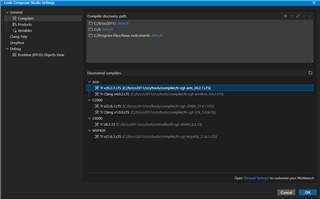
Verify installation in CCS
Go to:
Menubar → Window → Preferences → Code Composer Studio → Build → Compilers
You should now see the ARM compiler listed. -
Done!

The project should now import and build without any issues.
Is there an official TI-recommended way to resolve this issue automatically during project import or CCS installation?
It seems quite common—just wondering if I missed a checkbox during setup or if it's a known gap.
Thanks in advance for any insights!
