


Other Parts Discussed in Thread: TMS320F28388D, C2000WARE
Tool/software:
I am using this command in CCS 20.1.1
ccs-server-cli -noSplash -workspace "C:/Aditya2026/CCS_Project_Open_Issue" -application com.ti.ccs.apps.createProject -ccs.name "CCS_Project_Open_Issue29x" -ccs.device "TMS320F28388D" -ccs.outputFormat "ELF" -ccs.toolChain "TI" -ccs.toolVersion "22.6.0.LTS" -ccs.configurations "CPU1_FLASH" -ccs.definePathVariable "C2000WAREINSTALLDIR" "C:/ti/c2000/C2000Ware_5_02_00_00" -ccs.definePathVariable "CCSProjectFolder" "C:/Aditya2026/CCS_Project_Open_Issue/CCS_Project_Open_Issue29x_ert_rtw/CCS_Project"-ccs.setCompilerOptions "--abi=eabi -s -v28 -ml --abi=eabi -I$(TI_INCLUDE) --large_memory_model -v28 --float_support=fpu64 -ml --idiv_support=idiv0 -DF28388D -DCPU1 -DMW_CPU1 -DBOOT_FROM_FLASH=1 --tmu_support=tmu0 --fp_mode=relaxed -DSHIFT_IQMATH_RAMFUNCS -DCPU_RAMLS_PROG_START=0x8000 -DCPU_RAMLS_PROG_LENGTH=0x1800 -DCLA_RAMLS_PROG_START=0xA800 -DCLA_RAMLS_PROG_LENGTH=0x1800 -DCLA_RAMLS_DATA_START=0x9800 -DCLA_RAMLS_DATA_LENGTH=0x1000" -ccs.setLinkerOptions "--stack_size=1024 --warn_sections --heap_size=1024 --reread_libs --rom_model --priority -mCCS_Project_Open_Issue29x.map --retain=rts2800_fpu64_eabi.lib(.reset) --retain=f2838x_codestartbranch.obj(codestart) --retain=rts2800_fpu32_eabi.lib(.reset) --retain=f2838x_codestartbranch.obj(codestart)" -ccs.linkFile "..\ert_main.c" -ccs.linkFile "C:\ti\c2000\C2000Ware_5_02_00_00\driverlib\f2838x\driverlib\interrupt.c" -ccs.linkFile "C:\ti\c2000\C2000Ware_5_02_00_00\driverlib\f2838x\driverlib\sysctl.c" -ccs.linkFile "W:\39\apahariy.Bembed.j2958533\matlab\toolbox\c2b\tic2000_shared\src\c2838xBoard_Realtime_Support.c" -ccs.linkFile "W:\39\apahariy.Bembed.j2958533\matlab\toolbox\c2b\tic2000_shared\src\MW_c28xGlobalInterrupts.c" -ccs.linkFile "W:\39\apahariy.Bembed.j2958533\matlab\toolbox\c2b\tic2000\src\c2838Init.c" -ccs.linkFile "C:\ti\c2000\C2000Ware_5_02_00_00\driverlib\f2838x\driverlib\dma.c" -ccs.linkFile "C:\ti\c2000\C2000Ware_5_02_00_00\device_support\f2838x\common\source\f2838x_cputimers.c" -ccs.linkFile "C:\ti\c2000\C2000Ware_5_02_00_00\device_support\f2838x\common\source\f2838x_defaultisr.c" -ccs.linkFile "C:\ti\c2000\C2000Ware_5_02_00_00\device_support\f2838x\headers\source\f2838x_globalvariabledefs.c" -ccs.linkFile "C:\ti\c2000\C2000Ware_5_02_00_00\device_support\f2838x\common\source\f2838x_piectrl.c" -ccs.linkFile "C:\ti\c2000\C2000Ware_5_02_00_00\device_support\f2838x\common\source\f2838x_pievect.c" -ccs.linkFile "C:\ti\c2000\C2000Ware_5_02_00_00\device_support\f2838x\common\source\f2838x_sysctrl.c" -ccs.linkFile "C:\ti\c2000\C2000Ware_5_02_00_00\device_support\f2838x\common\source\f2838x_usdelay.asm" -ccs.linkFile "C:\ti\c2000\C2000Ware_5_02_00_00\device_support\f2838x\common\source\f2838x_codestartbranch.asm" -ccs.linkFile "C:\ti\c2000\C2000Ware_5_02_00_00\device_support\f2838x\common\source\f2838x_dma.c" -ccs.linkFile "C:\ti\c2000\C2000Ware_5_02_00_00\device_support\f2838x\common\source\f2838x_adc.c" -ccs.linkFile "c2000HardwareTimerConfig.c" -ccs.linkFile "MW_c28xGPIO.c" -ccs.linkFile "C:\ti\c2000\C2000Ware_5_02_00_00\driverlib\f2838x\driverlib\clb.c" -ccs.linkFile "C:\ti\c2000\C2000Ware_5_02_00_00\libraries\dsp\FPU\c28\source\fpu32\utility\memcpy_fast.asm"
this is the command result 
But when I look into CCS 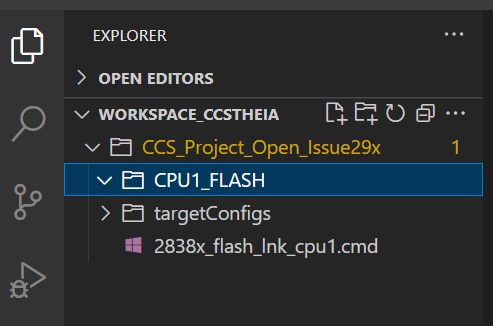
This project is empty and no option to Build.
although when I use the same flags to create the projectspec, it works for CCS 12.6 perfectly fine and build also goes through.
Is there any change in CCS 20.0.0 upwards for the projects configurations?
Regards,
Aditya

