This thread has been locked.

If you have a related question, please click the "Ask a related question" button in the top right corner. The newly created question will be automatically linked to this question.

TMS320F28P659DK-Q1: GUI Composer stand-alone app connection problem

Part Number: TMS320F28P659DK-Q1
Other Parts Discussed in Thread: TMS320F28379D, TMS320F28377S

Tool/software:

I make a GUI Composer. It works online and in CCS debug mode. However, it do es not work stand alone. 
I am not experts to change the ccxml file. Can you help me in a simple way what should I do?

This is the error: 

Also, I should mention that I am using "gcruntime-13.2.0-windows"

  • Hello,

    Sounds like the proper device support may be missing in that version of the runtime. I have brought this thread to the attention of GC experts.

    Thanks

    ki

  • Hi Ki, Reza, 

    gc runtime 13.2.0 does have support for this device. I don't have this exact device that I can test with, but I created a simple GUI Composer app using this device and I got past the ccxml file creation stage as I saw errors attempting to communicate with IcePick. This would be expected since I was using a different device. 

    Reza, 

    Could you check "C:\Users\YourUserID\guicomposer\runtime\gcruntime.v13\version.xml" file to check which version is listed? 

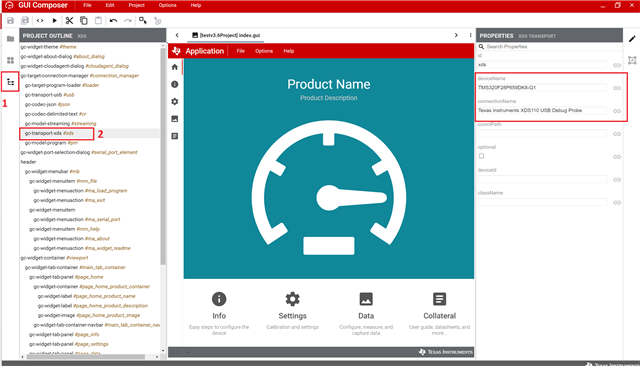
    Secondly, picture below shows my XDS transport settings for simple device, (red boxes and numbers show how to get to XDS transport configuration in GC Designer) could you confirm that this is what you used? 

  • Hi Reza,

    Is your GC application based on GCv2 or GCv3?

    Thanks

    ki

  • Hi Reza, 

    We are guessing that most likely your project is using v2 component library rather than v3 component library. The simplest way to tell them apart is by inspecting the project file structure. Picture below shows two styles of project. the one that has project.json and other files is a v3 component library project. 

    ...


    We found an issue in GC Designer when a v2 component library based application is exported for use on local PC. Once the fix is pushed to dev.ti.com you would need to re-export your application. However, in the meantime you could workaround this issue by editing

    C:\Users\YourUserID\guicomposer\runtime\gcruntime.v13\YourApplicationName\components\ti-core-backplane\ti-core-backplane.html

    Starting at line 2095, comment out line in italic font and add line in bold font

    getSupportedDevicesList: function(){
    var _self = this;
    var location = "/ticloudagent/getConfigInfo?os=" + _self.getOS();
    if (gc.desktop.isDesktop() || gc.desktop.isCCS()){
    //location = window.parent.location.protocol + "//dev.ti.com" + location;
    location = "https:" + "//dev.ti.com" + location;
    }

  • Dear,

    thank you for your answer. It's works with TMS320F28377S but not work with TMS320F28379D.

    I have this message:

    Error generating ccxmlFile: Device TMS320F28379D is not supported

    Regards

  • It's works with TMS320F28377S but not work with TMS320F28379D.

    To confirm, you tried the workaround mentioned by MartinS above but it only worked for the "S" but not the "D"?