This thread has been locked.

If you have a related question, please click the "Ask a related question" button in the top right corner. The newly created question will be automatically linked to this question.

TMDSCNCD28P55X: Problem in running usb examples

Part Number: TMDSCNCD28P55X
Other Parts Discussed in Thread: C2000WARE

Tool/software:

Hello,

I am using library C2000ware v5.03.

I am trying to run on the control card the examples about usb, in particular usv dev serial and usb bulk.

I am able to build and debug the code, but when I plug also the second usb cable (the upper one) all the COM ports disappear from the device manager and also the mouse stops working.

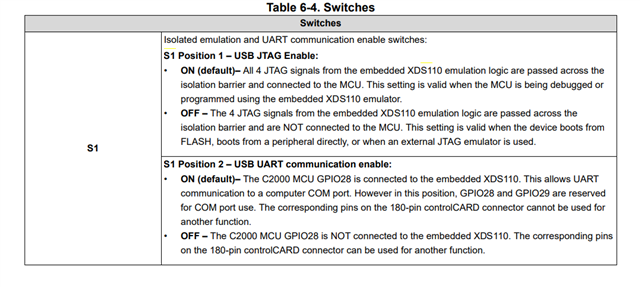
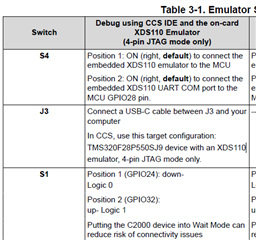
The switches on the board are as follows: S4 ON-ON, S1 0-1.

As an additional information I run the serial echo example and it does work, the problems started with the usb esamples.

What can I try to fix the issue?

Thank you,

Ilaria Del Bianco

  • Hi, 

    Which version of the Control Card are you using?  If you are using E2 and below, then you will not be able to run the examples since the USB signals are incorrectly connected on this board.

    The S1 switch positions should be ON for both position 1 and position 2. 

    Best Regards

    Siddharth

  • Hi Siddharth, my controlCard is MCU 132E1, both usb ports are of type C and the switches are: S1 for boot mode and S4 for JTAG and UART connection.
    I followed the following guide:

    Meanwhile after going further in the debugging process, I noticed that the code stucks into the 
    Device_cal function.
    Maybe it is an issue with this define?

    #define Device_cal ((void (*)(void))((uintptr_t)0x003fb220))

    Thank you in advance, 
    Ilaria Del Bianco
  • Hi, I have an update. I noticed that REV_ID wasn’t defined in the project, which caused Device_cal to point to the wrong address. After adding REV_ID=1 to the predefined symbols, the debug now reaches main() and runs correctly.

    Now the issue is that when I connect the second USB port to the PC (the upper USB port on the control card), the PC reports it as an unrecognized device. How can I fix this?

    Thanks!

  • Hi, 

    The switch positions look fine.  

    The unrecognized error occurs if the USB enumeration fails.  

    Can you check if the USB clock is configured to 60 MHz?

    Best Regards

    Siddharth

  • Hi, yes I can confirm, as into the example code there is this init:

    void USB_init(){
    //
    // Set the clocking to run from the PLL at 60MHz
    //
    SysCtl_setUSBClockDivider(SYSCTL_USBCLK_DIV_5);
    }

    Is it possible that there's an issue with the drivers on my PC? If so, how can I check and fix?

    Thank you,

    Ilaria

  • Ilaria

    I am able to run the example on the Control Card on my laptop without any such issue. 

    You can try to force Windows to find the drivers for the unrecognized device by pointing to the following folder  and check if it resolves the issue

    C:\ti\c2000\C2000Ware_5_04_00_00\utilities\windows_drivers 

    Best Regards

    Siddharth

  • Hello Siddharth, does version A solve the issue of " USB signals are incorrectly connected on this board" ? 


  • Hello Illaria

    It should work on E1 as well, I was mistaken earlier - the usb issue was on the F28P65x control card and not on the F28P55x control card.

    Did you try installing the Windows drivers?

    Best Regards

    Siddharth

  • Hello Siddharth,
    yes I tried all the drivers and also with different versions of the C2000 library, but the issue is always the same. When only the debug USB is connected, the code runs. When I connect the second USB port it is not recognized, all the USB ports are disconnected (even my mouse) and the device manager goes on refreshing. The only way to stop this refreshing is to connect the second USB to the PC through a USB hub: in this case the device is detected but it is not enumerated, so the PC can not connect.
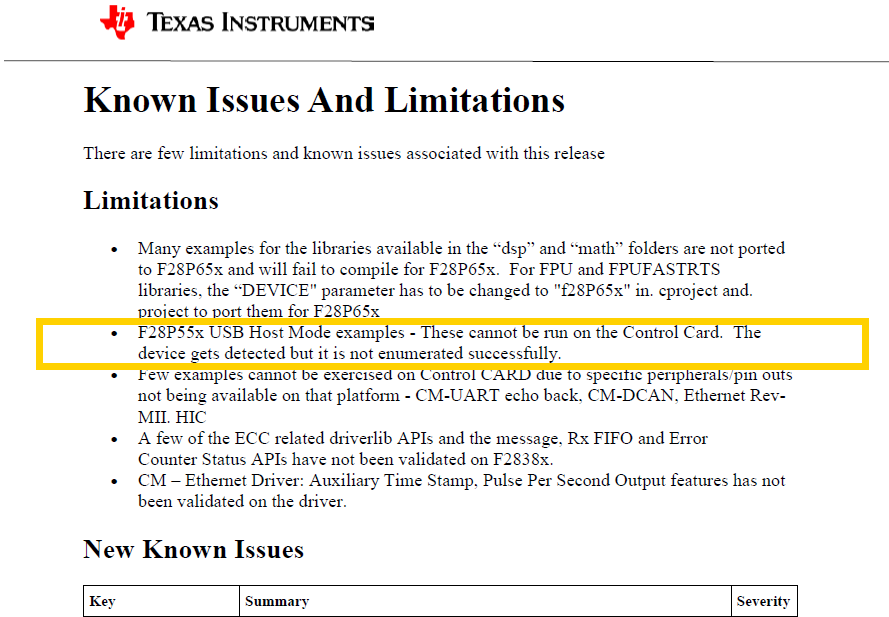
    I found this on the release notes (see image) , but you wrote that the example is working on your control card, so I don't understand if this may be the issue.
    Thank you,Ilaria

  • Hi, 

    The release note mentions about the host mode examples . However the device mode examples should run without any issues.

    Which example are you trying to run? Can you try any device mode examples like -usb_ex1_dev_serial, usb_ex2_dev_mouse

    Best Regards

    Siddharth

  • Hi,
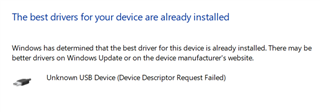
    yes as I mentioned the example I am working on is usb dev serial, but I also tried all the "dev" ones. The issue is always the same. Moreover when I try to update the driver in the device manager it looks like no better driver is found in the C2000 windows drivers folder:

    I tried different versions of the C2000 library and of CCS (12.7 and 20.1). I also tried erasing the whole flash memory before debugging.

    Let me know if there is something more I can investigate to make any of the usb dev examples work.

    Thank you and best regards,

    Ilaria

  • Ilaria,

    I am not sure what can be causing this issue on your end. If you want to further debug, then you need to monitor the USB bus signals.

    Do you have any other Launchpad/device to try it on?

    Best Regards

    Siddharth