This thread has been locked.

If you have a related question, please click the "Ask a related question" button in the top right corner. The newly created question will be automatically linked to this question.

TMS320F2800157: serial_flash_programmer utility for MDSCNCD2800157 controlCARD

Part Number: TMS320F2800157

Tool/software:

I am trying to use serial_flash_programmer utility with  MDSCNCD2800157 controlCARD.

I have the S4 Boot Mode switches as 
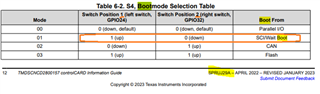
I build "led_ex1_blinky", and "flash_kernel_ex3_sci_flash_kernel" which I  processed with "hex2000.exe" producing txt files.  

>hex2000.exe -boot -a -sci8 flash_kernel_ex3_sci_flash_kernel.out -o flash_kernel_ex3_sci_flash_kernel.txt
Translating to ASCII-Hex format...
   "flash_kernel_ex3_sci_flash_kernel.out" codestart ==> (BOOT TABLE)
   "flash_kernel_ex3_sci_flash_kernel.out" .cinit ==> (BOOT TABLE)
   "flash_kernel_ex3_sci_flash_kernel.out" .const ==> (BOOT TABLE)
   "flash_kernel_ex3_sci_flash_kernel.out" .TI.ramfunc ==> (BOOT TABLE)
   "flash_kernel_ex3_sci_flash_kernel.out" .text.1 ==> (BOOT TABLE)
   "flash_kernel_ex3_sci_flash_kernel.out" .text.2 ==> (BOOT TABLE)

I then power on the controlCARD through USB and attempt to send communicate with the F2800157. 

This is my first failed attempt:

>serial_flash_programmer.exe  -d f280015x -k flash_kernel_ex3_sci_flash_kernel.txt -a led_ex1_blinky.txt -b 9600 -p COM28 -v

C2000 Serial Firmware Upgrader
Copyright (c) 2013 Texas Instruments Incorporated.  All rights reserved.

getting comm state
building comm DCB
adjusting port settings

calling f021_DownloadKernel CPU1 Kernel
Downloading flash_kernel_ex3_sci_flash_kernel.txt to device...

Attempting autobaud to load kernel...

Which hangs on "Attempting autobaud to load kernel..."

Next, I tried without "-b 9600" thinking the autobaud to be suspicious, but still it hangs.

Questions

Should serial_flash_programmer utility with  MDSCNCD2800157 controlCARD?

Maybe the USB enumeration of the CDC for the COM port is too slow, and the ROM Bootloader has already exited. It there a timing issue?

  • Hello,

    Should serial_flash_programmer utility with  MDSCNCD2800157 controlCARD?

    - Yes, can you confirm that your controlCARD is configured as discussed in section 5.1 of TMDSCNCD2800157 controlCARD Information Guide (Rev. A) and that you have selected the correct COM port?

    Maybe the USB enumeration of the CDC for the COM port is too slow, and the ROM Bootloader has already exited. It there a timing issue?
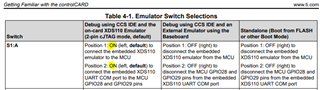
    - This shouldn't be the case, the boot ROM has a timeout in which it waits for a packet

    Best,

    Alex

  • Hi Alex,


    I am confident in my selection of Comm port. This is because I am using SDK example project sci_ex1_echoback to for verification.

    Test Procedure

    I run sci_ex1_echoback capturing in my terminal connected to COM28:

    Hello World!<CR><LF>
    You will enter a character, and the DSP will echo it back! <LF><CR>
    <LF>
    Enter a character: 

    Then I disconnect the terminal from COM28, and immediately:

    1) disconnect and reconnect USB.

    2) run serial_flash_programmer about 1 second after the connection

    serial_flash_programmer.exe  -d f280015x -k flash_kernel_ex3_sci_flash_kernel.txt -a led_ex1_blinky.txt -b 9600 -p COM28 -v
    
    C2000 Serial Firmware Upgrader
    Copyright (c) 2013 Texas Instruments Incorporated.  All rights reserved.
    
    getting comm state
    building comm DCB
    adjusting port settings
    
    calling f021_DownloadKernel CPU1 Kernel
    Downloading flash_kernel_ex3_sci_flash_kernel.txt to device...
    
    Attempting autobaud to load kernel...

    ... but it hangs at "Attempting autobaud to load kernel...".

    I do not change the S4 Boot Mode switches as during the test.

    SCI Issue on controlCARD:

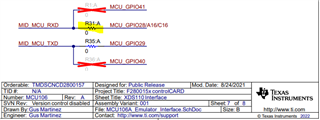
    I tried probing "R3 1 : A" of the Control Card but I see no data. The voltage at R31 A is high as I expect, but I see no autobaud traffic.

    Questions:

    1) Is the anything wrong with the test procedure above?

    Regards,

    Tollman

  • Hello,

    When you tested the sci_ex1_echoback example with the COM port, was the MCU able to receive characters as well as transmit: meaning if you input a character into the terminal does it get echoed back? This will confirm the RX connection as well as TX (which we can see works by the initial messages printed). 

    I tried probing "R3 1 : A" of the Control Card but I see no data. The voltage at R31 A is high as I expect, but I see no autobaud traffic.

    If the switches are set to route the GPIO28 and GPIO29 pins through the XDS, you won't see anything on the controlCARD headers (the signals don't get brought out in this case). So, seeing no traffic on the docking station headers is expected.

    Can you also verify your clock settings on the MCU are as expected - that the LSPCLK frequency set in the clocking registers matches the LSPCLK used by the SCI initialization function to set the baud rate? This will verify that the effective baud rates are actually matching. 

    Best Regards,

    Delaney

  • Delaney,

    I am also facing the same issue with the SCI autobaud not working. 

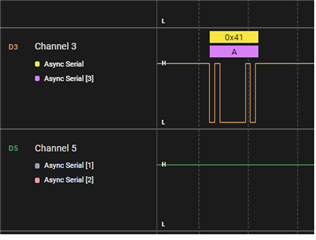
    I've checked the TX and RX lines using a logic analyzer, and I found that the host application  is sending the character 'A'

    but no traffic on SCI_TXD(Ch5)

    SCI_boot capture

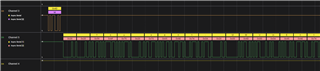
    below is sci echo example capture.
    SCI echo example


    I've also tried slower baud rate. please advice.

    Best Regards,

    Mahi

  • Hi Mahi,

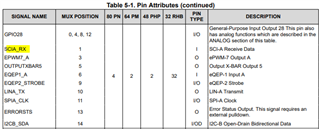
    There should be no hardware connection issue then. I would just verify that you are using the same GPIOs that are configured for SCI as part of the serial_flash_programmer code. I will let Alex comment on this.

    Best Regards,

    Delaney

  • Hi Mahi,

    Are you able to try a different baudrate for communication?

    Thanks and regards,

    Charles

  • yes, I did tried a slower baud rate of 4800.

    However, I finally found the issue - it appears that the documentation for TI dev board has an error in the boot mode selection table 6-2.

    S4 switch seems to be incorrectly documented. I set the S4 switch to Mode 02( which is documented as CAN boot per the table) and now SCI auto-baud detection is working correctly and able to upload the blinky image.

    please check the schematic or the silk screen on the board is root cause of the error.

    S4

    Best Regards,

    Mahi

  • Hi Mahi,

    Glad that you have resolved your issue. Thank you for this documentation notice, we will look to address it in a future SDK update.

    Thanks and regards,

    Charles