This thread has been locked.

If you have a related question, please click the "Ask a related question" button in the top right corner. The newly created question will be automatically linked to this question.

TMS320F280049C: Code is not working with can based bootloader, after long time of flashing.

Part Number: TMS320F280049C


Tool/software:

We successfully flashed the application to a new F280049C MCU using our custom CAN bootloader. The bootloader acknowledged the complete data transfer, and everything worked correctly.

However, after the device was powered off for a prolonged period and then powered on again, the application failed to execute. We attempted to re-flash the application using the CAN bootloader, and again received successful acknowledgments indicating a proper flash. Despite this, the application still did not run.

Interestingly, once we connected the device using JTAG and simply loaded the application via CCS, the application started executing properly. Following this, we attempted flashing the same application again via CAN bootloader — and this time, it worked as expected on power-up.

(Note: It occurs in 2 MCU out of 50)

Why this happen? how to find the root causes?

  • Hello,

    Are you able to reproduce the issue again after it started working? What state is the device in when the application fails to execute (where is the PC, etc.)?

    Best,

    Alex

  • Hello Alex,

    We are currently unable to determine the exact cause of the issue, and we're trying to understand what might trigger it. Specifically, we would like to know if any GPIO connection changes or register value modifications could cause this behavior. Could you please advise on the scenarios that might lead to such a problem?

    We've attempted flashing multiple times — the flashing process completes successfully, but the application code does not run afterward. Interestingly, our custom bootloader still works, which led us to suspect that either a flash reset is occurring after a power cycle or that there's an issue with the application entry point.

    Everything happens inside our testing area.

  • Hello,

    We've attempted flashing multiple times — the flashing process completes successfully, but the application code does not run afterward. Interestingly, our custom bootloader still works

    The application code doesn't run after flashing with JTAG or with your custom bootloader? By "still works", do you mean that the bootloader is flashing the code correctly but not branching? What are the entry points to your application and boot loader? Can you confirm that flash has actually been written to by either using the memory browser or the on-chip flash tool?

    If you are able to connect to the device to read the program counter and/or load symbols, that will provide a clue as to where execution has gone.

    Best,

    Alex

  • We have 50+ samples of MCU. in that this issue occurred in two MCU.

    We are using our own costume bootloader entry point is 0x0000. it will execute directly from RAM.

    Application entry point is 0x80000, it's by default entry address of the flash.

    by using GPIO 32 and 24 we are flashing our costume bootloader through can communication after it we are loading our application.

    it's we are doing from last one year no problem faced till last week,

    one microcontroller was working from 1 week and suddenly stopped working after it we tried power reset and re flashing through bootloader but still we didn't get the response from MCU, to do the debug we connected JTAG and loaded our application after that it's starts working, after that we tested with bootloader also it's working.

    another microcontroller stopped working with in 30 min, but we followed same procedure and it's working now.

    we are using some GPIO for read and write operation, if we did wrong connection, will it make problem?

  • Can you tell what reasons are there to not enter flash entry point and what is the difference in JTAG booting sequence and CAN bootloader booting sequence.

  • Hello,

    Can you connect to the device, then reset it and see where the program counter is? This will help to determine what state the device is in when it fails to start the application.

    You can also load your kernel into RAM through CCS, then step through it to see if it is behaving as expected.

    we are flashing our costume bootloader

    Are you flashing it or is it running from RAM?

    to do the debug we connected JTAG and loaded our application after that it's starts working, after that we tested with bootloader also it's working

    Can you erase all of flash in between these two tests? What is the result?

    Can you confirm that the bootloader is successfully writing the application to flash by inspecting the memory?

    Are the boot mode select pins configured for CAN boot or flash boot?

    Best,

    Alex

  • Can you connect to the device, then reset it and see where the program counter is? This will help to determine what state the device is in when it fails to start the application.

    How to do this? can you tell me the full process, with what tool I have to connect?

    You can also load your kernel into RAM through CCS, then step through it to see if it is behaving as expected.

    this one we did and it's working fine. now also I tried it's working as expected

    Are you flashing it or is it running from RAM?

    We are running from RAM.

    Can you confirm that the bootloader is successfully writing the application to flash by inspecting the memor

    yes, it's writing successfully, because every frame we are acknowledging, write fail, erase fail and saucerful kind of things.

    Are the boot mode select pins configured for CAN boot or flash boot?

    by default, it's flash mode. we have push pin to enter boot mode.

  • How to do this? can you tell me the full process, with what tool I have to connect?

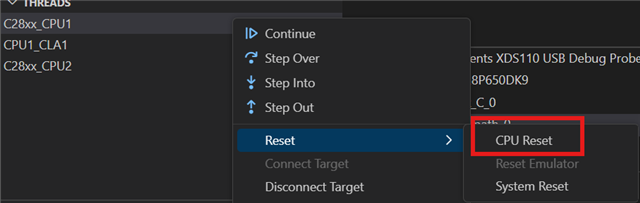
    You can see the current PC in the call stack view of CCS:

    To reset:

    You can also try loading the symbols for your application or bootloader (Load > Load Symbols).

    by default, it's flash mode. we have push pin to enter boot mode

    Is the bootloader stored in flash but loaded into RAM before running? Or are you sending the bootloader over SCI first, then your application? Does the push pin modify (pull high/low) the boot mode select pins?

    Best,

    Alex

  • Is the bootloader stored in flash but loaded into RAM before running? Or are you sending the bootloader over SCI first, then your application? Does the push pin modify (pull high/low) the boot mode select pins?

    No. by making GPIO 24 high and GPIO 32 low to enter CAN boot mode and we are sending our costume kernel file, it will run directly from RAM, and we are not storing in flash. after that we are making both GPIO to high to enter in flash mode.

  • Hello,

    > Can you connect to the device, then reset it, run, and see where the program counter is? This will help to determine what state the device is in when it fails to start the application.

    Were you able to perform these steps?

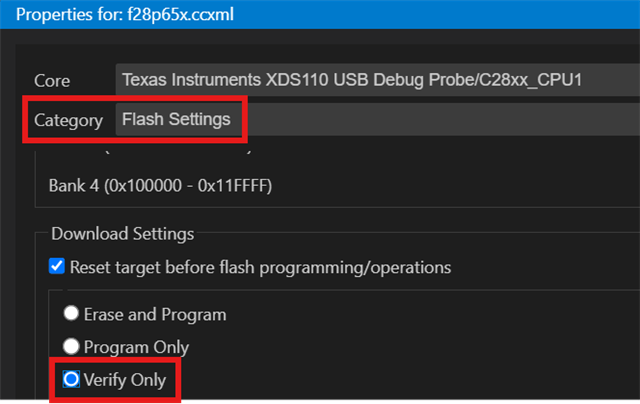
    Additionally, can you verify the integrity of the application in flash using CCS's on-chip flash tool?

    This can be done by changing the CCS flash loader settings to "verify only" in your project properties, then doing Run > Load Program as normal with your .out file.

    Best,

    Alex

  • Hi Alex

    I'm not able to do this, because I don't have MCU which is has a problem, after fixed I'm not able replicate it also

  • Hello,

    If the issue is no longer replicable then it is difficult to debug. If it shows up again, try to capture the device state, which will give information as to what the root cause could be, and open a new thread.

    Best,

    Alex