This thread has been locked.

If you have a related question, please click the "Ask a related question" button in the top right corner. The newly created question will be automatically linked to this question.

TMS320F2800137: Issue related with debugging MCU

Part Number: TMS320F2800137
Other Parts Discussed in Thread: XDS110ISO-EVM

Tool/software:

I am using my custom board with MCU TMS320F2800137 and connected  3.3V, GND TMS and TCK from debugger(in .ccxml selected cJTAG 2 wire)
Previously using debugger-> ISOXDS110 MCU115E1 and everything works fine. I was able to debug and run the code in MCU

Now I have brought debugger ->XDS110ISO-EVM MCU129A but not able to debug the code. but while testing the connection is it showing status of successful connection.

Error I have encounter is:
Texas Instruments XDS110 USB Debug Probe_0/C28xx_CPU1 : Target must be connected before loading program.

Thank you in advance.

  • Hello,

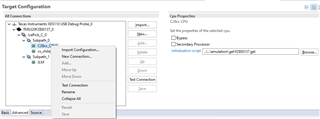
    Could you please try right clicking on your target configuration, then clicking launch target configuration? Then, could you right click on CPU1 in the debug menu and select the option to connect?

    Best,

    Matt

  • There is no launch target configuration here and no option available to connect on CPU1. 

    Can you help here?

  • Hi,

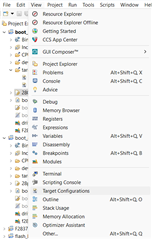
    Go to View > Target Configurations

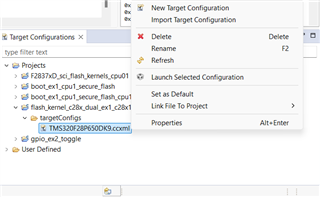
    The "Target Configurations" menu should appear. Open the "Projects" folder, navigate to your project, and right click the intended target configuration. Select "Launch Selected Configuration".

    The "Debug" window should appear. Right click the CPU1 core and select "Connect Target".

    Your debugger should now be connected to the device. Please attempt to load your program manually.

    Please let me know if anything is confusing or the program doesn't load successfully still.

    Best,

    Matt

  • Hello,

    Since I haven't heard back in a few weeks, I'll assume the issue is resolved and close the thread.

    Best,

    Matt

  • Hello, The solutions you guys provided to implement was not worked at all. but on my side I tried number of things from which one is absolutely working fine and I tell this because in future if someone face same issue like me should go for this solution.

    Inserted ferrite code between debugger and MCU card. I make 3-4 tight turns of wire to ferrite core and now debugging is smooth and there is no random error at all while doing some changes on power side as well.

    recommendation: use ferrite core between debugger and MCU.
    If working with compressor/BLDC motor use another ferrite core at 3 phase output side. 

    Thank you