This thread has been locked.

If you have a related question, please click the "Ask a related question" button in the top right corner. The newly created question will be automatically linked to this question.

F29H85X-SOM-EVM: C29-cert-pad.bin: no such file or directory Error

Part Number: F29H85X-SOM-EVM
Other Parts Discussed in Thread: XDS110ISO-EVM,

Tool/software:

Hello,

I am debugging F29H85X-SOM-EVM with XDS110ISO-EVM and led_ex2_blinky_cpu1_cpu2_cpu3_multi example.

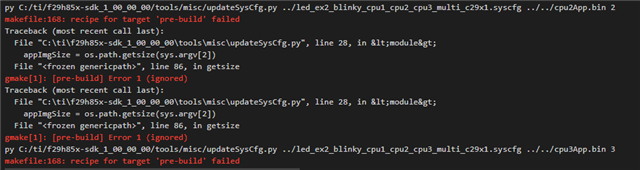
However I am having these 2 errors but can still enter to debug:

In debug, I can connect to CPU2 but can not stop the software at any breakpoint.

My hardware configuration is below same as in the board's guide:

Thanks in advance,

Nida

  • Hi Nida,

    How are you building the projects? Are you following the steps mentioned in the SDK?

    If you go to {F29_SDK_INSTALLATION}/docs/html/EXAMPLES_DRIVERS_LED_EX2_BLINKY_CPU1_CPU2_CPU3_MULTI.html

    This should provide you detailed steps on how to load this example to the CPUs.

    Also you can refer to the{F29_SDK_INSTALLATION}/docs/html/CCS_LAUNCH_PAGE.html to get more details on the ram/flash build pre req's needed for the projects.

    Best regards,

    Ryan Ma

  • Hi Ryan,

    How are you building the projects? Are you following the steps mentioned in the SDK?

    I am building the first project of the multi project in RAM build configuration and followed the CCS_LAUNCH_PAGE.html for RAM Build configuration. We can debug the project and connect to CPU2. However, below errors continue to show.

    when I build multi core project, the output errors:

    If I build a single CPU project below is the error output that I receive:

    [10]C:/ti/ccs2011/ccs/tools/compiler/ti-cgt-c29_1.0.0LTS/bin/c29objcopy.exe -O binary adc_ex1_soc_software.out adc_ex1_soc_software.bin
    [11]py C:/ti/f29h85x-sdk_1_00_00_00/tools/boot/signing/mcu_rom_image_gen.py --image-bin adc_ex1_soc_software.bin --core C29 --swrv 1 --loadaddr 0x200E1000 --sign-key C:/ti/f29h85x-sdk_1_00_00_00/tools/boot/signing/mcu_gpkey.pem --out-image adc_ex1_soc_software_cert.bin --device f29h85x --boot RAM --img_integ no
    [12]makefile:164: recipe for target 'post-build' failed
    [13]'openssl' is not recognized as an internal or external command,
    [14]operable program or batch fi

    [26] File "C:\Program Files\Python314\Lib\subprocess.py", line 577, in run
    [27] raise CalledProcessError(retcode, process.args,
    [28] output=stdout, stderr=stderr)
    [29]subprocess.CalledProcessError: Command 'openssl version' returned non-zero exit status 1.
    [30]gmake[2]: [post-build] Error 1 (ignored)
    [31]del C29-cert-pad.bin

    [32]Could Not Find C:\Users\nduranog\workspace_ccstheia\adc_ex1_soc_software\RAM\C29-cert-pad.bin

    As far as I understand, the issue is about python and openssl execution, that might be the reason why commands are not working in [11] and [29].

    What should I do to check python and openssl is correctly added in CCS and to check if any firewall (because of the company PC) is effecting the execution of these programs?

    Thanks,

    Nida

  • Hi Nida,

    Please refer to the SDK docs/ folder as I had mentioned here.

     This will have what pre req's are needed for python and openssl.

    Also you can refer to the{F29_SDK_INSTALLATION}/docs/html/CCS_LAUNCH_PAGE.html to get more details on the ram/flash build pre req's needed for the projects.

    Best regards,

    Ryan Ma

  • Hi Ryan,

    It does not matter if I choose RAM or FLASH to build, I am still having this error.

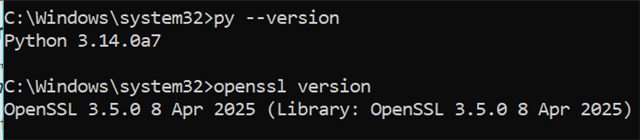
    In the documentation you are referring to, for RAM build, there is none application required, only for FLASH build python and openssl is required. Even tough I checked the preq's and downloaded the required applications. Below are the required applications & they are applied to PATH:

    In documentation, there are no pre requisites if RAM is selected. But this issue happens, files are not generated and below errors are shown:

    Because of this error, after flashing, in debug, CPU2 and CPU3 are not working as intended.

    Could you please help resolve makefile:186 recipe for target 'pre-build' failed error?

  • Hi Nida,

    Apologize for the inconveniences. Let me provide some steps to debug this.

    This error occurs when trying to update the syscfg file with CPU2 application binary information.

    The error indicates that Python cannot get the file size of 'cpu2App.bin', which typically means either:

    1. The file doesn't exist
    2. The path is incorrect
    3. File permissions issues

    Here are the steps to resolve this:

    1. Check File Existence and Path:
      1. # Verify the cpu2App.bin file exists in the correct location
        # Your command suggests it should be in:
        ../../cpu2App.bin
    2. Build Order Check:
      1. // Ensure proper build order:
        1. Build CPU3 project first to generate cpu3App.bin, then cpu2 project
        2. Then build CPU1 project with syscfg update
    3. Correct File Path
    4. Debug Steps:
      1. # Add these lines to updateSysCfg.py before line 28:
        print("Current working directory:", os.getcwd())
        print("Looking for file:", sys.argv[2])
        print("Full path:", os.path.abspath(sys.argv[2]))

    Best regards,

    Ryan Ma