This thread has been locked.

If you have a related question, please click the "Ask a related question" button in the top right corner. The newly created question will be automatically linked to this question.

TMS320F28P550SJ: CCS compile error "Invalid argument '-s': File "C:\.metadata\sdk.json" does not exist " after importing the same project

Part Number: TMS320F28P550SJ
Other Parts Discussed in Thread: SYSCONFIG, C2000WARE, TMP127

Tool/software:

I have a CCS 12.7 project saved at local directory " C:\Users\Xiaoquan\Documents\JX_CCS_git\JX_QS2_CCS127gitRepository\QS2".  Everything works fine. The command used (copied from CCS 12.7 console, let me call it "old CCS 12.7") is below when compiling:

======================

Building file: "../epwm_ex1_trip_zone.syscfg"

Invoking: SysConfig

"C:/ti/ccs1270/ccs/utils/sysconfig_1.20.0/sysconfig_cli.bat" --script "C:/Users/Xiaoquan/Documents/JX_CCS_git/JX_QS2_CCS127gitRepository/QS2/epwm_ex1_trip_zone.syscfg" -o "syscfg" -s "C:/ti/c2000/C2000Ware_5_02_00_00/.metadata/sdk.json" -d "F28P55x" --package 128PDT --part F28P55x_128PDT --compiler ccs

Running script...

======================

On the same computer, I then launched a new CCS 12.7, and choosed an empty/brand new workspace at  " C:\Users\Xiaoquan\Documents\workspace_CCS\workspace_tmp127  ";  then IMPORTED the same project from C:\Users\Xiaoquan\Documents\JX_CCS_git\JX_QS2_CCS127gitRepository\QS2".  But the compilation failed with error below on this new CCS 12.7:

======================

**** Build of configuration CPU1_FLASH for project QS2 ****

"C:\\ti\\ccs1270\\ccs\\utils\\bin\\gmake" -k -j 16 all -O

Building file: "../epwm_ex1_trip_zone.syscfg"
Invoking: SysConfig
"C:/ti/ccs1270/ccs/utils/sysconfig_1.20.0/sysconfig_cli.bat" --script "C:/Users/Xiaoquan/Documents/workspace_CCS/workspace_tmp127/QS2/epwm_ex1_trip_zone.syscfg" -o "syscfg" -s "/.metadata/sdk.json" -d "F28P55x" --package 128PDT --part F28P55x_128PDT --compiler ccs
subdir_rules.mk:23: recipe for target 'build-785151345' failed
Invalid argument '-s': File "C:\.metadata\sdk.json" does not exist
gmake: *** [build-785151345] Error 1
gmake: Target 'all' not remade because of errors.

**** Build Finished ****

======================

It is exactly the same project imported to "new CCS 12.7".  Why is the command used in "old CCS 12.7"  "  "syscfg" -s "C:/ti/c2000/C2000Ware_5_02_00_00/.metadata/sdk.json" ", 

but " "syscfg" -s "/.metadata/sdk.json" " in "new CCS 12.7", and caused the compilation error? Please advise how to fix it.  Thanks!

  • It is exactly the same project imported to "new CCS 12.7".  Why is the command used in "old CCS 12.7"  "  "syscfg" -s "C:/ti/c2000/C2000Ware_5_02_00_00/.metadata/sdk.json" ", 

    but " "syscfg" -s "/.metadata/sdk.json" " in "new CCS 12.7", and caused the compilation error? Please advise how to fix it.  Thanks!

    Hi Quentin,

    The problem appears to be related to the SysConfig sdk.json path configuration when importing projects between different workspaces. Here's what's happening and how to fix it:

    1. In your original working setup ("old CCS 12.7"), the sdk.json path is correctly pointing to:
    • C:/ti/c2000/C2000Ware_5_02_00_00/.metadata/sdk.json
    1. In the new workspace, the path is incorrectly set to just:
      1. /.metadata/sdk.json
    2. To fix this issue, you need to:
      1. Right-click on your project and select Properties
      2. Go to Dependencies 
        1. Ensure you have C2000WARE as a product dependency in your new project
        2. If you do, and you still get an error follow these next steps (c.)
      3. Go to Build -> SysConfig
      4. Click on "Edit Flags..."
      5. You should see the SysConfig options. Make sure the sdk.json path includes the full C2000Ware path by:
        1. Adding the variable ${C2000WARE_ROOT}/.metadata/sdk.json or
        2. Using the absolute path to your C2000Ware installation
    3. If the C2000WARE_ROOT variable is not defined, you'll need to:
      1. Go to Project Properties -> Build -> Variables
      2. Click on "Add..."
      3. Create a new variable named "C2000WARE_ROOT"
      4. Set its value to your C2000Ware installation path (e.g., "C:/ti/c2000/C2000Ware_5_02_00_00")
    4. If these steps still do not work, please use the latest CCS as I am able to verify that the variables should be copied over correctly.

    The reason for the different behavior is that when you import a project to a new workspace, CCS sometimes doesn't properly carry over all environment variables and paths. The original workspace had the correct C2000Ware path configuration, while the new workspace is trying to look for sdk.json in the root directory. I have verified your same steps using the latest CCS and I do not see this issue, you can also try upgrading your CCS to the new CCS20.2.

    Best regards,

    Ryan Ma

  • Hi Ryan,

    Thank you so much for your detailed elaborations!

    I followed your advice and installed latest CCS20.2, but after importing the same project, the compilation failed with another bunch of errors such as:

    ==========

    [57]"C:/ti/ccs2020/ccs/tools/compiler/ti-cgt-c2000_22.6.2.LTS/bin/cl2000" -v28 -ml -mt --cla_support=cla2 --float_support=fpu32 --tmu_support=tmu1 -Ooff --include_path="C:/Users/Xiaoquan/Documents/JX_CCS_git/JX_QS2_CCS127gitRepository/QS2" --include_path="C:/ti/c2000/C2000Ware_5_02_00_00" --include_path="C:/Users/Xiaoquan/Documents/JX_CCS_git/JX_QS2_CCS127gitRepository/QS2/device" --include_path="C:/ti/c2000/C2000Ware_5_02_00_00/driverlib/f28p55x/driverlib" --include_path="C:/ti/ccs2020/ccs/tools/compiler/ti-cgt-c2000_22.6.2.LTS/include" --define=DEBUG --define=RAM --diag_suppress=10063 --diag_warning=225 --diag_wrap=off --display_error_number --gen_func_subsections=on --abi=eabi --preproc_with_compile --preproc_dependency="calculate.d_raw" --include_path="C:/Users/Xiaoquan/Documents/JX_CCS_git/JX_QS2_CCS127gitRepository/QS2/CPU1_RAM/syscfg" --cmd_file="syscfg/board.opt" --cmd_file="syscfg/c2000ware_libraries.opt" "../calculate.c"
    [58]"..\QT2_AC_side.h", line 18: fatal error #1965: cannot open source file "spll_1ph_sogi.h"

    ==========

    So I guess I have to go back to CCS12.7 which I succeeded before. Would you mind providing some SCREEN CAPTURES to guide me through the steps needed to fix the problem?  For example, I don't know how to "Go to Dependencies"...  your help is really appreciated!

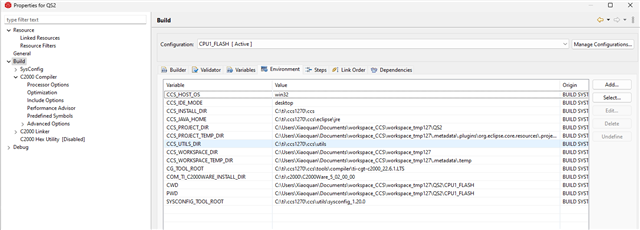
    Below are screen captures of some of my settings:

    I guess some variables are not set correctly?

    Thanks,

    Quentin

  • Of course, the settings are my "new CCS 12.7" settings.  I guess some variables are not set correctly?

  • also I am not familiar with CCS20.2; not sure how to use it; it seems very different than CCS 12.7; 

  • Hi Ryan,

    Do you think some of my variables are incorrectly set? I followed your advice below:

    =======

    You should see the SysConfig options. Make sure the sdk.json path includes the full C2000Ware path by:

    1. Using the absolute path to your C2000Ware installation:   "C:/ti/c2000/C2000Ware_5_02_00_00/.metadata/sdk.json"

    =====

    but then the comilation failed with errors like below:

    ==================

    Building file: "../ECU_infc_top.c"
    Invoking: C2000 Compiler
    "C:/ti/ccs1270/ccs/tools/compiler/ti-cgt-c2000_22.6.1.LTS/bin/cl2000" -v28 -ml -mt --cla_support=cla2 --float_support=fpu32 --tmu_support=tmu0 --vcu_support=vcu0 -O3 --fp_mode=relaxed --include_path="/libraries/math/CLAmath/c28/include" --include_path="C:/Users/Xiaoquan/Documents/workspace_CCS/workspace_tmp127/QS2/libraries/SPLL" --include_path="C:/Users/Xiaoquan/Documents/workspace_CCS/workspace_tmp127/QS2/libraries/DCL" --include_path="C:/Users/Xiaoquan/Documents/workspace_CCS/workspace_tmp127/QS2/libraries" --include_path="C:/Users/Xiaoquan/Documents/workspace_CCS/workspace_tmp127/QS2" --include_path="C:/Users/Xiaoquan/Documents/workspace_CCS/workspace_tmp127/QS2/device" --include_path="/driverlib/f28p55x/driverlib" --include_path="C:/ti/ccs1270/ccs/tools/compiler/ti-cgt-c2000_22.6.1.LTS/include" --define=_DEBUG --define=_FLASH --diag_suppress=10063 --diag_warning=225 --diag_wrap=off --display_error_number --gen_func_subsections=on --abi=eabi --preproc_with_compile --preproc_dependency="ECU_infc_top.d_raw" --include_path="C:/Users/Xiaoquan/Documents/workspace_CCS/workspace_tmp127/QS2/CPU1_FLASH/syscfg" --cmd_file="syscfg/board.opt" --cmd_file="syscfg/c2000ware_libraries.opt" "../ECU_infc_top.c"

    >> Compilation failure
    subdir_rules.mk:9: recipe for target 'ECU_infc_top.obj' failed
    "C:/Users/Xiaoquan/Documents/workspace_CCS/workspace_tmp127/QS2/device/driverlib.h", line 46: fatal error #1965: cannot open source file "inc/hw_memmap.h"
    1 catastrophic error detected in the compilation of "../ECU_infc_top.c".
    Compilation terminated.
    gmake: *** [ECU_infc_top.obj] Error 1

    ==================

  • "C:/Users/Xiaoquan/Documents/workspace_CCS/workspace_tmp127/QS2/device/driverlib.h", line 46: fatal error #1965: cannot open source file "inc/hw_memmap.h"

    Hi Quentin,

    There seems to be an issue with opening the "inc/hw_memmap.h" file. Can you make sure that your include options are correct? Can you provide a screenshot of what your include options are in the compiler settings?

  • Hi Ryan,

    Please see below which is the "include options" of my "new CCS 12.7" -- it fails in compiling:

    As comparison, Please see below which is the "include options" of my "old CCS 12.7" -- it compiles fine:

    They seem to be the same.

    ===========

    I just hope to achieve a simple goas described below:

    1. I have a CCS 12.7 project saved at local directory " C:\Users\Xiaoquan\Documents\JX_CCS_git\JX_QS2_CCS127gitRepository\QS2".  Everything works fine. 
    2. On the same computer, launch a new CCS 12.7 and choose a new different workspace, then import  the project above, and make sure it compiles fine.

    What is the best way to achieve this simple goal?

    Thanks,

    Quentin

  • Hi Quentin,

    The variables should have been carried over. There may be some bug in 12.7 that didn't allow for this.

    The best way in my opinion for this goal is to update your CCS and try to re do the steps you outlined.

    I have verified your same steps using the latest CCS and I do not see this issue, you can also try upgrading your CCS to the new CCS20.2.

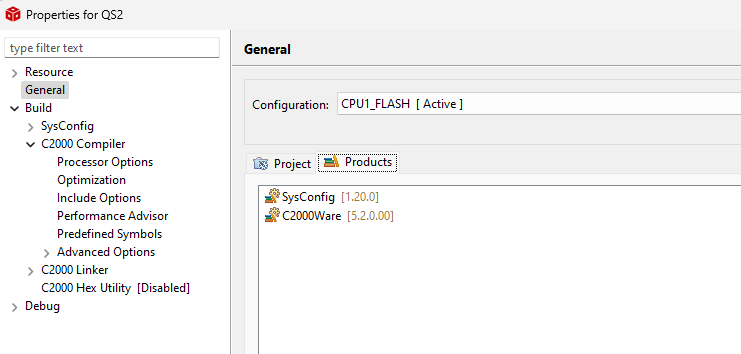
    Otherwise, you will have to go through and double check if your include options are being generated properly. Can you double check the products tab? Also, make sure the C2000 Compiler view, the summary of flags being set makes sense for your working directory. 

  • Hi Ryan,

    As explained earlier, I upgraded to latest CCS20.2 but still hit a bunch of compile errors. Julia Li, TI FAE, also suggested me to stcik with CCS12.7. 

    Below are screen captures of my product tab and C2000 Compiler view:

    Did you see any problem? Could you advise how to fix so that it can compile?

    Thanks,

    Quentin

  • Hi Quentin,

    One of the include paths seems to be incorrect which is the "/driverlib/f28p55x/driverlib". Looks like it's missing the absolute path to your c2000ware. Can you update this?

  • Hi Ryan,

    Thanks for this. Please see below:

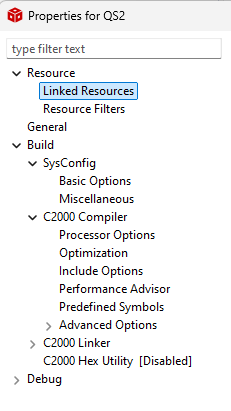
    1. Could you advise how to fix the "driverlib missing the absolute path to  c2000ware" issue? Please see my screen captures below which seem to be ok:

    2. You mentioned below earlier:

    ==========

    1. In the new workspace, the path is incorrectly set to just:
      1. /.metadata/sdk.json
    2. To fix this issue, you need to:
      1. Right-click on your project and select Properties
      2. Go to Dependencies 
        1. Ensure you have C2000WARE as a product dependency in your new project
        2. If you do, and you still get an error follow these next steps (c.)

    ==========

    Would you mind providing a screen capture to show how to "Go to Dependencies"? I am unable to find "Dependencies" from mine as shown below:

  • Hi Quentin,

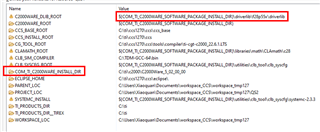
    The ${COM_TI_C2000WARE_SOFTWARE_PACKAGE_INSTALL_DIR} is not defined. Can you try changing the name of the COM_TI_C2000WARE_INSTALL_DIR to be COM_TI_C2000WARE_SOFTWARE_PACKAGE_INSTALL_DIR instead.

    Would you mind providing a screen capture to show how to "Go to Dependencies"? I am unable to find "Dependencies" from mine as shown below:

    Apologize this is for CCS20.2 or newer. For CCS12.8 or older, you can just go to General -> Products

  • Thanks a lot Ryan!  The problem seems to be the definition of  COM_TI_C2000WARE_INSTALL_DIR. After I change

    to below:

    It can compile. Thanks a lot!

  • Hi Quentin,

    Let's mark this as resolved.

    Best regards,

    Ryan Ma